







Question: Enhanced the product manager application(PHP and MYSQL from MURACH book) Based on Exercise 4-1, 1. Add another column to the Product List table that contains
Enhanced the product manager application(PHP and MYSQL from MURACH book)
Based on Exercise 4-1,
1. Add another column to the Product List table that contains Edit buttons. These buttons should link to an Edit Product page that works similarly to the Add Product page, but this page should contain the data for the selected product and have an Update Product button below the text boxes. When this button is clicked, the product should be updated.
2. To keep things simple, display the category ID in a text box. For extra credit, usa a drop-down list to display the correct category name for the product that's being edited.
May use UPDATE statement that updates multiple columns.
I did try some, still did not get it.
Here are my work, and BOLD and italic that I did not finished the work.
- edit_product_form.php -
prepare($query); $statement->execute(); $categories = $statement->fetchAll(); $statement->closeCursor(); ?>
Product Manager
Edit Product
View Product List
- edit_product.php -
require_once('database.php');
// Get IDs $product_id = filter_input(INPUT_POST, 'product_id', FILTER_VALIDATE_INT); $category_id = filter_input(INPUT_POST, 'category_id', FILTER_VALIDATE_INT);
// Delete the product from the database if ($product_id != false && $category_id != false) {
$query = 'UPDATE products SET name= Gibson Les Paul WHERE productID = :product_id'; $statement = $db->prepare($query); $statement->bindValue(':product_id', $product_id); $statement->bindValue(':code', $code); $statement->bindValue(':name', $name); $statement->bindValue(':price', $price); $sucess = $statement->execute(); $statement->closeCursor(); } // Display the Product List page include('index.php'); ?>
-myguitarshop.sql file-
-- create and select the database
DROP DATABASE IF EXISTS my_guitar_shop1;
CREATE DATABASE my_guitar_shop1;
USE my_guitar_shop1; -- MySQL command
-- create the tables
CREATE TABLE categories (
categoryID INT(11) NOT NULL AUTO_INCREMENT,
categoryName VARCHAR(255) NOT NULL,
PRIMARY KEY (categoryID)
);
CREATE TABLE products (
productID INT(11) NOT NULL AUTO_INCREMENT,
categoryID INT(11) NOT NULL,
productCode VARCHAR(10) NOT NULL UNIQUE,
productName VARCHAR(255) NOT NULL,
listPrice DECIMAL(10,2) NOT NULL,
PRIMARY KEY (productID)
);
CREATE TABLE orders (
orderID INT(11) NOT NULL AUTO_INCREMENT,
customerID INT NOT NULL,
orderDate DATETIME NOT NULL,
PRIMARY KEY (orderID)
);
-- insert data into the database
INSERT INTO categories VALUES
(1, 'Guitars'),
(2, 'Basses'),
(3, 'Drums');
INSERT INTO products VALUES
(1, 1, 'strat', 'Fender Stratocaster', '699.00'),
(2, 1, 'les_paul', 'Gibson Les Paul', '1199.00'),
(3, 1, 'sg', 'Gibson SG', '2517.00'),
(4, 1, 'fg700s', 'Yamaha FG700S', '489.99'),
(5, 1, 'washburn', 'Washburn D10S', '299.00'),
(6, 1, 'rodriguez', 'Rodriguez Caballero 11', '415.00'),
(7, 2, 'precision', 'Fender Precision', '799.99'),
(8, 2, 'hofner', 'Hofner Icon', '499.99'),
(9, 3, 'ludwig', 'Ludwig 5-piece Drum Set with Cymbals', '699.99'),
(10, 3, 'tama', 'Tama 5-Piece Drum Set with Cymbals', '799.99');
-- create the users and grant priveleges to those users
GRANT SELECT, INSERT, DELETE, UPDATE
ON my_guitar_shop1.*
TO mgs_user@localhost
IDENTIFIED BY 'pa55word';
GRANT SELECT
ON products
TO mgs_tester@localhost
IDENTIFIED BY 'pa55word';
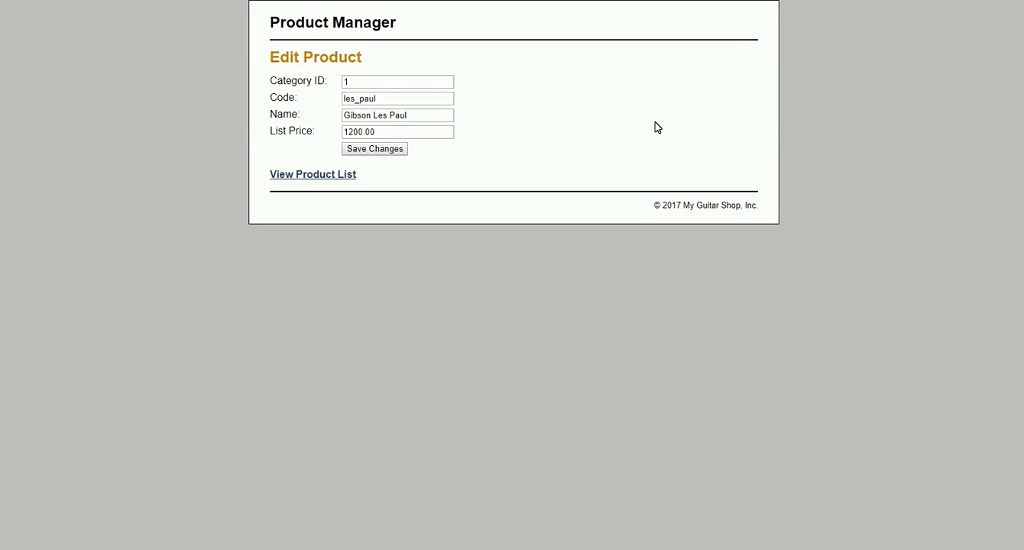
This is best answer of picture captured.
Thank you in advance.
Product Manager Edit Product Category ID 1 Code: Name List Price 1 les paul Gibson Les Pau 1200.00 Save Changes 2017 My Guitar Shop, Inc Product Manager Edit Product Category ID 1 Code: Name List Price 1 les paul Gibson Les Pau 1200.00 Save Changes 2017 My Guitar Shop, Inc
Step by Step Solution
There are 3 Steps involved in it

Get step-by-step solutions from verified subject matter experts
 Study Help