







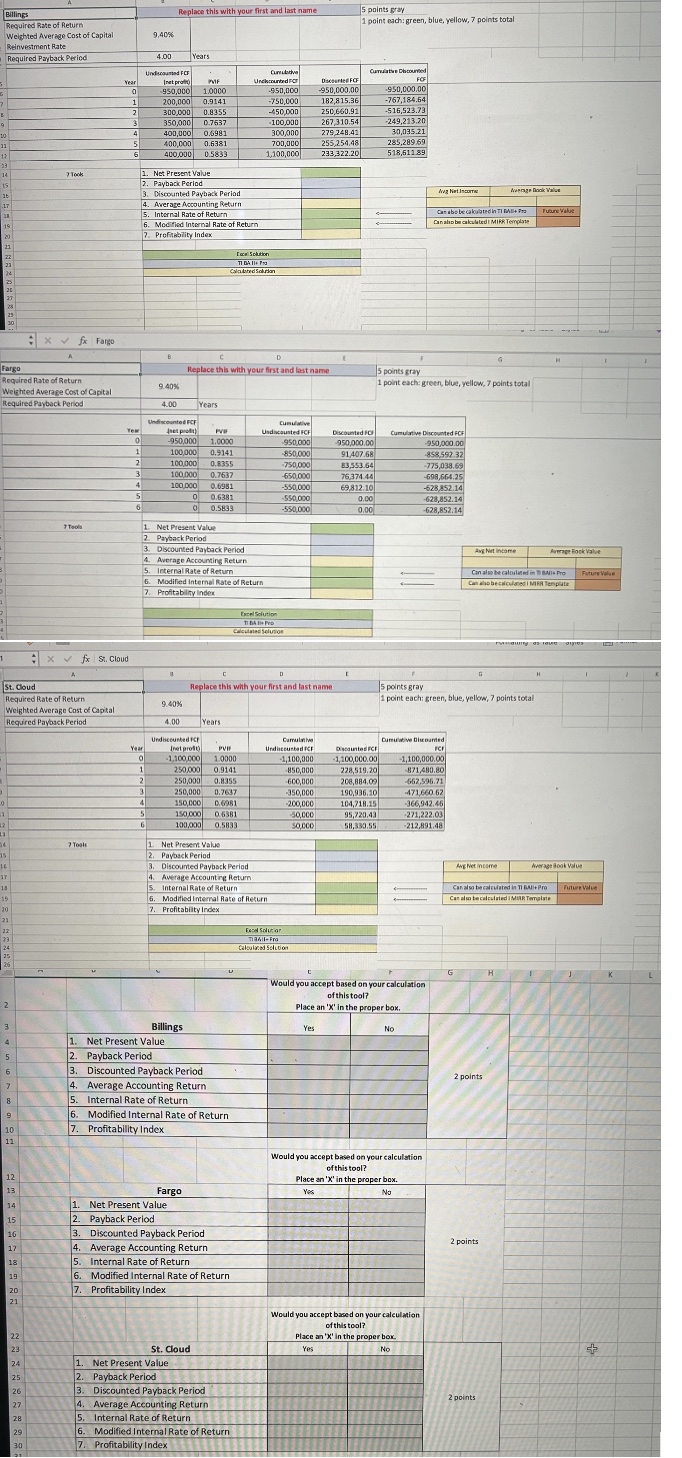
Question: Enter the Excel calculation / formula in the green cells: E 1 4 Net Present Value E 1 8 Internal Rate of Return E 1
Enter the Excel calculation formula in the green cells:
E Net Present Value
E Internal Rate of Return
E Modified Internal Rate of Return
Enter the Excel calculation in the yellow cells:
E Average Accounting Return
E Profitability Index
Enter your calculated value from your TI Business Analyst app or calculator in the blue cells:
E Payback Period
E Discounted Payback Period
Note there exists multiple ways to do most of the calculations. You will receive credit if you have a valid, alternate
calculation for any of the cells. If you use an alternate calculation solution, you must attach detailed documentation
showing your stepbystep solution.
Phase : PART C
The instructor will provide you with an updated template.
Complete the Part C tab, blue cells.
Determine if you could use only the selected tool for each project would you accept the project.
Using the updated, provided Excel Template select "Part C tab.
Do not copy data from another worksheet, or from another cell in this Template.
Do not change the format of any cell.
Place an in the proper box for each tool for each project. gray cell boxes in all.
Would you accept based on your calculation of this tool?
Place an X in the proper box.
Do this for all three projects.
I need to know the answers for all the green,yellow,and blue cells. I also need to know the formulas used in each cell. Thank you!
Step by Step Solution
There are 3 Steps involved in it
1 Expert Approved Answer
Step: 1 Unlock

Question Has Been Solved by an Expert!
Get step-by-step solutions from verified subject matter experts
Step: 2 Unlock
Step: 3 Unlock
 Study Help