



Question: Enter these commands on Router 1 does the public address work now? What error do you get (if any)? ________________________ NOTES Failure to match my
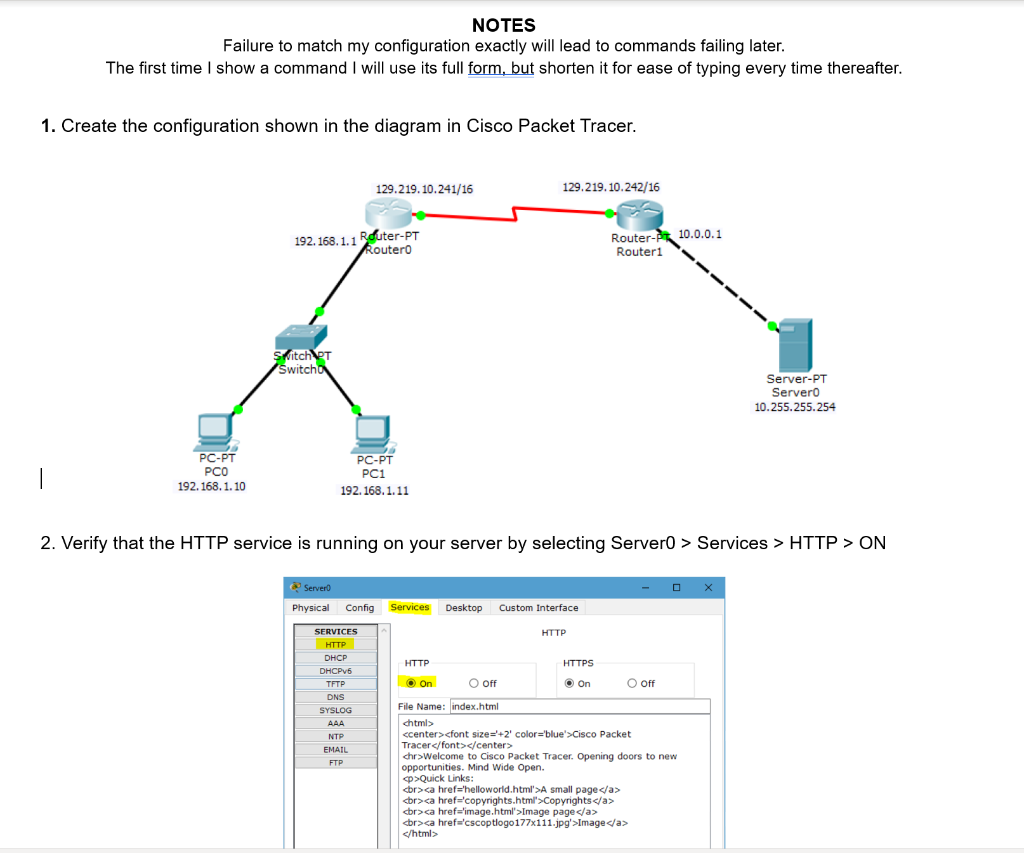
Enter these commands on Router 1
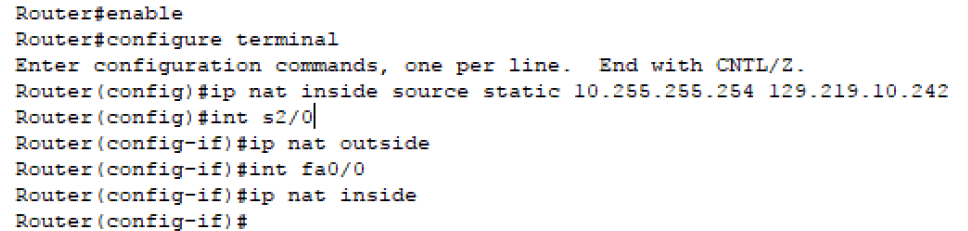
does the public address work now? What error do you get (if any)? ________________________
NOTES Failure to match my configuration exactly will lead to commands failing later The first time I show a command I will use its full form, but shorten it for ease of typing every time thereafter. 1. Create the configuration shown in the diagram in Cisco Packet Tracer 129.219.10.241/16 129.219.10.242/16 192.168. 1.1 Rduter-PT Router-P10.0.01 outer0 Routeri tch Switch Server-PT Server0 10.255.255.254 PC-PT PCO 192.168.1.10 PC-PT PC1 192.168.1.11 2. Verify that the HTTP service is running on your server by selecting Server0 > Services > HTTP > ON Physical Config Services Desktop Custom Interface SERVICES HTTP DHCP HTTP HTTPS O off TFTP DNS SYSLOG File Name: index.html ccenter>cfont size +2' color-'blue> Cisco Packet Tracer chr>Welcome to Cisco Packet Tracer. Opening doors to new opportunities. Mind Wide Open. p Quick Links A small page Copyrights dr>Image page Image EMAIL Router # enable Router#configure terminal Enter configuration commands, one per line Router (config) #ip nat inside source static Router (configint s2/01 Router (config-ifip nat outside Router (config-ii#int fa0/0 Router (config-111p nat inside Router (config-if) # End with CNTL/2 10.255.255.254 129.219.10.242
Step by Step Solution
There are 3 Steps involved in it

Get step-by-step solutions from verified subject matter experts