







Question: et EM4, Problem 1CP 1 Bookmark Show all steps: ON SK AK Data File needed for this Case Problem: Stefanek.xlsx Stefanek Budget Edmund and Lydia
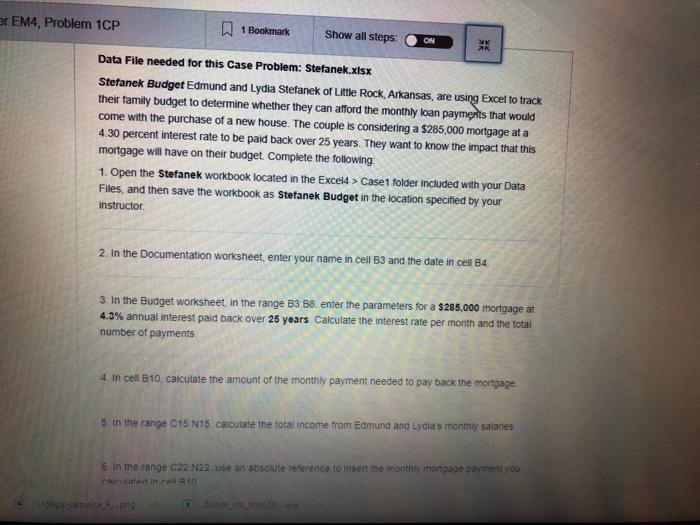
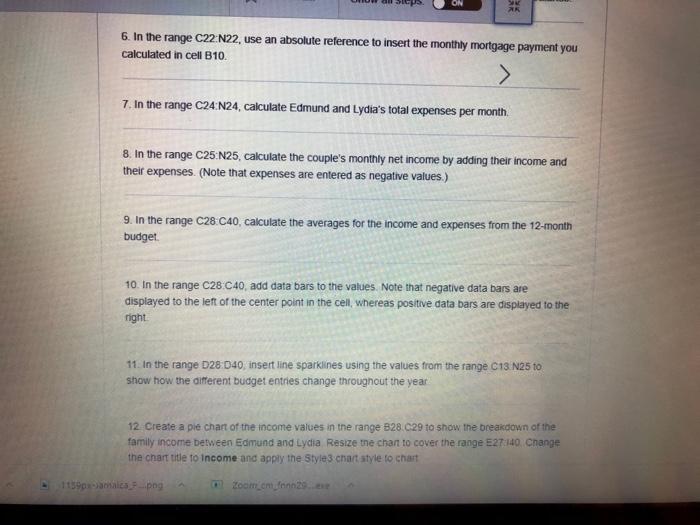
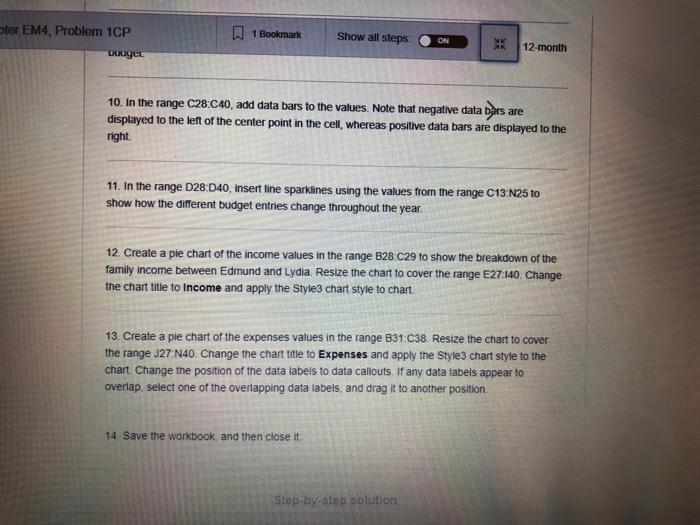
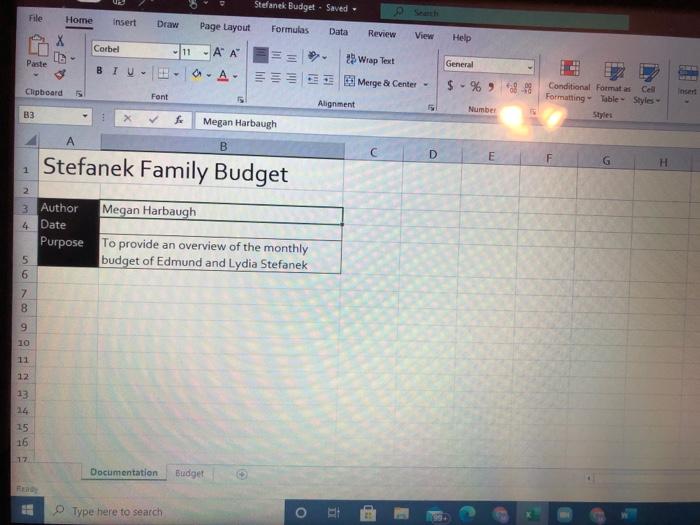
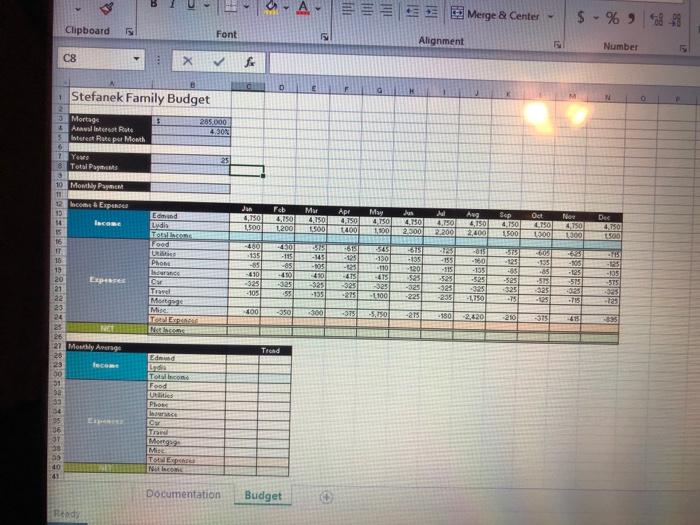
et EM4, Problem 1CP 1 Bookmark Show all steps: ON SK AK Data File needed for this Case Problem: Stefanek.xlsx Stefanek Budget Edmund and Lydia Stefanek of Little Rock, Arkansas, are using Excel to track their family budget to determine whether they can afford the monthly loan payments that would come with the purchase of a new house. The couple is considering a $285,000 mortgage at a 4.30 percent interest rate to be paid back over 25 years. They want to know the impact that this mortgage will have on their budget. Complete the following 1. Open the Stefanek workbook located in the Excel4 > Case1 folder included with your Data Files, and then save the workbook as Stefanek Budget in the location specified by your instructor 2. In the Documentation worksheet, enter your name in cell 83 and the date in cell B4 3. In the Budget worksheet in the range 83 88. enter the parameters for a $285,000 mortgage at 4.3% annual interest paid back over 25 years Calculate the interest rate per month and the total number of payments 4. In cell 810, calculate the amount of the monthly payment needed to pay back the mortgage s in the range C15 N15, calculate the total income from Edmund and Lydia's monthly satanes 6. In the range C22N22. use an absolute reference to insert the monthly mortgage payment you chirme in PALO ming Toonen 6. In the range C22N22, use an absolute reference to insert the monthly mortgage payment you calculated in cell 10. > 7. In the range C24 N24, calculate Edmund and Lydia's total expenses per month 8. In the range C25 N25, calculate the couple's monthly net income by adding their income and their expenses. (Note that expenses are entered as negative values) 9. In the range C28 C40, calculate the averages for the income and expenses from the 12-month budget 10. In the range C28 C40, add data bars to the values. Note that negative data bars are displayed to the left of the center point in the cell, whereas positive data bars are displayed to the night 11. In the range 028.040, insert line sparklines using the values from the range C13 N25 to show how the different budget entries change throughout the year 12. Create a pie chart of the income values in the range B28.029 to show the breakdown of the family income between Edmund and Lydia Resize the chan to cover the range E27:140 Change the chart title to Income and apply the Style 3 chart style to chart 11392.png Zoom om finns ter EM4, Problem 1CP 1 Bookmark Show all steps ON 12 month 2009. are 10. In the range C28:Cao, add data bars to the values. Note that negative data bers displayed to the left of the center point in the cell, whereas positive data bars are displayed to the right 11. In the range D28:040, insert tine sparklines using the values from the range C13N25 to show how the different budget entries change throughout the year 12. Create a pie chart of the income values in the range B28 C29 to show the breakdown of the family income between Edmund and Lydia. Resize the chart to cover the range E27:140. Change the chart title to Income and apply the style3 chart style to chart. 13. Create a ple chart of the expenses values in the range 831C38. Resize the chart to cover the range J27N40. Change the chart title to Expenses and apply the Style 3 chart style to the chart Change the position of the data labels to data caliouts. If any data labels appear to overlap, select one of the overlapping data labels, and drag it to another position 14. Save the workbook, and then close it. Step-bystep solution File Home Stefanek Budget - Saved. Page Layout Formulas Data Insert Draw Review View Help Corbel -1 - Au BIU--A- til Paste 25 Wrap Text Merge & Center - tale General $ - % -99 Clipboard Insert Font Alignment Conditional Formatas Cel Formatting - Table - Styles Styles Number B3 Megan Harbaugh A B D EF Stefanek Family Budget H 1 2 3 Author Megan Harbaugh 4 Date Purpose To provide an overview of the monthly budget of Edmund and Lydia Stefanek 6 5 7 9 10 12 13 14 15 16 Documentation Budget Type here to search 8 Merge & Center $ - % 9813 Clipboard Font Alignment Number C8 X V f B D E Stefanek Family Budget 285.000 430 3 Montage Antest Rule 3 ture Rute per Month 16 1 Year 8 Total Pas 25 10 Monthly Post 11 1 come Expenses 13 H laceme Ang End Lydis Jan 4,150 1.500 Feb 4.750 1200 Mur 4.150 15001 re Apr 4.750 1400 May 4.750 1.100 du 4.101 4,150 2300 2.200 150 Sep 8.150 1,500 Oct 4.150 1000 Des 4.750 1500 2,400 1300 Food 615 -135 16 IT 16 13 20 21 Phone SIS -145 -105 490 5451 -130 -110 -415 -125 85 -450 325 55 -135 120 -815 1960 -135 -525 305 -1150 125 385 -525 -123 ATS 325 -27 -610 325 -105 Epis -155 -115 525 -525 -2351 CM Travel Mortges 0915 -125 -135 -375 60 155 *85 -515 325 1251 -105 125 -515 -025 -75 -135 100 -325 225 -75 23 24 400 -350 -375 150 -215 -980 210 Top 25 21 Monthly Ang Trend 23 loce Edmund LO To con Food 92 Plon rice Trand Mise TE 40 Documentation Budget Rends et EM4, Problem 1CP 1 Bookmark Show all steps: ON SK AK Data File needed for this Case Problem: Stefanek.xlsx Stefanek Budget Edmund and Lydia Stefanek of Little Rock, Arkansas, are using Excel to track their family budget to determine whether they can afford the monthly loan payments that would come with the purchase of a new house. The couple is considering a $285,000 mortgage at a 4.30 percent interest rate to be paid back over 25 years. They want to know the impact that this mortgage will have on their budget. Complete the following 1. Open the Stefanek workbook located in the Excel4 > Case1 folder included with your Data Files, and then save the workbook as Stefanek Budget in the location specified by your instructor 2. In the Documentation worksheet, enter your name in cell 83 and the date in cell B4 3. In the Budget worksheet in the range 83 88. enter the parameters for a $285,000 mortgage at 4.3% annual interest paid back over 25 years Calculate the interest rate per month and the total number of payments 4. In cell 810, calculate the amount of the monthly payment needed to pay back the mortgage s in the range C15 N15, calculate the total income from Edmund and Lydia's monthly satanes 6. In the range C22N22. use an absolute reference to insert the monthly mortgage payment you chirme in PALO ming Toonen 6. In the range C22N22, use an absolute reference to insert the monthly mortgage payment you calculated in cell 10. > 7. In the range C24 N24, calculate Edmund and Lydia's total expenses per month 8. In the range C25 N25, calculate the couple's monthly net income by adding their income and their expenses. (Note that expenses are entered as negative values) 9. In the range C28 C40, calculate the averages for the income and expenses from the 12-month budget 10. In the range C28 C40, add data bars to the values. Note that negative data bars are displayed to the left of the center point in the cell, whereas positive data bars are displayed to the night 11. In the range 028.040, insert line sparklines using the values from the range C13 N25 to show how the different budget entries change throughout the year 12. Create a pie chart of the income values in the range B28.029 to show the breakdown of the family income between Edmund and Lydia Resize the chan to cover the range E27:140 Change the chart title to Income and apply the Style 3 chart style to chart 11392.png Zoom om finns ter EM4, Problem 1CP 1 Bookmark Show all steps ON 12 month 2009. are 10. In the range C28:Cao, add data bars to the values. Note that negative data bers displayed to the left of the center point in the cell, whereas positive data bars are displayed to the right 11. In the range D28:040, insert tine sparklines using the values from the range C13N25 to show how the different budget entries change throughout the year 12. Create a pie chart of the income values in the range B28 C29 to show the breakdown of the family income between Edmund and Lydia. Resize the chart to cover the range E27:140. Change the chart title to Income and apply the style3 chart style to chart. 13. Create a ple chart of the expenses values in the range 831C38. Resize the chart to cover the range J27N40. Change the chart title to Expenses and apply the Style 3 chart style to the chart Change the position of the data labels to data caliouts. If any data labels appear to overlap, select one of the overlapping data labels, and drag it to another position 14. Save the workbook, and then close it. Step-bystep solution File Home Stefanek Budget - Saved. Page Layout Formulas Data Insert Draw Review View Help Corbel -1 - Au BIU--A- til Paste 25 Wrap Text Merge & Center - tale General $ - % -99 Clipboard Insert Font Alignment Conditional Formatas Cel Formatting - Table - Styles Styles Number B3 Megan Harbaugh A B D EF Stefanek Family Budget H 1 2 3 Author Megan Harbaugh 4 Date Purpose To provide an overview of the monthly budget of Edmund and Lydia Stefanek 6 5 7 9 10 12 13 14 15 16 Documentation Budget Type here to search 8 Merge & Center $ - % 9813 Clipboard Font Alignment Number C8 X V f B D E Stefanek Family Budget 285.000 430 3 Montage Antest Rule 3 ture Rute per Month 16 1 Year 8 Total Pas 25 10 Monthly Post 11 1 come Expenses 13 H laceme Ang End Lydis Jan 4,150 1.500 Feb 4.750 1200 Mur 4.150 15001 re Apr 4.750 1400 May 4.750 1.100 du 4.101 4,150 2300 2.200 150 Sep 8.150 1,500 Oct 4.150 1000 Des 4.750 1500 2,400 1300 Food 615 -135 16 IT 16 13 20 21 Phone SIS -145 -105 490 5451 -130 -110 -415 -125 85 -450 325 55 -135 120 -815 1960 -135 -525 305 -1150 125 385 -525 -123 ATS 325 -27 -610 325 -105 Epis -155 -115 525 -525 -2351 CM Travel Mortges 0915 -125 -135 -375 60 155 *85 -515 325 1251 -105 125 -515 -025 -75 -135 100 -325 225 -75 23 24 400 -350 -375 150 -215 -980 210 Top 25 21 Monthly Ang Trend 23 loce Edmund LO To con Food 92 Plon rice Trand Mise TE 40 Documentation Budget Rends
Step by Step Solution
There are 3 Steps involved in it

Get step-by-step solutions from verified subject matter experts
 Study Help