







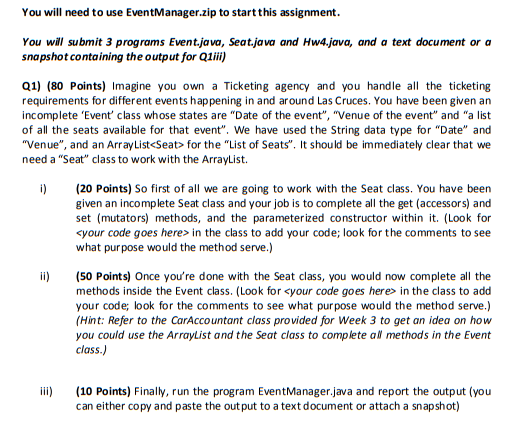
Question: Event.java package eventmanager; import java.util.ArrayList; public class Event { //we could have used the Date class to represent this but we use string for simplicity
Event.java
package eventmanager;
import java.util.ArrayList;
public class Event { //we could have used the Date class to represent this but we use string for simplicity private String date; private String venue; //The area in Las Cruces where the event is being held. private ArrayList seatList; //An arraylist of seats /* Complete the parameterized constructor for the Event class Inputs: dte = Date of the event venu = venue of the event You are supposed to assign all the above inputs to their respective global variables */ public Event(String dte, String venu) { // } /* Returns the value of the variable Date Delete 'return "";' statement and replace it with your own code */ public String getDate() { // return ""; } /* Returns the value of the variable venue Delete 'return "";' statement and replace it with your own code */ public String getVenue() { // return ""; } /* In this method you would simply add a "Seat" instance (object) to the "seatlist" */ public void addSeat(Seat object) { // } /* In this method, you will go over the "seatlist" using a for loop and then count all the 'sold' seats. You can use "getMarketStatus()" method of the Seat class to know which seats should be accounted for (Hint: Refer to a similar function in "CarAccountant" class provided for week 3) Delete 'return 0;' statement and replace it with your own code. ATTENTION CS 452 STUDENTS: It's compulsory for you to check for empty "seatlist" and change the return value if that's the case. */ public int getNumberOfSoldSeats() { // return 0; } /* In this method, you could either go over the "seatlist" using a for loop and then count all the 'unsold' seats by using the "getMarketStatus()" method of the Seat class or you could simply subtract the sold seats (obtained from getNumberOfSoldSeats()) from the total number of seats (size of "seatlist") (Hint: Refer to a similar function in "CarAccountant" class provided for week 3) Delete 'return 0;' statement and replace it with your own code. ATTENTION CS 452 STUDENTS: It's compulsory for you to check for empty "seatlist" and change the return value if that's the case. */ public int getNumberOfUnsoldSeats() { // return 0; } /* In this method, you would simply return the size of the "seatlist" Delete 'return 0;' statement and replace it with your own code. */ public int getTotalSeats() { // return 0; } /* In this method you would go over the "seatlist" using a for loop and add the last names on all "sold" Seats using "getCustomersLastName()". You could use the method "getMarketStatus()" to see which all seats are sold so that you only add the last names on the "sold" seats. An empty "guestlist" variable has been created for you, you are supposed to fill this list. (Hint: Refer to a similar function in "CarAccountant" class provided for week 3) ATTENTION CS 452 STUDENTS: It's compulsory for you to check for empty "seatlist" and change the return value if that's the case. */ public ArrayList getGuestsList() { ArrayList guestlist=new ArrayList(); // return guestlist; } /* In this method you would go over the "seatlist" using a for loop and gather the total sale by adding the "cost" of all "sold" seats. You can use the method "getMarketStatus()" to see which all seats are sold and then use "getCost()" method to get an access to their "cost". (Hint: Refer to a similar function in "CarAccountant" class provided for week 3) Delete 'return 0;' statement and replace it with your own code. ATTENTION CS 452 STUDENTS: It's compulsory for you to check for empty "seatlist" and change the return value if that's the case. */ public int getTotalSale() { // return 0; } }
EventManager.java
package eventmanager;
public class EventManager { public static void main(String args[]) { Event event1=new Event("07/20/2018", "Downtown"); Event event2=new Event("07/12/2018", "University Ave"); Seat seat1ForEvent1 = new Seat(false,1,"",50); Seat seat2ForEvent1 = new Seat(true,2,"Tiep",50); Seat seat3ForEvent1 = new Seat(true,3,"Van",50); Seat seat4ForEvent1 = new Seat(false,4,"",50); Seat seat1ForEvent2 = new Seat(true,1,"Tu",100); Seat seat2ForEvent2 = new Seat(false,2,"",100); Seat seat3ForEvent2 = new Seat(false,3,"",100); Seat seat4ForEvent2 = new Seat(true,4,"Quan",100); Seat seat5ForEvent2 = new Seat(true,5,"Nhat",100); event1.addSeat(seat1ForEvent1); event1.addSeat(seat2ForEvent1); event1.addSeat(seat3ForEvent1); event1.addSeat(seat4ForEvent1); event2.addSeat(seat1ForEvent2); event2.addSeat(seat2ForEvent2); event2.addSeat(seat3ForEvent2); event2.addSeat(seat4ForEvent2); event2.addSeat(seat5ForEvent2); System.out.println("Event 1: Info"); System.out.println("Date: "+event1.getDate()); System.out.println("Venue: "+event1.getVenue()); System.out.println("Total Number of Seats: "+event1.getTotalSeats()); System.out.println("Total Number of Sold Seats: "+event1.getNumberOfSoldSeats()); System.out.println("Total Number of Unsold Seats: "+event1.getNumberOfUnsoldSeats()); System.out.println("Total Sale: "+event1.getTotalSale()); System.out.println("Guest List: "+event1.getGuestsList()); System.out.println("Event 2: Info"); System.out.println("Date: "+event2.getDate()); System.out.println("Venue: "+event2.getVenue()); System.out.println("Total Number of Seats: "+event2.getTotalSeats()); System.out.println("Total Number of Sold Seats: "+event2.getNumberOfSoldSeats()); System.out.println("Total Number of Unsold Seats: "+event2.getNumberOfUnsoldSeats()); System.out.println("Total Sale: "+event2.getTotalSale()); System.out.println("Guest List: "+event2.getGuestsList()); } }
Seat.java
package eventmanager;
public class Seat { private boolean sold; // sold = true means the seat is sold and sold = false means is not sold private int seatNumber; // an id of the seat private String registeredCustomerLastName; //last name of the customer if the seat was sold. private int cost; //price of the seat /* Complete the parameterized constructor for the Seat class Inputs: sld = market status (sold or unsold) stnum = seatNumber regcustlastname = registered customer's last name (if sold) cst = cost of the seat You are supposed to assign all the above inputs to their respective global variables */ public Seat(boolean sld, int stnum, String regcustlastname, int cst) { // } /* This method returns the market status of the seat or in simple words the value of variable "sold" Delete 'return false;' statement and replace it with your own code. */ public boolean getMarketStatus() { // return false; } /* Returns the value of the variable seatNumber Delete 'return 0;' statement and replace it with your own code. */ public int getSeatNumber() { // return 0; } /* Returns the value of the variable registeredCustomerLastName Delete 'return "";' statement and replace it with your own code */ public String getCustomersLastName() { // return ""; } /* Returns the value of the variable cost Delete 'return 0;' statement and replace it with your own code. */ public int getCost() { // return 0; } /* Updates the global variable "sold" with the new "status" */ protected void setMarketStatust(boolean status) { // } /* Updates the global variable "registeredCustomerLastName" with the new "lastname" */ protected void setCustomersLastName(String lastname) { // } }
Step by Step Solution
There are 3 Steps involved in it

Get step-by-step solutions from verified subject matter experts
 Study Help