





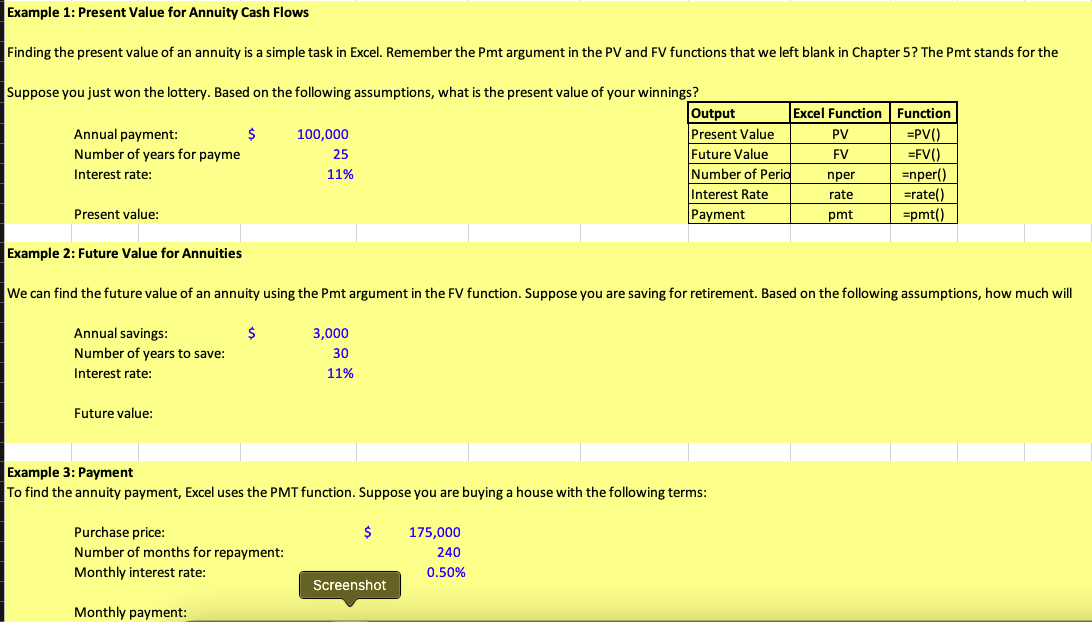
Question: Example 1: Present Value for Annuity Cash Flows Finding the present value of an annuity is a simple task in Excel. Remember the Pmt argument
Example 1: Present Value for Annuity Cash FlowsExample 1: Present Value for Annuity Cash Flows
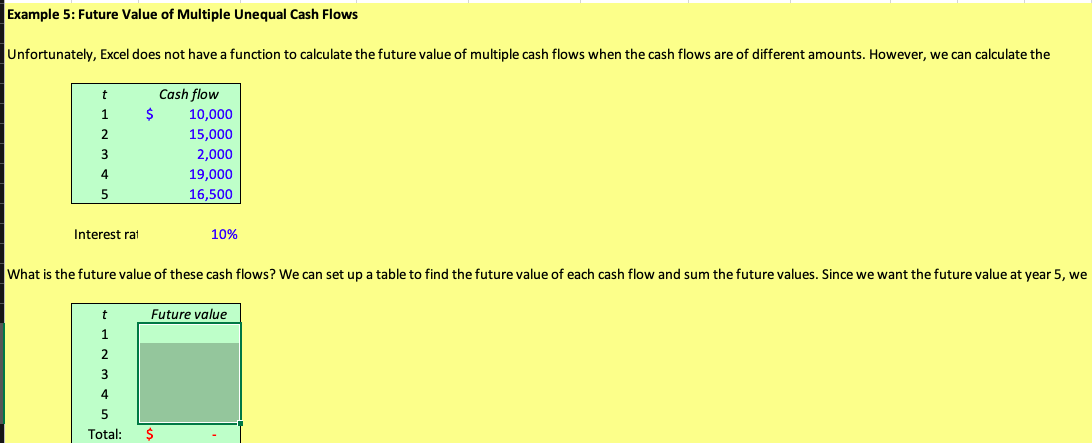
Example 1: Present Value for Annuity Cash Flows Finding the present value of an annuity is a simple task in Excel. Remember the Pmt argument in the PV and FV functions that we left blank in Chapter 5? The Pmt stands for the Suppose you just won the lottery. Based on the following assumptions, what is the present value of your winnings? Output Excel Function Function Annual payment: $ 100,000 Present Value PV =PV() Number of years for payme 25 Future Value FV =FV() Interest rate: 11% Number of Perio nper =nper() Interest Rate rate =rate() Present value: Payment pmt =pmt() Example 2: Future Value for Annuities We can find the future value of an annuity using the Pmt argument in the FV function. Suppose you are saving for retirement. Based on the following assumptions, how much will Annual savings: 3,000 Number of years to save: 30 Interest rate: 11% Future value: Example 3: Payment To find the annuity payment, Excel uses the PMT function. Suppose you are buying a house with the following terms: Purchase price: $ 175,000 Number of months for repayment: 240 Monthly interest rate: 0.50% Screenshot Monthly payment:Example 5: Future Value of Multiple Unequal Cash Flows Unfortunately, Excel does not have a function to calculate the future value of multiple cash flows when the cash flows are of different amounts. However, we can calculate the Cash flow $ 10,000 15,000 2,000 UI BWI 19,000 16,500 Interest rat 10% What is the future value of these cash flows? We can set up a table to find the future value of each cash flow and sum the future values. Since we want the future value at year 5, we Future value UI AWNI Total: S

Step by Step Solution

There are 3 Steps involved in it

1 Expert Approved Answer
Step: 1 Unlock blur-text-image

Question Has Been Solved by an Expert!

Get step-by-step solutions from verified subject matter experts

Step: 2 Unlock
Step: 3 Unlock

Students Have Also Explored These Related Finance Questions!