







Question: EXCEL 1 EXPERT ASSIGNMENT PART 1 1. Open the spreadsheet Sunny Day Pizza located in the Excel 1 Expert folder. 2. Add your name and
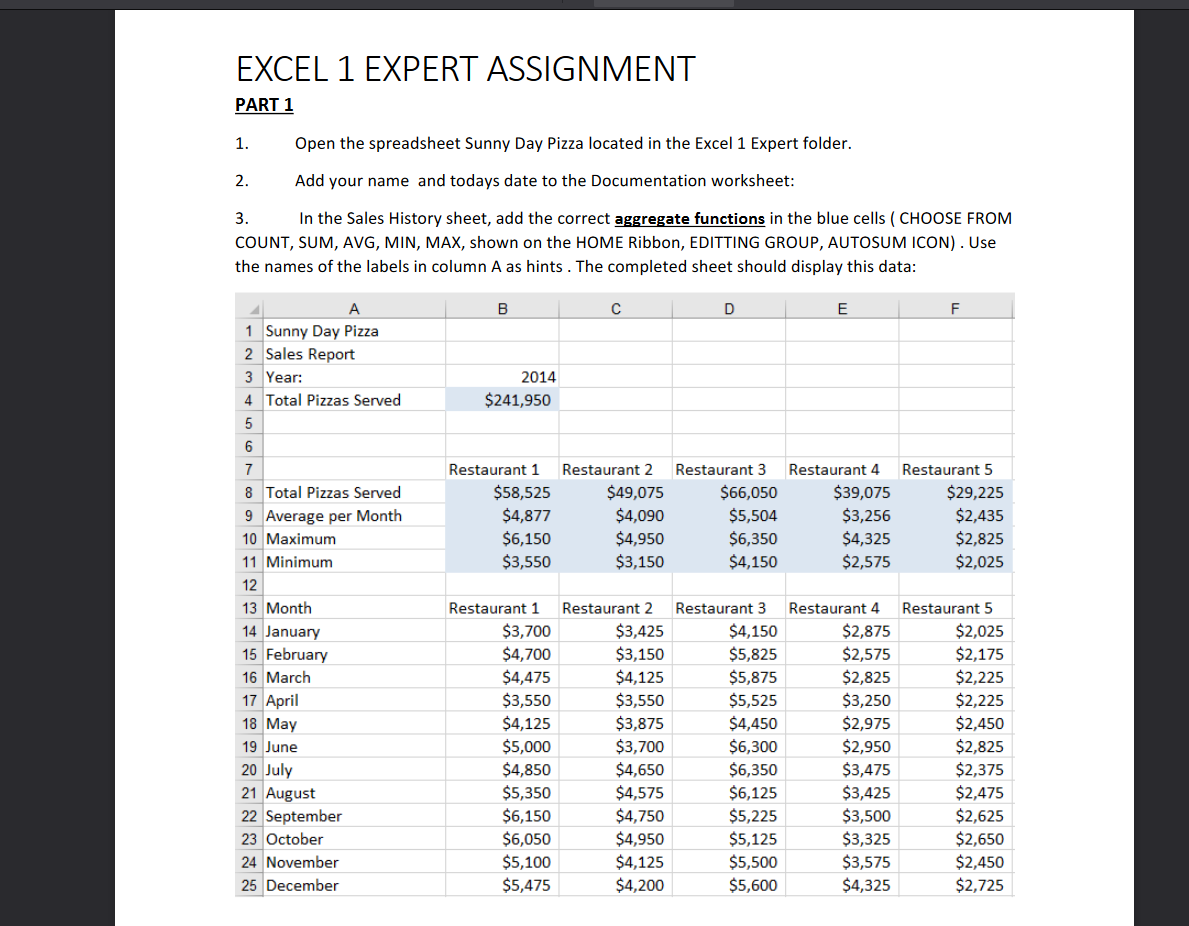
EXCEL 1 EXPERT ASSIGNMENT PART 1 1. Open the spreadsheet Sunny Day Pizza located in the Excel 1 Expert folder. 2. Add your name and todays date to the Documentation worksheet: 3. In the Sales History sheet, add the correct aggregate functions in the blue cells (CHOOSE FROM COUNT, SUM, AVG, MIN, MAX, shown on the HOME Ribbon, EDITTING GROUP, AUTOSUM ICON). Use the names of the labels in column A as hints. The completed sheet should display this data: B D E F A 1 Sunny Day Pizza 2 Sales Report 3 Year: 4 Total Pizzas Served 5 2014 $241,950 6 Restaurant 1 $58,525 $4,877 $6,150 $3,550 Restaurant 2 $49,075 $4,090 $4,950 $3,150 Restaurant 3 $66,050 $5,504 $6,350 $4,150 Restaurant 4 $39,075 $3,256 $4,325 $2,575 Restaurant 5 $29,225 $2,435 $2,825 $2,025 7 8 Total Pizzas Served 9 Average per Month 10 Maximum 11 Minimum 12 13 Month 14 January 15 February 16 March 17 April 18 May 19 June 20 July 21 August 22 September 23 October 24 November 25 December Restaurant 1 $3,700 $4,700 $4,475 $3,550 $4,125 $5,000 $4,850 $5,350 $6,150 $6,050 $5,100 $5,475 Restaurant 2 $3,425 $3,150 $4,125 $3,550 $3,875 $3,700 $4,650 $4,575 $4,750 $4,950 $4,125 $4,200 Restaurant 3 $4,150 $5,825 $5,875 $5,525 $4,450 $6,300 $6,350 $6,125 $5,225 $5,125 $5,500 $5,600 Restaurant 4 $2,875 $2,575 $2,825 $3,250 $2,975 $2,950 $3,475 $3,425 $3,500 $3,325 $3,575 $4,325 Restaurant 5 $2,025 $2,175 $2,225 $2,225 $2,450 $2,825 $2,375 $2,475 $2,625 $2,650 $2,450 $2,725
Step by Step Solution
There are 3 Steps involved in it

Get step-by-step solutions from verified subject matter experts
 Study Help