







Question: Not sure how to start the methods in the ImageManipulation class. All assistance is extremely welcome! I have included the ColorStack class so you can
Not sure how to start the methods in the ImageManipulation class. All assistance is extremely welcome! I have included the ColorStack class so you can understand the main purpose of the assignment. We are to understand how to use the stack as a data structure and use it with an Array List to manipulate the image.
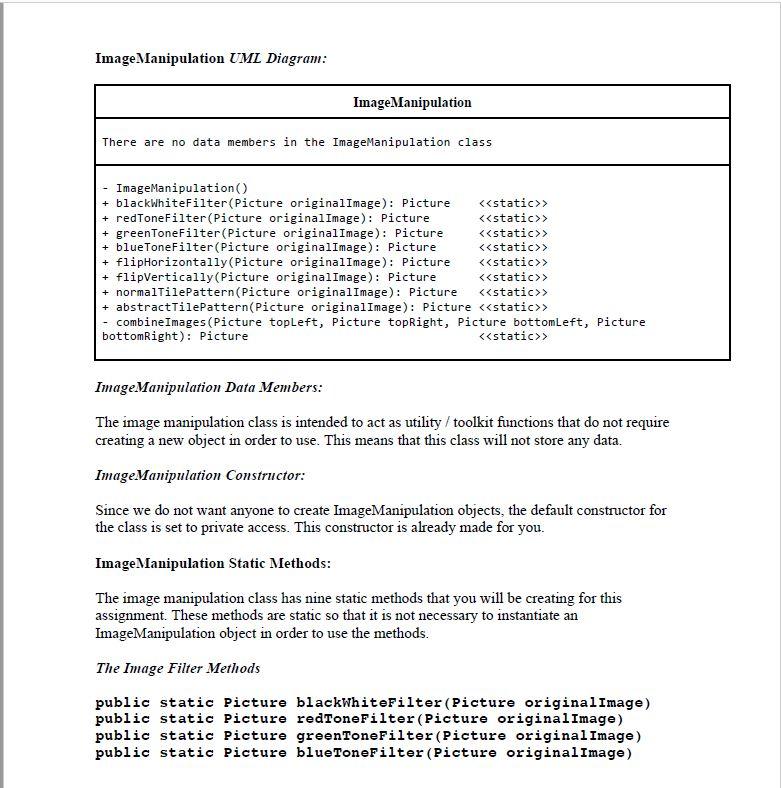
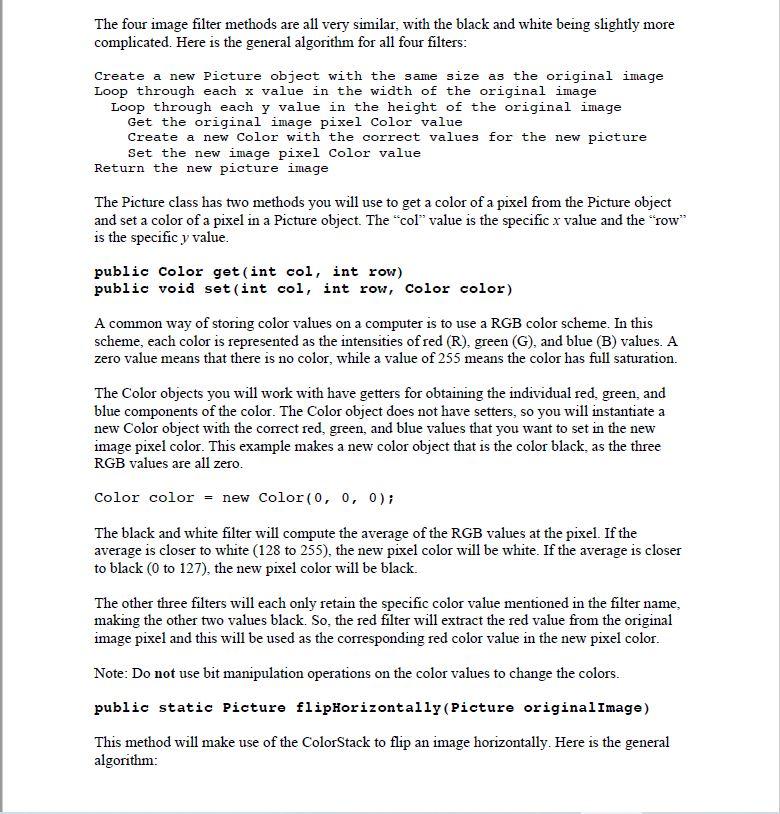
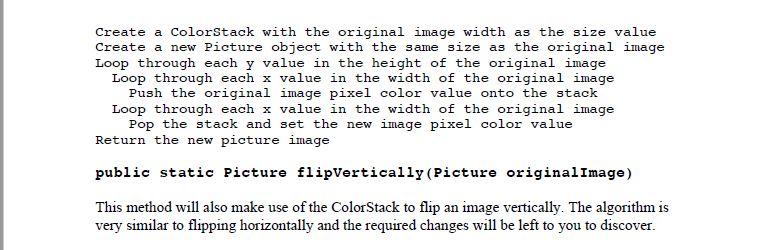
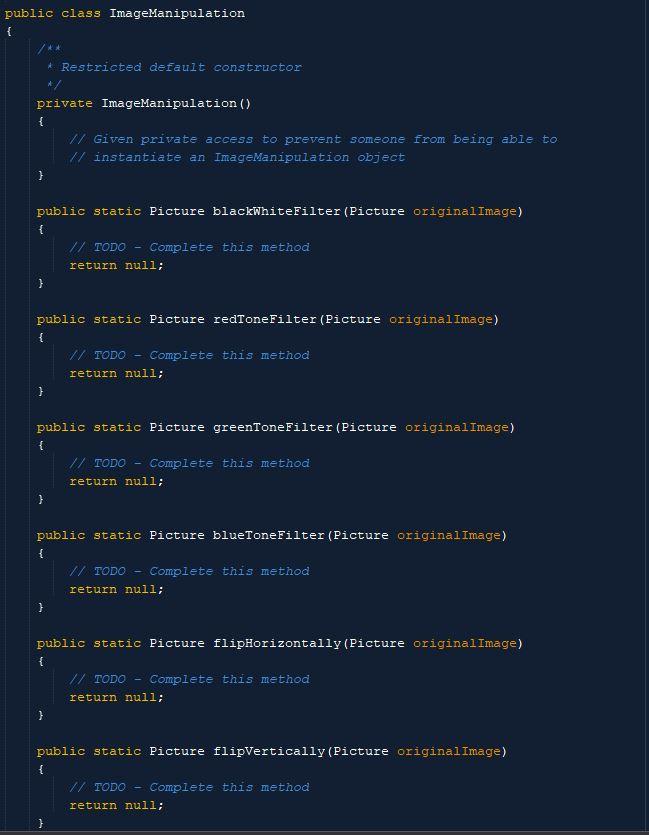
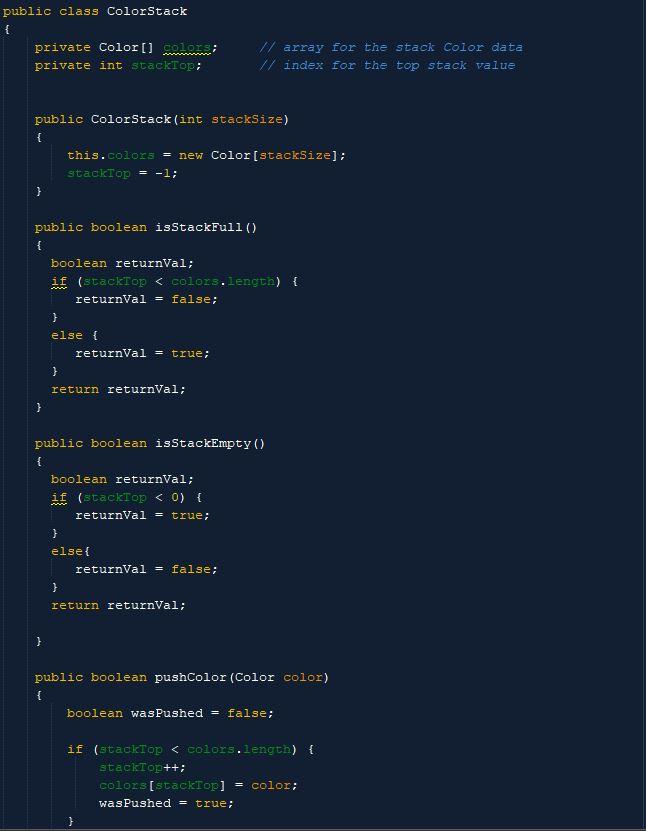
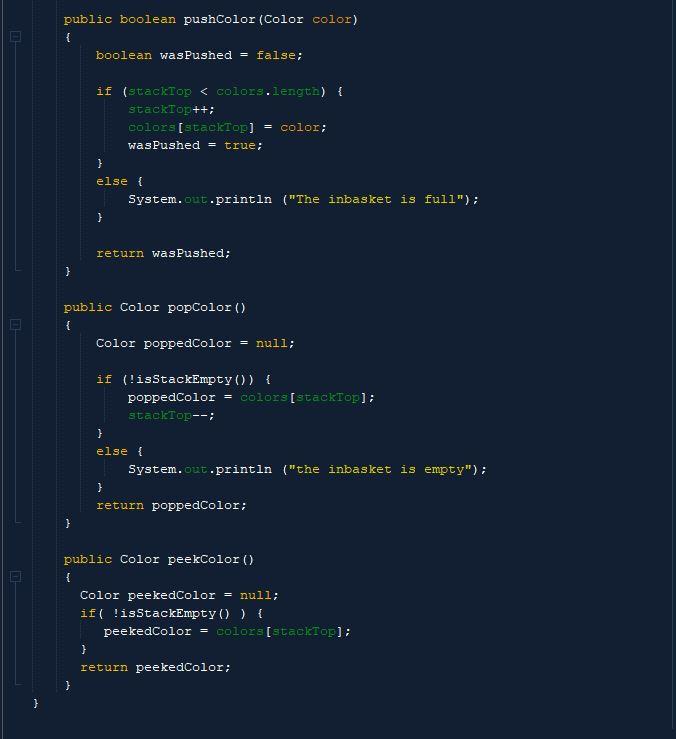
Image Manipulation UML Diagram: Image Manipulation There are no data members in the ImageManipulation class ImageManipulation() + blackWhiteFilter(Picture originalImage): Picture > + redTone Filter(Picture originalImage): Picture > + greenToneFilter(Picture originalImage): Picture > + blueToneFilter(Picture originalImage): Picture > + flipHorizontally(Picture originalImage): Picture > + flipVertically(Picture originalImage): Picture static>> + normalTilePattern (Picture originalImage): Picture > + abstractTilePattern(Picture originalImage): Picture static>> - combine Images (Picture topleft, Picture topRight, Picture bottomleft, Picture bottomRight): Picture > Image Manipulation Data Members: The image manipulation class is intended to act as utility / toolkit functions that do not require creating a new object in order to use. This means that this class will not store any data. Image Manipulation Constructor: Since we do not want anyone to create ImageManipulation objects, the default constructor for the class is set to private access. This constructor is already made for you. Image Manipulation Static Methods: The image manipulation class has nine static methods that you will be creating for this assignment. These methods are static so that it is not necessary to instantiate an ImageManipulation object in order to use the methods. The Image Filter Methods public static Picture blackwhiteFilter (Picture originalImage) public static Picture redToneFilter (Picture originalImage) public static Picture greenToneFilter(Picture original Image) public static Picture blueToneFilter (Picture originalImage) The four image filter methods are all very similar, with the black and white being slightly more complicated. Here is the general algorithm for all four filters: Create a new Picture object with the same size as the original image Loop through each x value in the width of the original image Loop through each y value in the height of the original image Get the original image pixel color value Create a new color with the correct values for the new picture Set the new image pixel color value Return the new picture image The Picture class has two methods you will use to get a color of a pixel from the Picture object and set a color of a pixel in a Picture object. The "col" value is the specific x value and the "row" is the specific y value. public Color get(int col, int row) public void set(int col, int row, color color) A common way of storing color values on a computer is to use a RGB color scheme. In this scheme, each color is represented as the intensities of red (R), green (G), and blue (B) values. A zero value means that there is no color, while a value of 255 means the color has full saturation. The Color objects you will work with have getters for obtaining the individual red, green, and blue components of the color. The Color object does not have setters, so you will instantiate a new Color object with the correct red, green, and blue values that you want to set in the new image pixel color. This example makes a new color object that is the color black, as the three RGB values are all zero. Color color = new Color(0, 0, 0); The black and white filter will compute the average of the RGB values at the pixel. If the average is closer to white (128 to 255), the new pixel color will be white. If the average is closer to black (0 to 127), the new pixel color will be black. The other three filters will each only retain the specific color value mentioned in the filter name, making the other two values black. So, the red filter will extract the red value from the original image pixel and this will be used as the corresponding red color value in the new pixel color. Note: Do not use bit manipulation operations on the color values to change the colors. public static Picture flipHorizontally(Picture originalImage) This method will make use of the ColorStack to flip an image horizontally. Here is the general algorithm: Create a ColorStack with the original image width as the size value Create a new Picture object with the same size as the original image Loop through each y value in the height of the original image Loop through each x value in the width of the original image Push the original image pixel color value onto the stack Loop through each x value in the width of the original image Pop the stack and set the new image pixel color value Return the new picture image public static Picture flipvertically (Picture originalImage) This method will also make use of the ColorStack to flip an image vertically. The algorithm is very similar to flipping horizontally and the required changes will be left to you to discover. public class ImageManipulation { Restricted default constructor private ImageManipulation() { 1/ Given private access to prevent someone from being able to // instantiate an ImageManipulation object } public static Picture blackwhiteFilter (Picture originalImage) { // TODO Complete this method return null; } public static Picture redToneFilter (Picture original Image) { // TODO - Complete this method return null; } public static Picture greenToneFilter (Picture originalImage) { // TODO Complete this method return null; } public static Picture blueToneFilter (Picture originalImage) { // TODO - Complete this method return null; public static Picture flipHorizontally (Picture originalImage) { // TODO - Complete this method return null; } public static Picture flipvertically (Picture originalImage) { // TODO Complete this method return null; } public class ColorStack { private Color[] clon private int stackTop; // array for the stack Color data // index for the top stack value public ColorStack (int stackSize) { this.colors = new Color (stackSize]; stackTop = -1; } public boolean isStackFull() { boolean returnval; if (stackrop > + redTone Filter(Picture originalImage): Picture > + greenToneFilter(Picture originalImage): Picture > + blueToneFilter(Picture originalImage): Picture > + flipHorizontally(Picture originalImage): Picture > + flipVertically(Picture originalImage): Picture static>> + normalTilePattern (Picture originalImage): Picture > + abstractTilePattern(Picture originalImage): Picture static>> - combine Images (Picture topleft, Picture topRight, Picture bottomleft, Picture bottomRight): Picture > Image Manipulation Data Members: The image manipulation class is intended to act as utility / toolkit functions that do not require creating a new object in order to use. This means that this class will not store any data. Image Manipulation Constructor: Since we do not want anyone to create ImageManipulation objects, the default constructor for the class is set to private access. This constructor is already made for you. Image Manipulation Static Methods: The image manipulation class has nine static methods that you will be creating for this assignment. These methods are static so that it is not necessary to instantiate an ImageManipulation object in order to use the methods. The Image Filter Methods public static Picture blackwhiteFilter (Picture originalImage) public static Picture redToneFilter (Picture originalImage) public static Picture greenToneFilter(Picture original Image) public static Picture blueToneFilter (Picture originalImage) The four image filter methods are all very similar, with the black and white being slightly more complicated. Here is the general algorithm for all four filters: Create a new Picture object with the same size as the original image Loop through each x value in the width of the original image Loop through each y value in the height of the original image Get the original image pixel color value Create a new color with the correct values for the new picture Set the new image pixel color value Return the new picture image The Picture class has two methods you will use to get a color of a pixel from the Picture object and set a color of a pixel in a Picture object. The "col" value is the specific x value and the "row" is the specific y value. public Color get(int col, int row) public void set(int col, int row, color color) A common way of storing color values on a computer is to use a RGB color scheme. In this scheme, each color is represented as the intensities of red (R), green (G), and blue (B) values. A zero value means that there is no color, while a value of 255 means the color has full saturation. The Color objects you will work with have getters for obtaining the individual red, green, and blue components of the color. The Color object does not have setters, so you will instantiate a new Color object with the correct red, green, and blue values that you want to set in the new image pixel color. This example makes a new color object that is the color black, as the three RGB values are all zero. Color color = new Color(0, 0, 0); The black and white filter will compute the average of the RGB values at the pixel. If the average is closer to white (128 to 255), the new pixel color will be white. If the average is closer to black (0 to 127), the new pixel color will be black. The other three filters will each only retain the specific color value mentioned in the filter name, making the other two values black. So, the red filter will extract the red value from the original image pixel and this will be used as the corresponding red color value in the new pixel color. Note: Do not use bit manipulation operations on the color values to change the colors. public static Picture flipHorizontally(Picture originalImage) This method will make use of the ColorStack to flip an image horizontally. Here is the general algorithm: Create a ColorStack with the original image width as the size value Create a new Picture object with the same size as the original image Loop through each y value in the height of the original image Loop through each x value in the width of the original image Push the original image pixel color value onto the stack Loop through each x value in the width of the original image Pop the stack and set the new image pixel color value Return the new picture image public static Picture flipvertically (Picture originalImage) This method will also make use of the ColorStack to flip an image vertically. The algorithm is very similar to flipping horizontally and the required changes will be left to you to discover. public class ImageManipulation { Restricted default constructor private ImageManipulation() { 1/ Given private access to prevent someone from being able to // instantiate an ImageManipulation object } public static Picture blackwhiteFilter (Picture originalImage) { // TODO Complete this method return null; } public static Picture redToneFilter (Picture original Image) { // TODO - Complete this method return null; } public static Picture greenToneFilter (Picture originalImage) { // TODO Complete this method return null; } public static Picture blueToneFilter (Picture originalImage) { // TODO - Complete this method return null; public static Picture flipHorizontally (Picture originalImage) { // TODO - Complete this method return null; } public static Picture flipvertically (Picture originalImage) { // TODO Complete this method return null; } public class ColorStack { private Color[] clon private int stackTop; // array for the stack Color data // index for the top stack value public ColorStack (int stackSize) { this.colors = new Color (stackSize]; stackTop = -1; } public boolean isStackFull() { boolean returnval; if (stackrop
Step by Step Solution
There are 3 Steps involved in it

Get step-by-step solutions from verified subject matter experts
 Study Help