







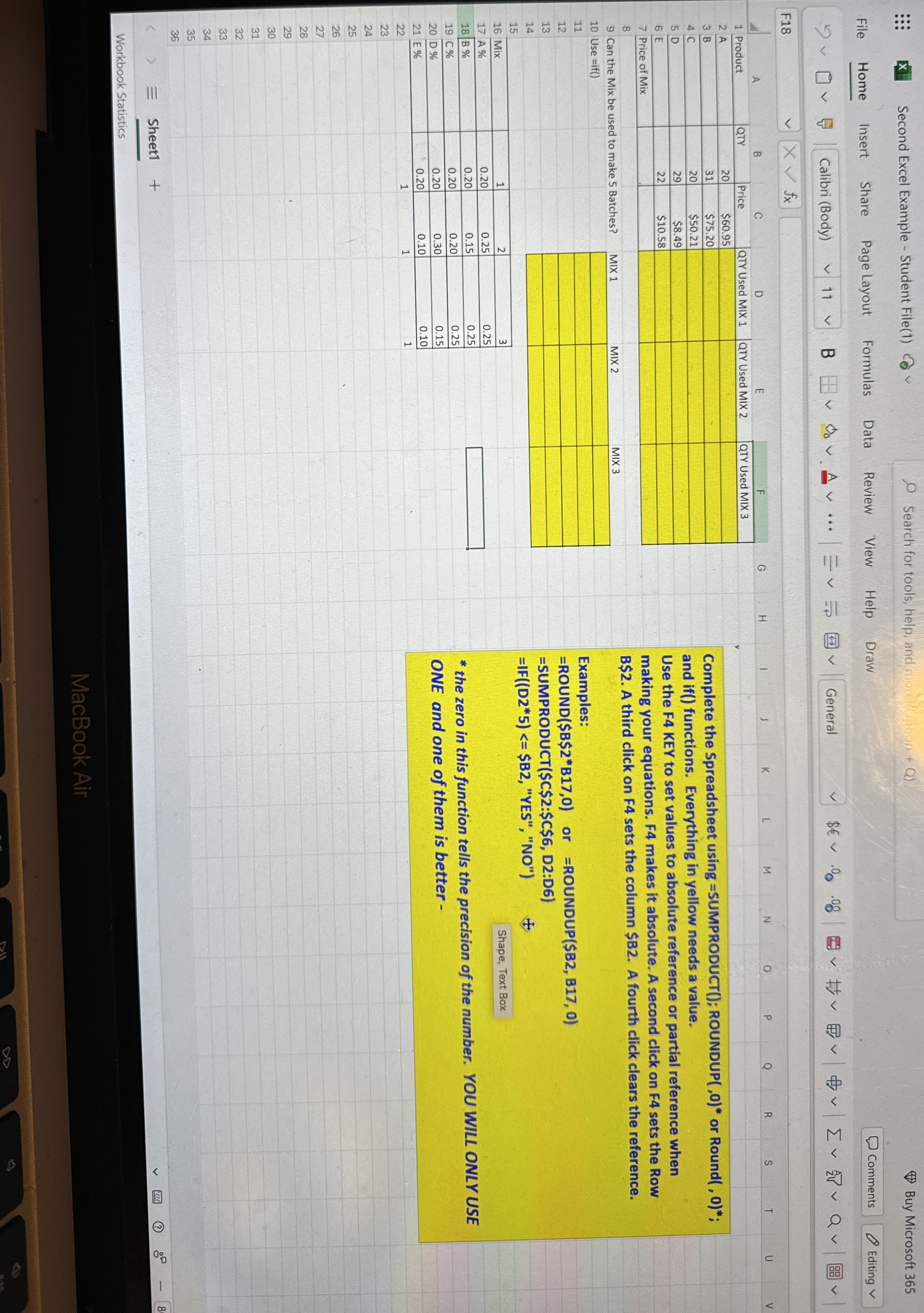
Question: Excel Complete the Spreadsheet using = SUMPRODUCT ( ) ; ROUNDUP ( , 0 ) * or Round ( , 0 ) * ; and
Excel
Complete the Spreadsheet using SUMPRODUCT; ROUNDUP or Round;
and if functions. Everything in yellow needs a value.
Use the F KEY to set values to absolute reference or partial reference when
making your equations. F makes it absolute A second click on F sets the Row
$ A third click on sets the column $ A fourth click clears the reference.
Can the Mix be used to make Batches?
Examples:
ROUND$B$B or ROUNDUP$B B
SUMPRODUCT$C$:$C$ D:D
IFD $B "YES", NO
the zero in this function tells the precision of the number. YOU WILL ONLY USE
ONE and one of them is better
Step by Step Solution
There are 3 Steps involved in it
1 Expert Approved Answer
Step: 1 Unlock

Question Has Been Solved by an Expert!
Get step-by-step solutions from verified subject matter experts
Step: 2 Unlock
Step: 3 Unlock
 Study Help