







Question: Excel File Edit Window Help 98% a 8 Thu Sep 9 2:18 PM View Insert Format Tools Data NGO ... AutoSave ON 2. Unit 2
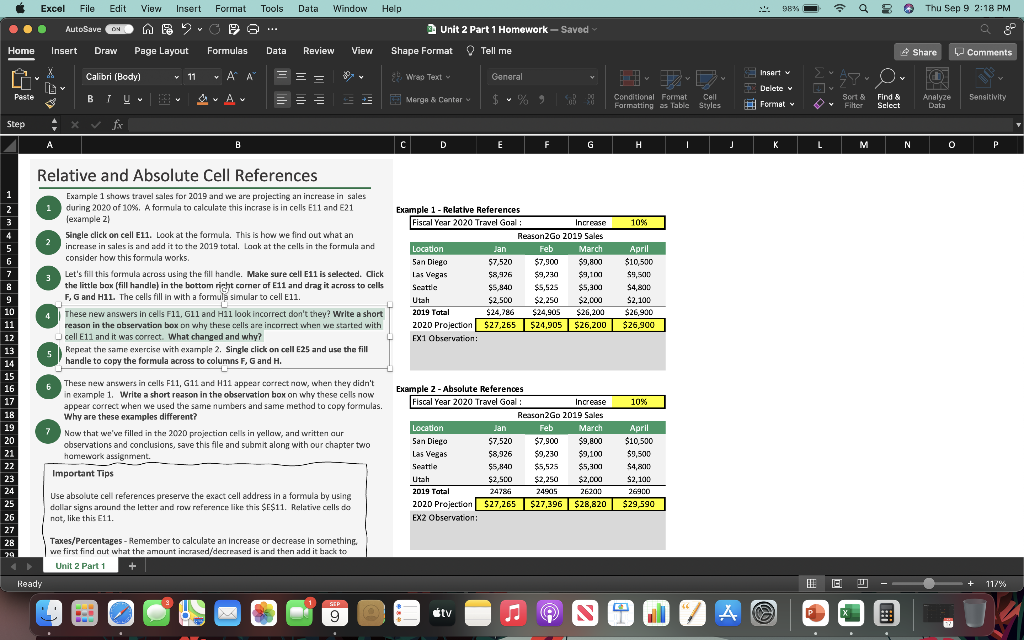
Excel File Edit Window Help 98% a 8 Thu Sep 9 2:18 PM View Insert Format Tools Data NGO ... AutoSave ON 2. Unit 2 Part 1 Homework - Saved Home Insert Draw Page Layout Formulas Data Review View Shape Format Tell me Share Comments X Calibri (Body) v 11 AP Insert v = = Genera 9. Wrao Text 3 2-D O Delete Paste BIU === + Merga & Centar $ v % 9 Conditional Format Cell Formatting as Table Styles Sort & Filter ! Format Find & Select Analyze Data Sensitivity Step fr A B D E F G H . I J L L M N 0 P 1 2 10% 4 6 Relative and Absolute Cell References Example 1 shaws travel sales for 2019 and we are projecting an increase in sales during 2020 of 10%. A formula to calculate this incrase is in cells E11 and 521 lexample 21 Single click on cell E11. Look at the formula. This is how we find out what an increase in sales is and add it to the 2019 total. Look at the cells in the formula and consider how this formula works. Let's fill this formula across using the till handle. Make sure cell E11 is selected. Click the little box (fill handle) in the bottom right corner of E11 and drag it across to cells F, G and H1l. The cells fill in with a formula simular to cell E11. These new answers in cells F11, G11 and Hll look incorrect don't they? Write a short reason in the observation box on why these cells are incorrect when we started with cell E11 and it was correct. What changed and why? 5 Repeat the same exercise with example 2. Single click on cell E25 and use the fill handle to copy the formula across to columns F, G and H. Example 1 - Relative References Fiscal Year 2020 Travel Goal Increase Reason2Go 2019 Sales Location Jan Feb March 5an Diego $7,520 $7.900 $9,800 $8,976 $9,230 $9,100 Seattle $5,840 $5,525 $5,300 Utah $2,500 $2.250 $2,000 2019 Total $24,796 $24,905 $26,200 2020 Projection $27.265 $24,905 $26,200 EX1 Observation: Las Vegas April $10,500 $9.500 $ $4,800 $ $2,100 $26,900 $26,900 8 9 10 11 12 13 14 15 16 17 18 19 20 21 22 23 24 25 26 27 28 30 These new answers in cells F11, G11 and H11 appear correct now, when they didn't in example 1. Write a short reason in the observation box on why these cells now appear correct when we used the same numbers and same method to copy formulas. Why are these examples different? 7 Now that we've filled in the 2020 projection cells in yellow, and written cur observations and conclusions, save this file and submit alone with our chapter two homework assignment. Important Tips Example 2 - Absolute References Fiscal Year 2020 Travel Goal Increase 10% Reason2Go 2019 Sales Location Jan Feb March April San Diego $7,520 $7.900 $9,800 $10,500 $ Las Vegas $8,926 $9.230 $9,100 $9,500 Seattia $5,840 $5,525 $5,800 $4,2010 Utah $2.5CO $2,250 $2,000 $2,100 2019 Tatal 24786 24905 26200 26900 2020 Projection $27,265 $27,396 $28,820 $29,590 EX2 Observation: Use absolute cell references preserve the exact cell address in a formula by using dallar signs around the letter and row reference like this $E$11. Relative cells do nat, like this E11. Taxes/Percentages - Remember to calculate an increase or decrease in somethine. we first find out what the amount incrased/decreased is and then add it back to Unit 2 Part 1 + Ready TEC D + 117% tv A Excel File Edit Window Help 98% a 8 Thu Sep 9 2:18 PM View Insert Format Tools Data NGO ... AutoSave ON 2. Unit 2 Part 1 Homework - Saved Home Insert Draw Page Layout Formulas Data Review View Shape Format Tell me Share Comments X Calibri (Body) v 11 AP Insert v = = Genera 9. Wrao Text 3 2-D O Delete Paste BIU === + Merga & Centar $ v % 9 Conditional Format Cell Formatting as Table Styles Sort & Filter ! Format Find & Select Analyze Data Sensitivity Step fr A B D E F G H . I J L L M N 0 P 1 2 10% 4 6 Relative and Absolute Cell References Example 1 shaws travel sales for 2019 and we are projecting an increase in sales during 2020 of 10%. A formula to calculate this incrase is in cells E11 and 521 lexample 21 Single click on cell E11. Look at the formula. This is how we find out what an increase in sales is and add it to the 2019 total. Look at the cells in the formula and consider how this formula works. Let's fill this formula across using the till handle. Make sure cell E11 is selected. Click the little box (fill handle) in the bottom right corner of E11 and drag it across to cells F, G and H1l. The cells fill in with a formula simular to cell E11. These new answers in cells F11, G11 and Hll look incorrect don't they? Write a short reason in the observation box on why these cells are incorrect when we started with cell E11 and it was correct. What changed and why? 5 Repeat the same exercise with example 2. Single click on cell E25 and use the fill handle to copy the formula across to columns F, G and H. Example 1 - Relative References Fiscal Year 2020 Travel Goal Increase Reason2Go 2019 Sales Location Jan Feb March 5an Diego $7,520 $7.900 $9,800 $8,976 $9,230 $9,100 Seattle $5,840 $5,525 $5,300 Utah $2,500 $2.250 $2,000 2019 Total $24,796 $24,905 $26,200 2020 Projection $27.265 $24,905 $26,200 EX1 Observation: Las Vegas April $10,500 $9.500 $ $4,800 $ $2,100 $26,900 $26,900 8 9 10 11 12 13 14 15 16 17 18 19 20 21 22 23 24 25 26 27 28 30 These new answers in cells F11, G11 and H11 appear correct now, when they didn't in example 1. Write a short reason in the observation box on why these cells now appear correct when we used the same numbers and same method to copy formulas. Why are these examples different? 7 Now that we've filled in the 2020 projection cells in yellow, and written cur observations and conclusions, save this file and submit alone with our chapter two homework assignment. Important Tips Example 2 - Absolute References Fiscal Year 2020 Travel Goal Increase 10% Reason2Go 2019 Sales Location Jan Feb March April San Diego $7,520 $7.900 $9,800 $10,500 $ Las Vegas $8,926 $9.230 $9,100 $9,500 Seattia $5,840 $5,525 $5,800 $4,2010 Utah $2.5CO $2,250 $2,000 $2,100 2019 Tatal 24786 24905 26200 26900 2020 Projection $27,265 $27,396 $28,820 $29,590 EX2 Observation: Use absolute cell references preserve the exact cell address in a formula by using dallar signs around the letter and row reference like this $E$11. Relative cells do nat, like this E11. Taxes/Percentages - Remember to calculate an increase or decrease in somethine. we first find out what the amount incrased/decreased is and then add it back to Unit 2 Part 1 + Ready TEC D + 117% tv A
Step by Step Solution
There are 3 Steps involved in it

Get step-by-step solutions from verified subject matter experts
 Study Help