







Question: Excel File Edit Window Help View Insert Format Tools Data Module 4 HW problems part 1 AutoSave OFT Review Formulas View Insert Data Tell me
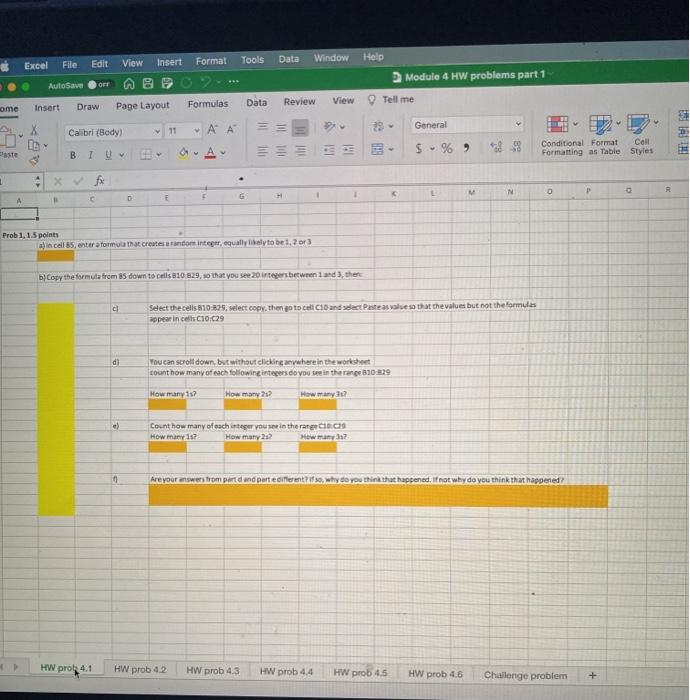
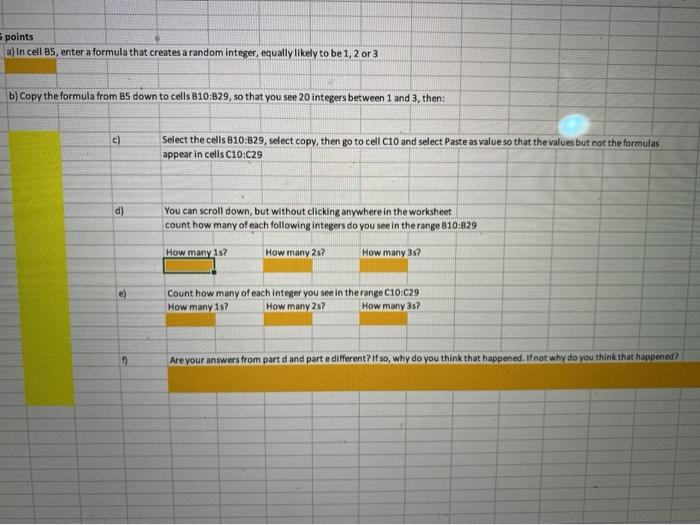
Excel File Edit Window Help View Insert Format Tools Data Module 4 HW problems part 1 AutoSave OFT Review Formulas View Insert Data Tell me ome Draw Page Layout General Calibri (Body) - A A A 28 Conditional Format Coll Formatting as Table Styles $ % ) I U B 1 Xfx N P . - c F D Prob1,1.5 points din cell 85, enter a formula that creates a random integer, equally to be 1, 2 or 3 by Copy the formula from 85 down to cells 810 829, so that you see 20 intepers between and the . Select the cells 810-879. select copy. then go to call and select Pastas vale so that the values but not the formulas appear in cell C10C29 d) You can scroll down, but without clicking anywhere in the worksheet count how many of each following intecers do you see in the e510 529 How many is? How many 202 Howany? e) Count how many of each integer you see in the range CIOCOS How many 157 How many 2.2 0 Are your answers from pared and parte different so why do you think that happened. If not why do you think that happened? HW pro 4.1 HW prob 42 HW prob 4.3 HW prob 4.4 HW prob 4.5 HW prob 4.6 Challenge problem + points a) In cell BS, enter a formula that creates a random Integer, equally likely to be 1, 2 or 3 b) Copy the formula from BS down to cells B10:329, so that you see 20 integers between 1 and 3, then: Select the cells 810:329, select copy, then go to cell C10 and select Paste as value so that the values but not the formulas appear in cells C10:c29 d) You can scroll down, but without clicking anywhere in the worksheet count how many of each following integers do you see in the range 810:829 How many 1s? How many 257 How many 357 Count how many of each integer you see in the range C10:29 How many 1s? How many 2s? How many 357 Are your answers from part d and parte different? If so, why do you think that happened. If not why do you think that happened? Excel File Edit Window Help View Insert Format Tools Data Module 4 HW problems part 1 AutoSave OFT Review Formulas View Insert Data Tell me ome Draw Page Layout General Calibri (Body) - A A A 28 Conditional Format Coll Formatting as Table Styles $ % ) I U B 1 Xfx N P . - c F D Prob1,1.5 points din cell 85, enter a formula that creates a random integer, equally to be 1, 2 or 3 by Copy the formula from 85 down to cells 810 829, so that you see 20 intepers between and the . Select the cells 810-879. select copy. then go to call and select Pastas vale so that the values but not the formulas appear in cell C10C29 d) You can scroll down, but without clicking anywhere in the worksheet count how many of each following intecers do you see in the e510 529 How many is? How many 202 Howany? e) Count how many of each integer you see in the range CIOCOS How many 157 How many 2.2 0 Are your answers from pared and parte different so why do you think that happened. If not why do you think that happened? HW pro 4.1 HW prob 42 HW prob 4.3 HW prob 4.4 HW prob 4.5 HW prob 4.6 Challenge problem + points a) In cell BS, enter a formula that creates a random Integer, equally likely to be 1, 2 or 3 b) Copy the formula from BS down to cells B10:329, so that you see 20 integers between 1 and 3, then: Select the cells 810:329, select copy, then go to cell C10 and select Paste as value so that the values but not the formulas appear in cells C10:c29 d) You can scroll down, but without clicking anywhere in the worksheet count how many of each following integers do you see in the range 810:829 How many 1s? How many 257 How many 357 Count how many of each integer you see in the range C10:29 How many 1s? How many 2s? How many 357 Are your answers from part d and parte different? If so, why do you think that happened. If not why do you think that happened
Step by Step Solution
There are 3 Steps involved in it

Get step-by-step solutions from verified subject matter experts
 Study Help