







Question: excel Function: DATE; Formula: Add, Multiply, Divide; Cell Referencing Using Excel to Compute Interest and Maturity Date PROBLEM The following notes vary in maturity periods,
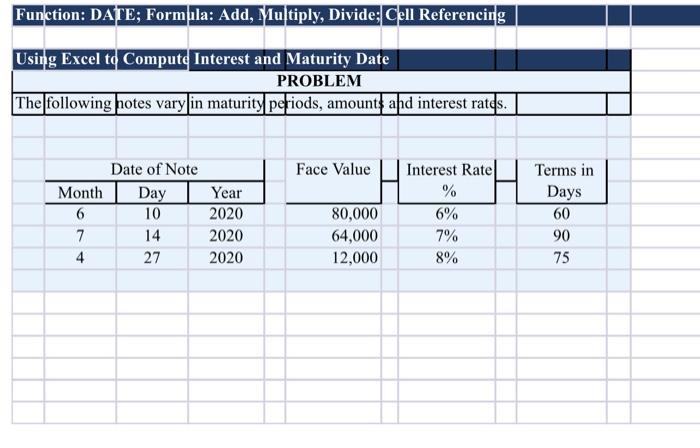
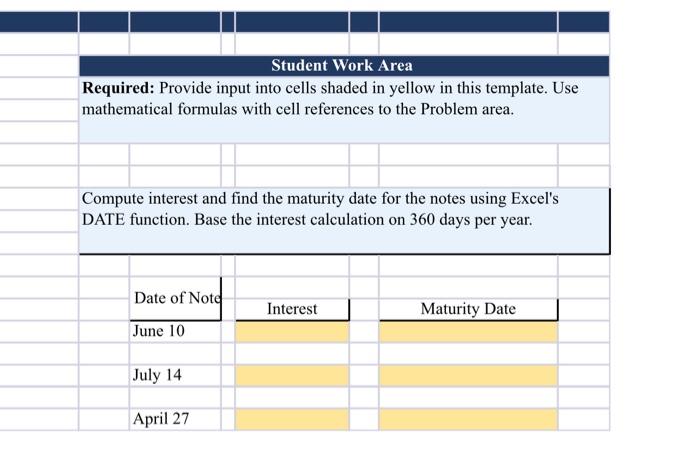
Function: DATE; Formula: Add, Multiply, Divide; Cell Referencing Using Excel to Compute Interest and Maturity Date PROBLEM The following notes vary in maturity periods, amounts and interest rates. Date of Note Month Day 6 10 7 14 4 27 Year 2020 2020 2020 Face Value Interest Rate % 6% 7% 8% 80,000 64,000 12,000 Terms in Days 60 90 75 Student Work Area Required: Provide input into cells shaded in yellow in this template. Use mathematical formulas with cell references to the Problem area. Compute interest and find the maturity date for the notes using Excel's DATE function. Base the interest calculation on 360 days per year. Date of Note June 10 July 14 April 27 Interest Maturity Date
Step by Step Solution
There are 3 Steps involved in it

Get step-by-step solutions from verified subject matter experts
 Study Help