







Question: Excel has many present value functions, although you can also get great results just using formulas PV OF $1.00 =1/(1+r)^n Use this formula for PV
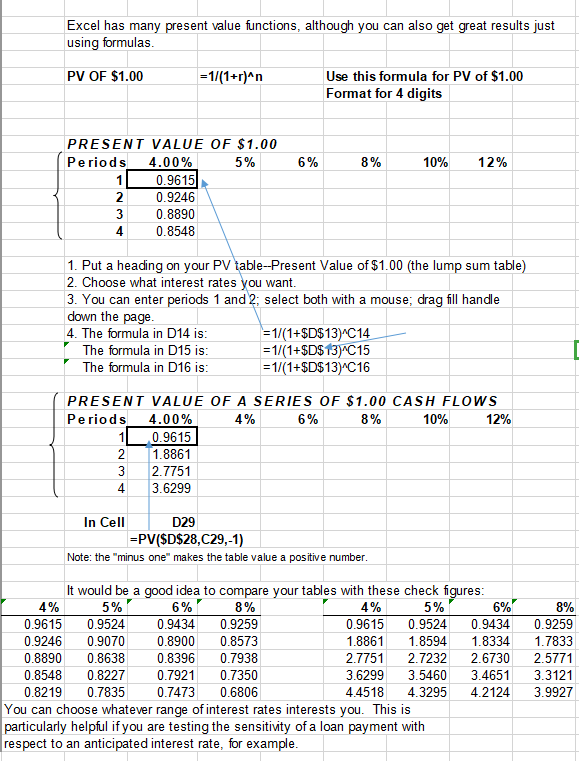
Excel has many present value functions, although you can also get great results just using formulas PV OF $1.00 =1/(1+r)^n Use this formula for PV of $1.00 Format for 4 digits 6% 8% 10% 12% PRESENT VALUE OF $1.00 Periods 4.00% 5% 1 0.9615 2 0.9246 3 0.8890 0.8548 1. Put a heading on your PV table--Present Value of $1.00 (the lump sum table) 2. Choose what interest rates you want. 3. You can enter periods 1 and 2 select both with a mouse; drag fill handle down the page. 4. The formula in D14 is: = 1/(1+$D$13) C14 The formula in D15 is: = 1/(1+$D$ 13)C15 The formula in D16 is: = 1/(1+$D$13) C16 12% PRESENT VALUE OF A SERIES OF $1.00 CASH FLOWS Periods 4.00% 4% 6% 8% 10% 1 2 [1.8861 3 2.7751 4 3.6299 In Cell D29 =PV($D$28,C29,-1) Note: the "minus one" makes the table value a positive number. It would be a good idea to compare your tables with these check figures: 4% 5% 6%' 8% 4% 5% 6% 0.9615 0.9524 0.9434 0.9259 0.9615 0.9524 0.9434 0.9246 0.9070 0.8900 0.8573 1.8861 1.8594 1.8334 0.8890 0.8638 0.8396 0.7938 2.7751 2.7232 2.6730 0.8548 0.8227 0.7921 0.7350 3.6299 3.5460 3.4651 0.8219 0.7835 0.7473 0.6806 4.4518 4.3295 4.2124 You can choose whatever range of interest rates interests you. This is particularly helpful if you are testing the sensitivity of a loan payment with respect to an anticipated interest rate, for example. 8% 0.9259 1.7833 2.5771 3.3121 3.9927
Step by Step Solution
There are 3 Steps involved in it

Get step-by-step solutions from verified subject matter experts
 Study Help