







Question: EXCEL HELP!!!--- Solver for Option 1, in which you want the objective (Cell D16) to have the minimum (Min) number of employees scheduled by changing
EXCEL HELP!!!---
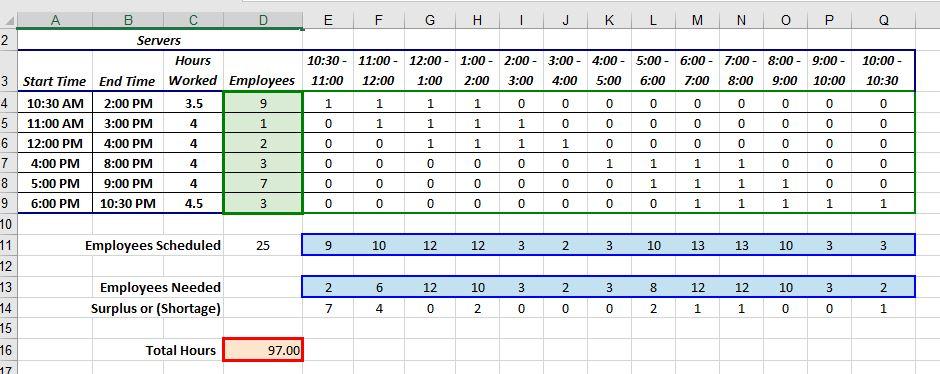
Solver for Option 1, in which you want the objective (Cell D16) to have the minimum (Min) number of employees scheduled by changing the number of employees (D4:D9). The first constraint is to be sure that you have enough (>=) employees (E11:Q11) to meet expected demand (E13:Q13) and the second constraint is to be sure that only whole numbers are used (because you cannot schedule part of a person to work). This solution used 97.00 hours and has 9 employees scheduled at 10:30 in the morning, which are 7 more than needed. Keep this solution, and solver for Option 2 by adding an additional constraint that allows no more than two employees to be scheduled for the first shift, (Hint: D4 Now, I have the first part for option 1 figured out but I am stuck on option 2. Please see below what I have so far. Also i put in bold specifically what i need help with.
Step by Step Solution
There are 3 Steps involved in it

Get step-by-step solutions from verified subject matter experts
 Study Help