



Question: Excel Scenario Manager Question(s) - Hello, I consider myself to be fairly proficient in Excel, but this topic is quite confusing for me. Can someone
Excel Scenario Manager Question(s) - Hello, I consider myself to be fairly proficient in Excel, but this topic is quite confusing for me.
Can someone make sense of this for me, as far as how this would ultimately look?
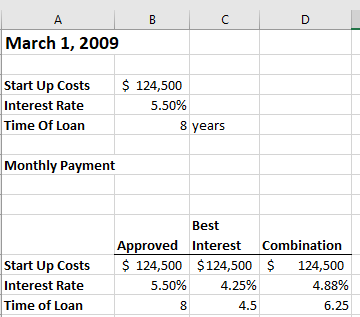
This is the starting data to use:
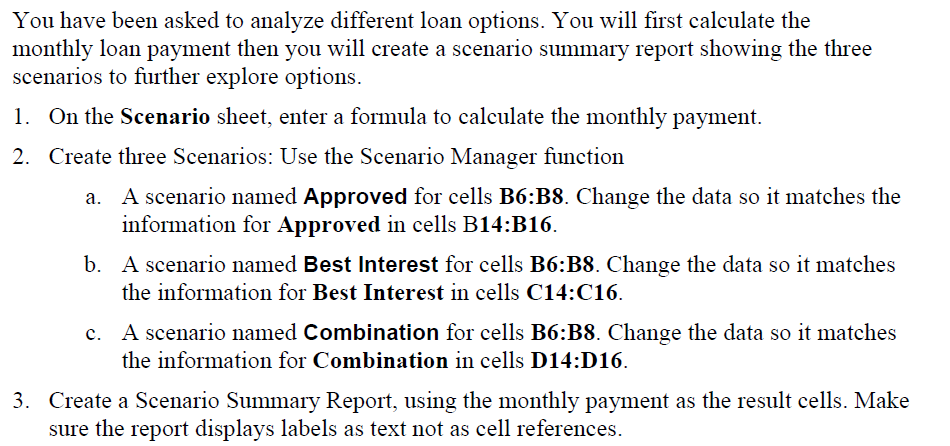
Here is what is being asked:
This can be split into multiple questions/posts, but let's start here and you can follow the extra posts.
A B D March 1, 2009 Start Up Costs Interest Rate Time Of Loan $ 124,500 5.50% 8 years Monthly Payment Start Up Costs Interest Rate Time of Loan Best Approved Interest Combination $ 124,500 $ 124,500 $ 124,500 5.50% 4.25% 4.88% 8 4.5 6.25 You have been asked to analyze different loan options. You will first calculate the monthly loan payment then you will create a scenario summary report showing the three scenarios to further explore options. 1. On the Scenario sheet, enter a formula to calculate the monthly payment. 2. Create three Scenarios: Use the Scenario Manager function A scenario named Approved for cells B6:38. Change the data so it matches the information for Approved in cells B14:B16. b. A scenario named Best Interest for cells B6:38. Change the data so it matches the information for Best Interest in cells C14:C16. A scenario named Combination for cells B6:B8. Change the data so it matches the information for Combination in cells D14:D16. 3. Create a Scenario Summary Report, using the monthly payment as the result cells. Make sure the report displays labels as text not as cell references
Step by Step Solution
There are 3 Steps involved in it

Get step-by-step solutions from verified subject matter experts