







Question: Excel stimulation ch 2.1 Paste PUMULAS DATA REVIEW VIEW Signs Calibri 11 -A A 96 M BIU- Alignment Number Conditional Formutas en Cells Formatting Table
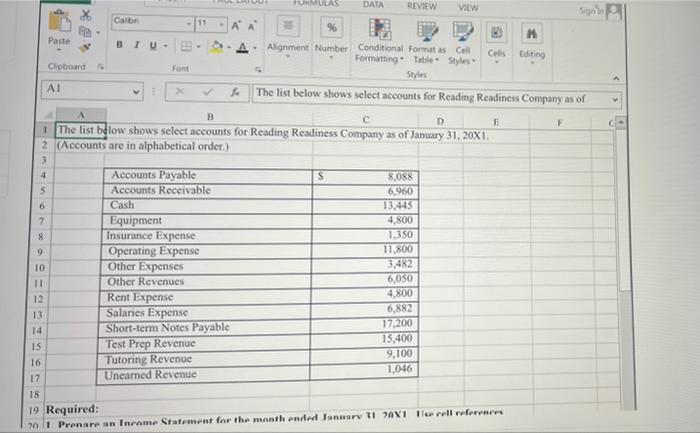
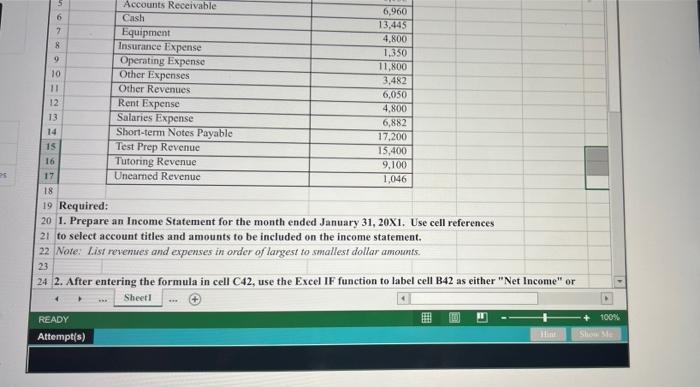
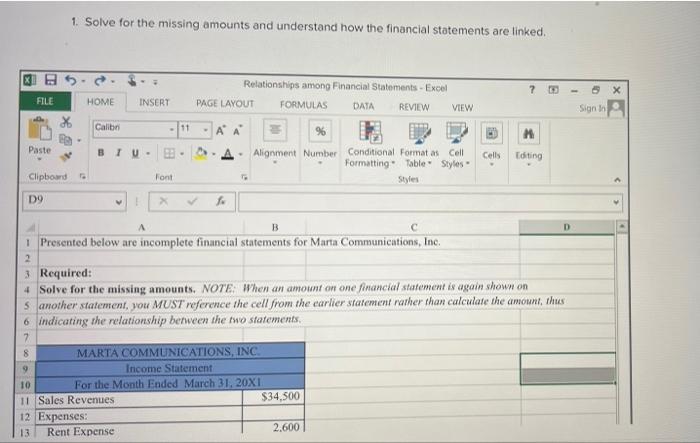
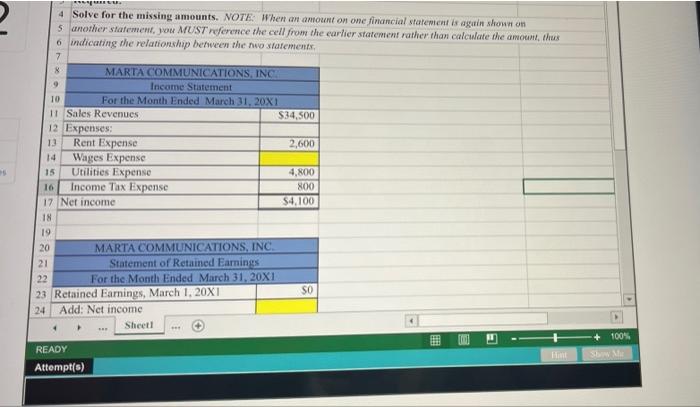
Paste PUMULAS DATA REVIEW VIEW Signs Calibri 11 -A A 96 M BIU- Alignment Number Conditional Formutas en Cells Formatting Table Styles Editing Clipboard Font Styles A1 The list below shows select accounts for Reading Readiness Company as of A B c D F The list below shows select accounts for Reading Readiness Company as of January 31, 20X1 2 (Accounts are in alphabetical order.) 3 4 Accounts Payable S 8.088 5 Accounts Receivable 6.960 6 Cash 13,445 7 Equipment 4.800 8 Insurance Expense 1.350 9 Operating Expense 11.800 10 Other Expenses 3,482 11 Other Revenues 6,050 12 Rent Expense 4,800 13 6,882 Salaries Expense 17,200 Short-term Notes Payable 14 15,400 15 Test Prep Revenue 9,100 16 Tutoring Revenue 17 1,046 Uneamed Revenue 18 19 Required: 2011 Prenaran Income Statement for the month ended January 11 01 Trell reference ooo 6 2 B Accounts Receivable 6,960 Cash 13,445 Equipment 4.800 Insurance Expense 1.350 9 Operating Expense 11,800 10 Other Expenses 3,482 11 Other Revenues 6,050 12 Rent Expense 4.800 13 Salaries Expense 6,882 14 Short-term Notes Payable 17,200 15 Test Prep Revenue 15,400 16 Tutoring Revenue 9,100 17 Unearned Revenue 1,046 18 19 Required: 20 1. Prepare an Income Statement for the month ended January 31, 20X1. Use cell references 21 to select account titles and amounts to be included on the income statement. 22 Note: List revenues and expenses in order of largest to smallest dollar amounts. 23 24 2. After entering the formula in cell C42, use the Excel IF function to label cell B42 as either "Net Income" or Sheet1 E 100% READY Attempt(s) Show 1. Solve for the missing amounts and understand how the financial statements are linked Relationships among Financial Statements - Excel PAGE LAYOUT FORMULAS DATA REVIEW VIEW 7 - FILE HOME INSERT Sign In Calibri 11 Paste Alignment Number Conditional Format as Cell Formatting Table Styles Cells Editing Clipboard Font D9 V A B D I Presented below are incomplete financial statements for Marta Communications, Inc. 2 3 Required: 4 Solve for the missing amounts. NOTE: When an amount on one financial statement is again shown on 5 another statement, you MUST reference the cell from the earlier statement rather than calculate the amount, thus 6 indicating the relationship between the two statements, 7 MARTA COMMUNICATIONS, INC Income Statement 10 For the Month Ended March 31, 20X1 11 Sales Revenues $34.500 12 Expenses: 13 Rent Expense 2.600 8 2 4 Solve for the missing amounts. NOTE: When an amount on one financial statement is again shown on 5 another statement, you MUST reference the cell from the earlier statement rather than calculate the amount, thus 6 indicating the relationship between the nio statements, 7 8 MARTA COMMUNICATIONS INC 9 Income Statement 10 For the Month Ended March 31, 20X1 11 Sales Revenues $34.500 12 Expenses 13 Rent Expense 2,600 14 Wages Expense 15 Utilities Expense 4,800 16 Income Tax Expense 800 17 Net income $4,100 18 19 20 MARTA COMMUNICATIONS, INC. 21 Statement of Retained Earnings 22 For the Month Ended March 31, 20X1 SO 23 Retained Earnings, March 1, 20X1 24 Add: Net income Sheet 100% E READY Attempt(s) Hm SME
Step by Step Solution
There are 3 Steps involved in it

Get step-by-step solutions from verified subject matter experts
 Study Help