







Question: Exercise 1: 1. Create a simple Graphical User Interface (GUI): Create new JFrameForm and use the Palette to drag and drop the Swing Containers and
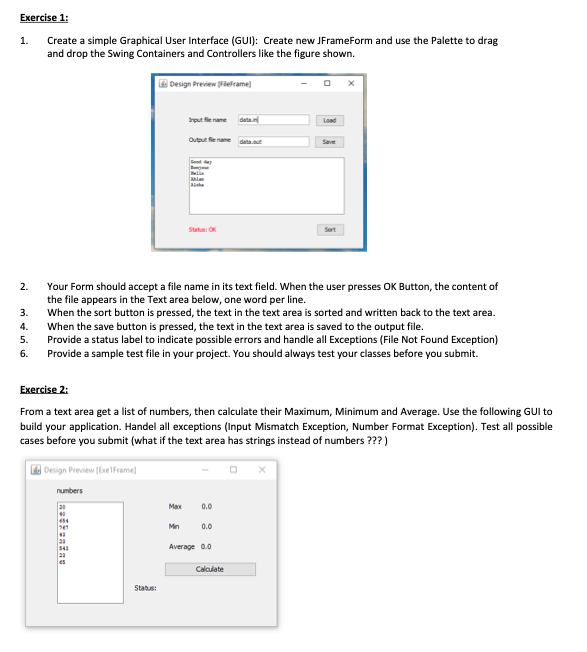
Exercise 1: 1. Create a simple Graphical User Interface (GUI): Create new JFrameForm and use the Palette to drag and drop the Swing Containers and Controllers like the figure shown. Design Preview Fieframe Trout fe named Load Status: OK Sort 2. 3. 4. 5. 6. Your Form should accept a file name in its text field. When the user presses OK Button, the content of the file appears in the Text area below, one word per line. When the sort button is pressed, the text in the text area is sorted and written back to the text area. When the save button is pressed, the text in the text area is saved to the output file. Provide a status label to indicate possible errors and handle all Exceptions (File Not Found Exception) Provide a sample test file in your project. You should always test your classes before you submit. Exercise 2: From a text area get a list of numbers, then calculate their Maximum, Minimum and Average. Use the following Gul to build your application. Handel all exceptions (Input Mismatch Exception, Number Format Exception). Test all possible cases before you submit (what if the text area has strings instead of numbers ???) Design Preview (frelFrame) numbers 20 Max 0.0 09 0.0 123 Average 0.0 23 es Calculate Status
Step by Step Solution
There are 3 Steps involved in it

Get step-by-step solutions from verified subject matter experts
 Study Help