







Question: Exercise 1 Open document exercisel.xls. 1. Create 11 sheet (February-December) same as January, using copy-paste sheets. 2. Rename the sheets appropriately (with month names). 3.
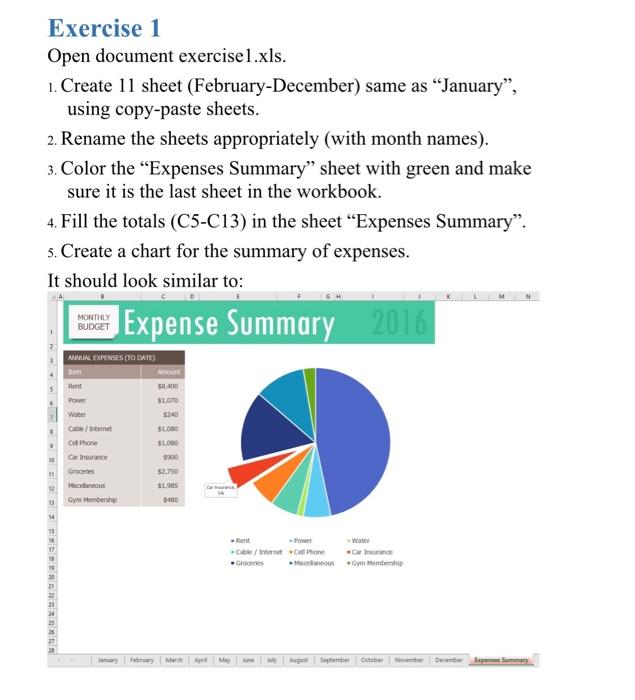
Exercise 1 Open document exercisel.xls. 1. Create 11 sheet (February-December) same as "January, using copy-paste sheets. 2. Rename the sheets appropriately (with month names). 3. Color the Expenses Summary" sheet with green and make sure it is the last sheet in the workbook. 4. Fill the totals (C5-C13) in the sheet Expenses Summary". 5. Create a chart for the summary of expenses. It should look similar to: Expense Summary 2016 MONTHLY BUDGET 6 ANNUAL EXPENSES (TO DATE) AIRE Hent 2400 Power $1.070 5240 Cable/ S1080 Ce Phone SLO Grande $900 8 D $2.750 Groceries Miscellaneous Gym Membership 51.90 5480 15 Cite/Internet Catone care Gomes concus Gym Membeni 12 58 79 20 20 22 23 25 27 25 March April une July be December |
Step by Step Solution
There are 3 Steps involved in it

Get step-by-step solutions from verified subject matter experts
 Study Help