







Question: Exercise 1 Step 1: Create a Java Project named Labl. Step 2: In that project, create two classes named Numbers and Numbers Test. Details of
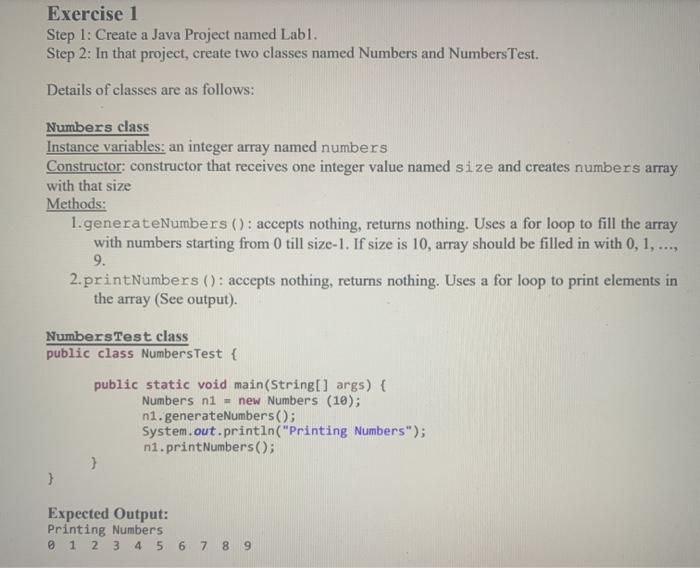
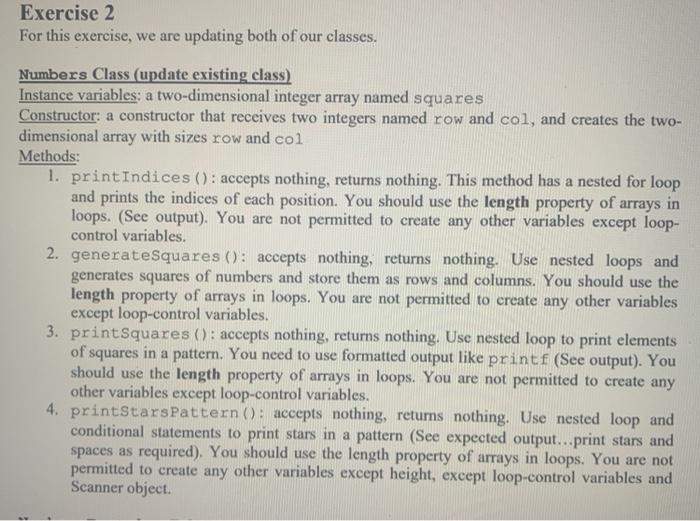
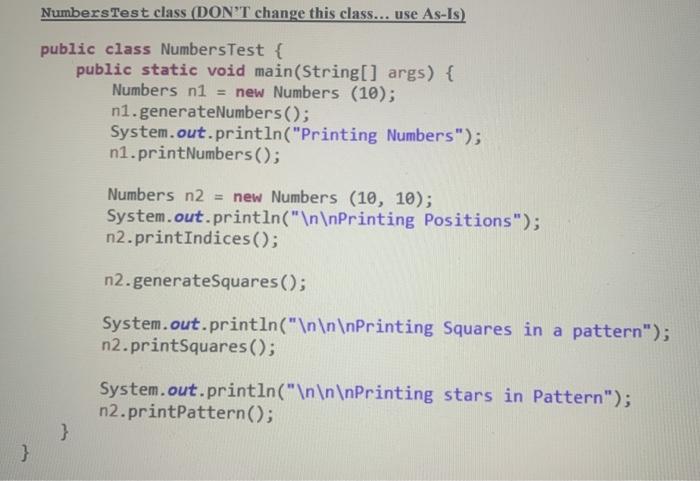
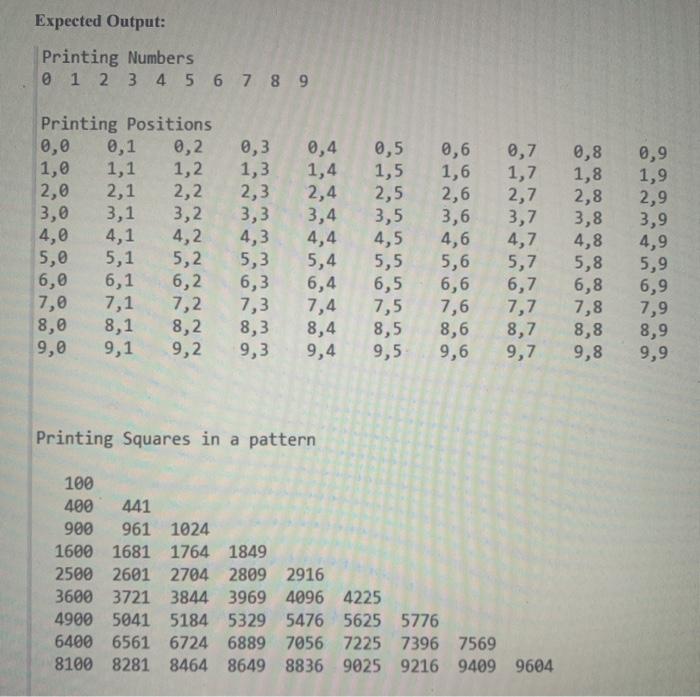
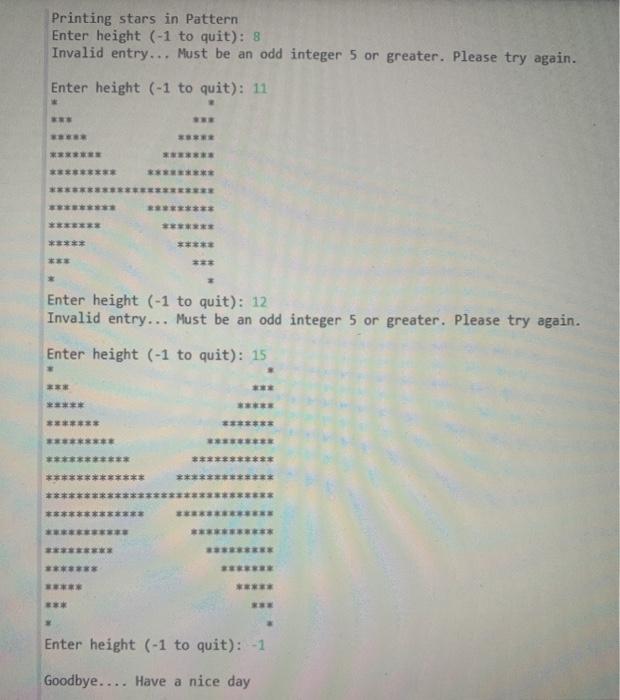
Exercise 1 Step 1: Create a Java Project named Labl. Step 2: In that project, create two classes named Numbers and Numbers Test. Details of classes are as follows: Numbers class Instance variables, an integer array named numbers Constructor: constructor that receives one integer value named size and creates numbers array with that size Methods: 1.generateNumbers (): accepts nothing, returns nothing. Uses a for loop to fill the array with numbers starting from 0 till size-1. If size is 10, array should be filled in with 0, 1, ..., 9. 2.printNumbers (): accepts nothing, returns nothing. Uses a for loop to print elements in the array (See output) Numbers Test class public class Numbers Test { public static void main(String[] args) { Numbers ni = new Numbers (10); nl.generateNumbers(); System.out.println("Printing Numbers"); ni.print Numbers(); } Expected Output: Printing Numbers 0 1 2 3 4 5 6 7 8 9 Exercise 2 For this exercise, we are updating both of our classes. Numbers Class (update existing class) Instance variables: a two-dimensional integer array named squares Constructor: a constructor that receives two integers named row and col, and creates the two- dimensional array with sizes row and col Methods: 1. printIndices(): accepts nothing, returns nothing. This method has a nested for loop and prints the indices of each position. You should use the length property of arrays in loops. (See output). You are not permitted to create any other variables except loop- control variables. 2. generateSquares (): accepts nothing, returns nothing. Use nested loops and generates squares of numbers and store them as rows and columns. You should use the length property of arrays in loops. You are not permitted to create any other variables except loop-control variables. 3. printSquares (): accepts nothing, returns nothing. Use nested loop to print elements of squares in a pattern. You need to use formatted output like printf (See output). You should use the length property of arrays in loops. You are not permitted to create any other variables except loop-control variables. 4. printStarsPattern (: accepts nothing, returns nothing. Use nested loop and conditional statements to print stars in a pattern (See expected output...print stars and spaces as required). You should use the length property of arrays in loops. You are not permitted to create any other variables except height, except loop-control variables and Scanner object Numbers Test class (DON'T change this class... use As-Is) public class Numbers Test { public static void main(String[] args) { Numbers n1 = new Numbers (10); n1.generateNumbers(); System.out.println("Printing Numbers"); n1.printNumbers(); Numbers n2 = new Numbers (10, 10); System.out.println(" Printing Positions"); n2.print Indices(); n2.generateSquares(); System.out.println(" Printing Squares in a pattern"); n2.printSquares(); System.out.println(" Printing stars in Pattern"); n2.printPattern(); } } Expected Output: Printing Numbers 0 1 2 3 4 5 6 7 8 9 Printing Positions 0,0 0,1 0,2 0,3 0,4 0,5 0,6 0,7 0,8 0,9 1,0 1,1 1,2 1,3 1,4 1,5 1,6 1,7 1,8 1,9 2,0 2,1 22 23 2,4 2,5 2,6 2,7 2,8 2,9 13,0 3,1 3,2 3,3 3,4 3,5 3,6 3,7 3,8 3,9 4,0 4,1 4,2 4,3 4,4 4,5 4,6 4,7 4,8 4,9 5,0 5,1 5,2 5,3 5,4 5,5 5,6 5,7 5,8 5,9 6,0 6,1 6,2 6,3 6,4 6,5 6,6 6,7 6,8 6,9 7,0 7,1 7,2 7,3 7,4 7,5 7,6 7,7 7,8 7,9 8,0 8,1 8,2 8,3 8,4 8,5 8,6 8,7 8,8 8,9 9,0 9,1 9,2 9,3 9,4 9,5 9,6 9,7 9,8 9,9 Printing Squares in a pattern 100 400 441 900 961 1024 1600 1681 1764 1849 2500 2601 2704 2809 2916 3600 3721 3844 3969 4096 4225 4900 5041 5184 5329 5476 5625 5776 6400 6561 6724 6889 7056 7225 7396 7569 8100 8281 8464 8649 8836 9025 9216 9409 9604 Printing stars in Pattern Enter height (-1 to quit): 8 Invalid entry... Must be an odd integer 5 or greater. Please try again. Enter height (-1 to quit): 11 Enter height (-1 to quit): 12 Invalid entry... Must be an odd integer 5 or greater. Please try again. Enter height (-1 to quit): 15 Enter height (-1 to quit): -1 Goodbye.... Have a nice day
Step by Step Solution
There are 3 Steps involved in it

Get step-by-step solutions from verified subject matter experts
 Study Help