Question: Exercise #12 SimQuick (a) and (b) Example 12: Resources and Priorities Consider the BQ restaurant described in Exercise 4, part b. (You don't need to
Exercise #12 SimQuick (a) and (b)
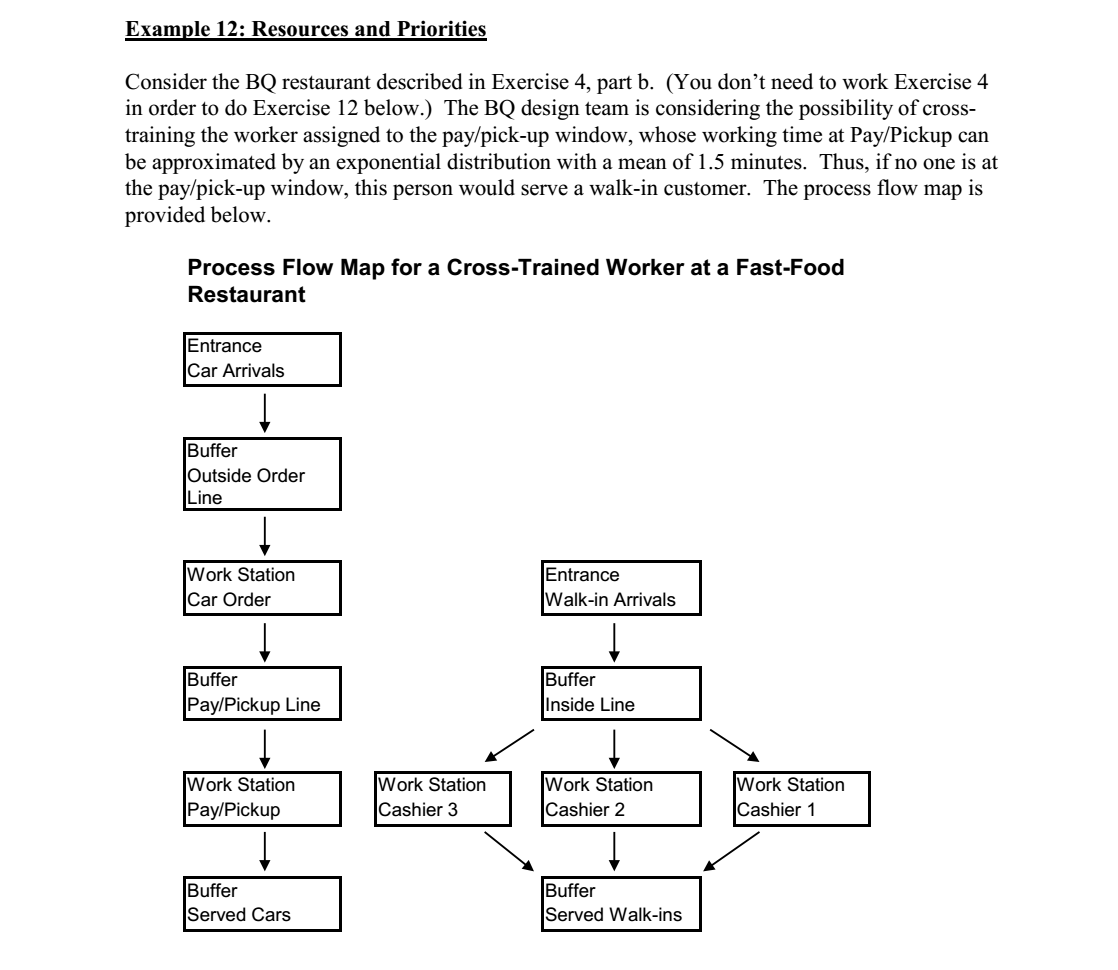
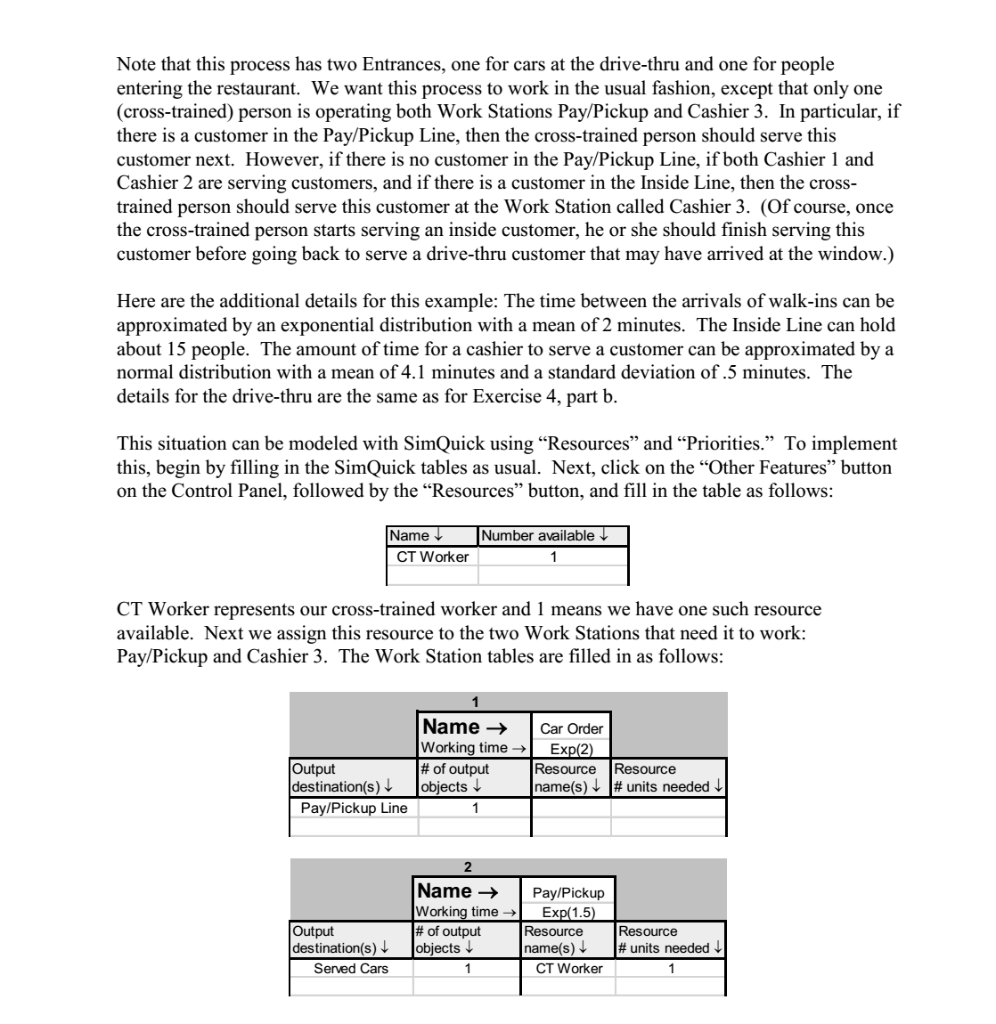
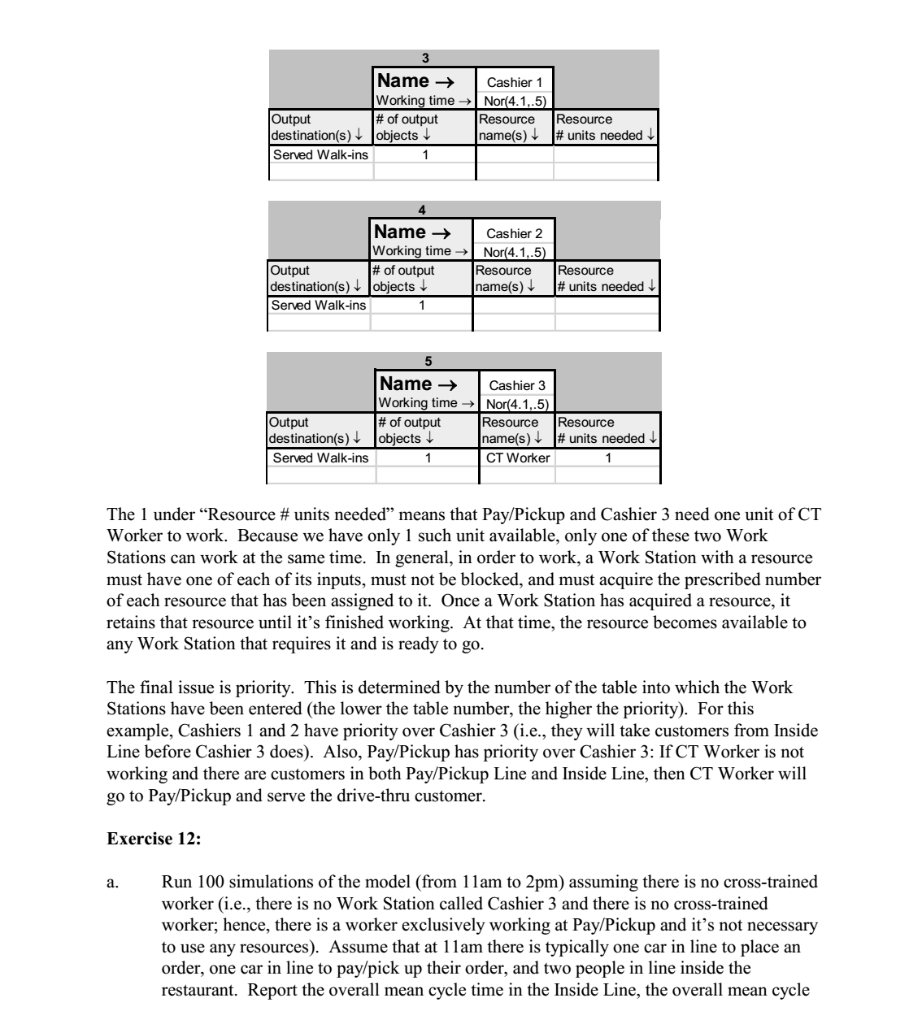
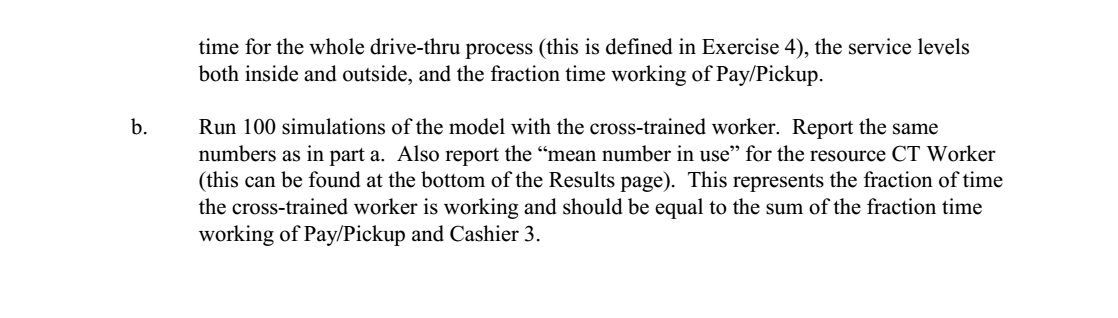
Example 12: Resources and Priorities Consider the BQ restaurant described in Exercise 4, part b. (You don't need to work Exercise 4 in order to do Exercise 12 below.) The BQ design team is considering the possibility of cross- training the worker assigned to the pay/pick-up window, whose working time at Pay/Pickup can be approximated by an exponential distribution with a mean of 1.5 minutes. Thus, if no one is at the pay/pick-up window, this person would serve a walk-in customer. The process flow map is provided below. Process Flow Map for a Cross-Trained Worker at a Fast-Food Restaurant Entrance Car Arrivals Buffer Outside Order Line Work Station Car Order Entrance Walk-in Arrivals Buffer Pay/Pickup Line Buffer Inside Line Work Station Pay/Pickup Work Station Cashier 3 Work Station Cashier 2 Work Station Cashier 1 Buffer Served Cars Buffer Served Walk-ins Note that this process has two Entrances, one for cars at the drive-thru and one for people entering the restaurant. We want this process to work in the usual fashion, except that only one (cross-trained) person is operating both Work Stations Pay/Pickup and Cashier 3. In particular, if there is a customer in the Pay/Pickup Line, then the cross-trained person should serve this customer next. However, if there is no customer in the Pay/Pickup Line, if both Cashier 1 and Cashier 2 are serving customers, and if there is a customer in the Inside Line, then the cross- trained person should serve this customer at the Work Station called Cashier 3. (Of course, once the cross-trained person starts serving an inside customer, he or she should finish serving this customer before going back to serve a drive-thru customer that may have arrived at the window.) Here are the additional details for this example: The time between the arrivals of walk-ins can be approximated by an exponential distribution with a mean of 2 minutes. The Inside Line can hold about 15 people. The amount of time for a cashier to serve a customer can be approximated by a normal distribution with a mean of 4.1 minutes and a standard deviation of .5 minutes. The details for the drive-thru are the same as for Exercise 4, part b. This situation can be modeled with SimQuick using Resources and Priorities. To implement this, begin by filling in the SimQuick tables as usual. Next, click on the Other Features button on the Control Panel, followed by the Resources button, and fill in the table as follows: Name CT Worker Number available 1 CT Worker represents our cross-trained worker and 1 means we have one such resource available. Next we assign this resource to the two Work Stations that need it to work: Pay/Pickup and Cashier 3. The Work Station tables are filled in as follows: Name Car Order Working time Exp(2) Output # of output Resource Resource destination(s) objects name(s)# units needed Pay/Pickup Line 1 Name Working time # of output Output destination(s) Served Cars Pay/Pickup Exp(1.5) Resource name(s) CT Worker objects Resource # units needed 1 Name Cashier 1 Working time Nor(4.1,.5) Output # of output Resource Resource destination(s) + objects name(s) # units needed Served Walk-ins Name Cashier 2 Working time Nor(4.1,.5) Output # of output Resource Resource destination(s) objects name(s) # units needed Served Walk-ins 1 5 Name Cashier 3 Working time Nor(4.1,.5) Output # of output Resource Resource destination(s) objects name(s) + # units needed Served Walk-ins 1 CT Worker 1 The 1 under Resource # units needed means that Pay/Pickup and Cashier 3 need one unit of CT Worker to work. Because we have only 1 such unit available, only one of these two Work Stations can work at the same time. In general, in order to work, a Work Station with a resource must have one of each of its inputs, must not be blocked, and must acquire the prescribed number of each resource that has been assigned to it. Once a Work Station has acquired a resource, it retains that resource until it's finished working. At that time, the resource becomes available to any Work Station that requires it and is ready to go. The final issue is priority. This is determined by the number of the table into which the Work Stations have been entered (the lower the table number, the higher the priority). For this example, Cashiers 1 and 2 have priority over Cashier 3 (i.e., they will take customers from Inside Line before Cashier 3 does). Also, Pay/Pickup has priority over Cashier 3: If CT Worker is not working and there are customers in both Pay/Pickup Line and Inside Line, then CT Worker will go to Pay/Pickup and serve the drive-thru customer. Exercise 12: a. Run 100 simulations of the model (from 11am to 2pm) assuming there is no cross-trained worker (i.e., there is no Work Station called Cashier 3 and there is no cross-trained worker; hence, there is a worker exclusively working at Pay/Pickup and it's not necessary to use any resources). Assume that at 11am there is typically one car in line to place an order, one car in line to pay/pick up their order, and two people in line inside the restaurant. Report the overall mean cycle time in the Inside Line, the overall mean cycle time for the whole drive-thru process (this is defined in Exercise 4), the service levels both inside and outside, and the fraction time working of Pay/Pickup. b. Run 100 simulations of the model with the cross-trained worker. Report the same numbers as in part a. Also report the mean number in use" for the resource CT Worker (this can be found at the bottom of the Results page). This represents the fraction of time the cross-trained worker is working and should be equal to the sum of the fraction time working of Pay/Pickup and Cashier 3. Example 12: Resources and Priorities Consider the BQ restaurant described in Exercise 4, part b. (You don't need to work Exercise 4 in order to do Exercise 12 below.) The BQ design team is considering the possibility of cross- training the worker assigned to the pay/pick-up window, whose working time at Pay/Pickup can be approximated by an exponential distribution with a mean of 1.5 minutes. Thus, if no one is at the pay/pick-up window, this person would serve a walk-in customer. The process flow map is provided below. Process Flow Map for a Cross-Trained Worker at a Fast-Food Restaurant Entrance Car Arrivals Buffer Outside Order Line Work Station Car Order Entrance Walk-in Arrivals Buffer Pay/Pickup Line Buffer Inside Line Work Station Pay/Pickup Work Station Cashier 3 Work Station Cashier 2 Work Station Cashier 1 Buffer Served Cars Buffer Served Walk-ins Note that this process has two Entrances, one for cars at the drive-thru and one for people entering the restaurant. We want this process to work in the usual fashion, except that only one (cross-trained) person is operating both Work Stations Pay/Pickup and Cashier 3. In particular, if there is a customer in the Pay/Pickup Line, then the cross-trained person should serve this customer next. However, if there is no customer in the Pay/Pickup Line, if both Cashier 1 and Cashier 2 are serving customers, and if there is a customer in the Inside Line, then the cross- trained person should serve this customer at the Work Station called Cashier 3. (Of course, once the cross-trained person starts serving an inside customer, he or she should finish serving this customer before going back to serve a drive-thru customer that may have arrived at the window.) Here are the additional details for this example: The time between the arrivals of walk-ins can be approximated by an exponential distribution with a mean of 2 minutes. The Inside Line can hold about 15 people. The amount of time for a cashier to serve a customer can be approximated by a normal distribution with a mean of 4.1 minutes and a standard deviation of .5 minutes. The details for the drive-thru are the same as for Exercise 4, part b. This situation can be modeled with SimQuick using Resources and Priorities. To implement this, begin by filling in the SimQuick tables as usual. Next, click on the Other Features button on the Control Panel, followed by the Resources button, and fill in the table as follows: Name CT Worker Number available 1 CT Worker represents our cross-trained worker and 1 means we have one such resource available. Next we assign this resource to the two Work Stations that need it to work: Pay/Pickup and Cashier 3. The Work Station tables are filled in as follows: Name Car Order Working time Exp(2) Output # of output Resource Resource destination(s) objects name(s)# units needed Pay/Pickup Line 1 Name Working time # of output Output destination(s) Served Cars Pay/Pickup Exp(1.5) Resource name(s) CT Worker objects Resource # units needed 1 Name Cashier 1 Working time Nor(4.1,.5) Output # of output Resource Resource destination(s) + objects name(s) # units needed Served Walk-ins Name Cashier 2 Working time Nor(4.1,.5) Output # of output Resource Resource destination(s) objects name(s) # units needed Served Walk-ins 1 5 Name Cashier 3 Working time Nor(4.1,.5) Output # of output Resource Resource destination(s) objects name(s) + # units needed Served Walk-ins 1 CT Worker 1 The 1 under Resource # units needed means that Pay/Pickup and Cashier 3 need one unit of CT Worker to work. Because we have only 1 such unit available, only one of these two Work Stations can work at the same time. In general, in order to work, a Work Station with a resource must have one of each of its inputs, must not be blocked, and must acquire the prescribed number of each resource that has been assigned to it. Once a Work Station has acquired a resource, it retains that resource until it's finished working. At that time, the resource becomes available to any Work Station that requires it and is ready to go. The final issue is priority. This is determined by the number of the table into which the Work Stations have been entered (the lower the table number, the higher the priority). For this example, Cashiers 1 and 2 have priority over Cashier 3 (i.e., they will take customers from Inside Line before Cashier 3 does). Also, Pay/Pickup has priority over Cashier 3: If CT Worker is not working and there are customers in both Pay/Pickup Line and Inside Line, then CT Worker will go to Pay/Pickup and serve the drive-thru customer. Exercise 12: a. Run 100 simulations of the model (from 11am to 2pm) assuming there is no cross-trained worker (i.e., there is no Work Station called Cashier 3 and there is no cross-trained worker; hence, there is a worker exclusively working at Pay/Pickup and it's not necessary to use any resources). Assume that at 11am there is typically one car in line to place an order, one car in line to pay/pick up their order, and two people in line inside the restaurant. Report the overall mean cycle time in the Inside Line, the overall mean cycle time for the whole drive-thru process (this is defined in Exercise 4), the service levels both inside and outside, and the fraction time working of Pay/Pickup. b. Run 100 simulations of the model with the cross-trained worker. Report the same numbers as in part a. Also report the mean number in use" for the resource CT Worker (this can be found at the bottom of the Results page). This represents the fraction of time the cross-trained worker is working and should be equal to the sum of the fraction time working of Pay/Pickup and Cashier 3









 Study Help