







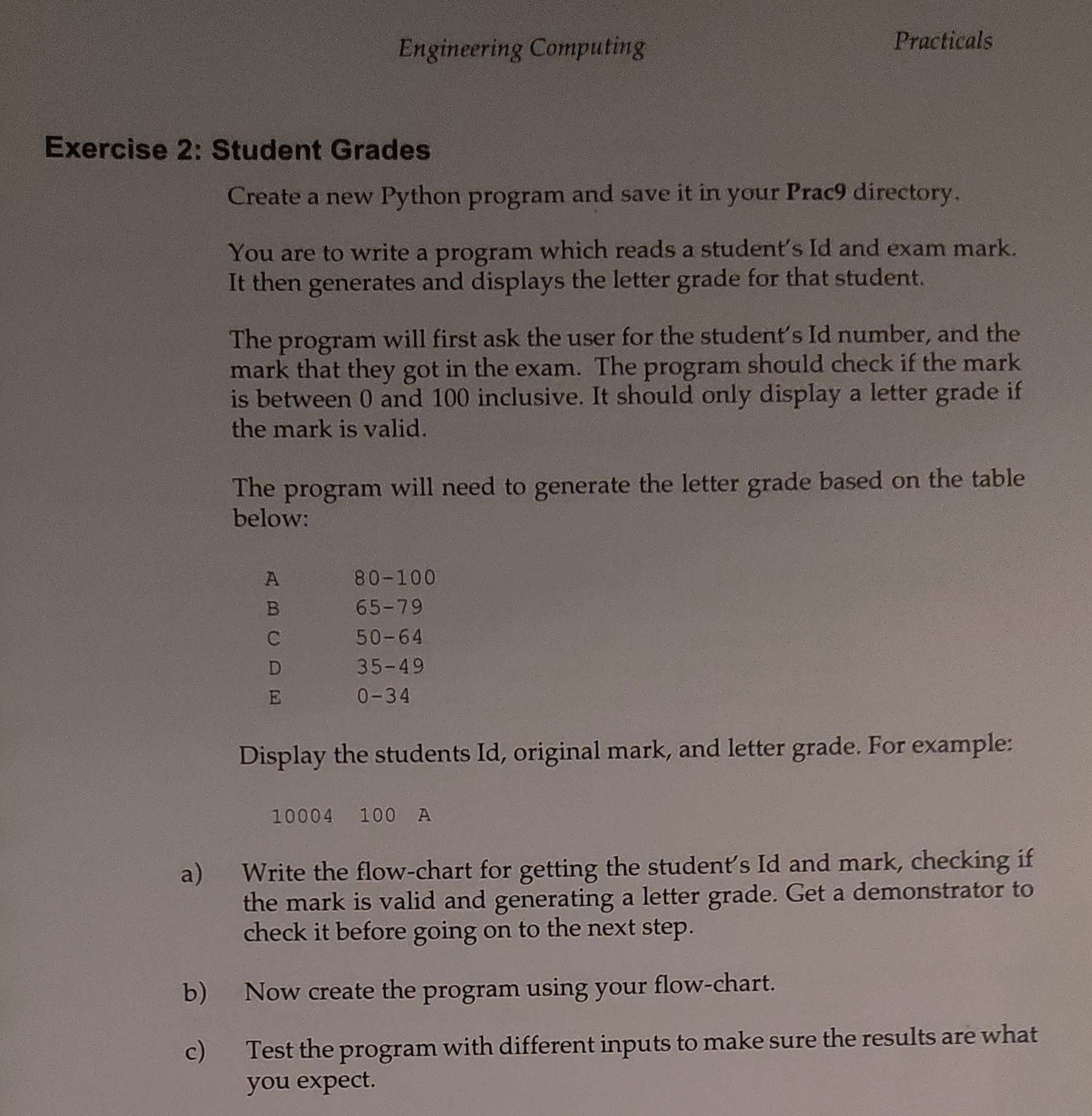
Question: Exercise 2 : Student Grades Create a new Python program and save it in your Prac 9 directory. You are to write a program which
Exercise : Student Grades
Create a new Python program and save it in your Prac directory.
You are to write a program which reads a student's Id and exam mark.
It then generates and displays the letter grade for that student.
The program will first ask the user for the student's Id number, and the
mark that they got in the exam. The program should check if the mark
is between and inclusive. It should only display a letter grade if
the mark is valid.
The program will need to generate the letter grade based on the table
below:
Display the students Id original mark, and letter grade. For example:
a Write the flowchart for getting the student's Id and mark, checking if
the mark is valid and generating a letter grade. Get a demonstrator to
check it before going on to the next step.
b Now create the program using your flowchart.
c Test the program with different inputs to make sure the results are what
you expect.
Step by Step Solution
There are 3 Steps involved in it
1 Expert Approved Answer
Step: 1 Unlock

Question Has Been Solved by an Expert!
Get step-by-step solutions from verified subject matter experts
Step: 2 Unlock
Step: 3 Unlock
 Study Help