







Question: Exercise 2 This exercise demonstrates how to use the increment and decrement operators double-plus sign ++ and double-minus sign - , respectively - Remove all
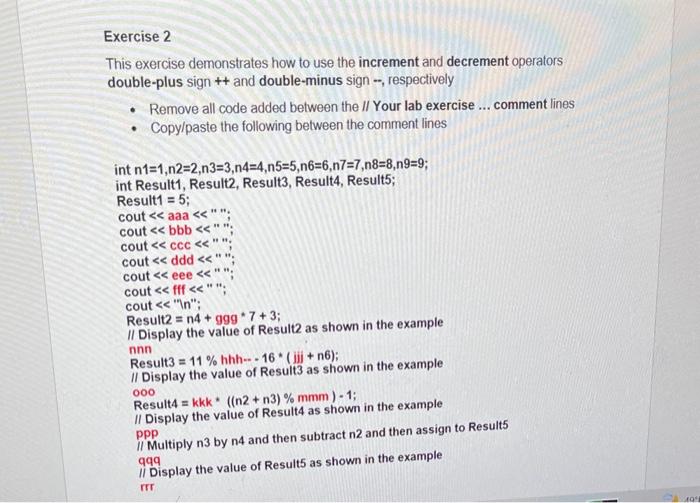
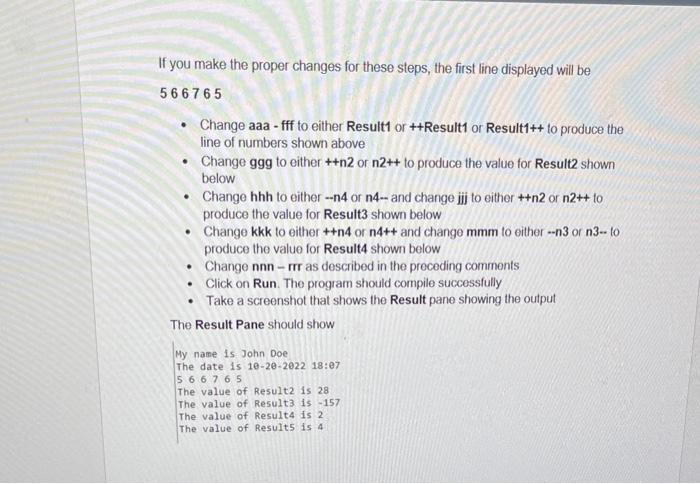
Exercise 2 This exercise demonstrates how to use the increment and decrement operators double-plus sign ++ and double-minus sign - , respectively - Remove all code added between the II Your lab exercise ... comment lines - Copy/paste the following between the comment lines int n1=1,n2=2,n3=3,n4=4,n5=5,n6=6,n7=7,n8=8,n9=9; int Result1, Result2, Result3, Result4, Result5; Result1 = 5; cout aaa "; cout bbb "; cout ccc "; cout ddd ""; cout eee "; cout fff"; cout "n" "; Result2 =n4+ggg7+3; II Display the value of Result as shown in the example nnn Result 3=11% hhh -16 * (jij+n6); II Display the value of Result3 as shown in the example Result =kkk((n2+n3)%mmm)1; ooo II Display the value of Result4 as shown in the example Il Multiply n3 by n4 and then subtract n2 and then assign to Result 5 ppp qqq Display the value of Result5 as shown in the example irr If you make the proper changes for these steps, the first line displayed will be 566765 - Change aaa - fff to either Result1 or ++Result1 or Result1++ to produce the line of numbers shown above - Change ggg to either ++n2 or n2++ to produce the value for Result2 shown below - Change hhh to either n4 or n4 and change jij to either ++n2 or n2++ to produce the value for Result 3 shown below - Change kkk to either ++n4 or n4++ and change mmm to either n3 or n310 produce the value for Result4 shown below - Change nnnrr as described in the preceding comments - Click on Run. The program should compile successfully - Take a screenshot that shows the Result pane showing the output The Result Pane should show My name is John Doe The date is 1020202218:97 56676 The value of Resultz is 28 The value of Result3 is -157 The value of Result4 is 2 The value of Results is 4
Step by Step Solution
There are 3 Steps involved in it

Get step-by-step solutions from verified subject matter experts
 Study Help