







Question: EXERCISE: Create an Eclipse Java project as describe below. Fig 1 -5 are the required visual representation of horse race at developing phases. The user
EXERCISE: Create an Eclipse Java project as describe below.
Fig 1 -5 are the required visual representation of horse race at developing phases.
The user selects1 up to 12 horses to participate in the race. Clicking Selection complete closes the selection (and deselection), and opens the GUI of the race for visual inspection (Figure 2). Clicking Start starts the race the Selection window is disposed.
Analysis and requirements Input
The listing of names for twelve horses as shown on the selection window. The user may input different names. Increasing the field over 12 participants is not practical and not allowed in the program.
The length of the track; recommended value 25
Delay: time period between the strides in milliseconds; recommended value 200
The probability of forward stride; recommended choice is between 0.55 0.6
Font name, style and size. The selection window shows default fonts (Figure 1). The field window is using Dialog, Font.BOLD and 24 ( Figure 5). Applying user selected font is optional
Background color for the various components; the Figures show recommended templates
The racehorse icon; use an icon of your desire.
Components and layout on the name selector window. - BorderLayout on the pane (default) or on a main panel - a panel for north, center and south - a label on the north panel - a listing of check boxes on the center panel, nested GridLayout is used with a single column - two buttons on the south panel; - east and west regions are ignored
Components and layout on the race window - BorderLayout - three labels on the north panel; additional dummy labels can be used for padding - icon on the south panel - one label for each listed horse name on the west panel, GridLayout applied - JTextFields or TextFields on the center panel, GridLayout - one panel for a JTextField to show placement and another JTextField to show strides for each horse, carried by GridLayout; TextFields could also be used.
Design
The logic of the design is illustrated by the Class Chart at the end of the project description.
Non-GUI classes
1. Horse. This class represents the properties of a single race horse. Details are in the UML below
2. RaceOrganizer. This class is the actual Model of the MVC paradigm. The class is responsible - to maintain an ArrayList of Horse objects that contains the runners, to run the race , to process all necessary data for each runner until race ends , to notify RaceGUI class (the View) continually after each turn of all the horses made a stride.
See more detailed information in the UML diagram.
| Class Horse |
|
| DATA FIELDS |
|
| -name : String
-position : int
-placement : int
-finished : boolean
-strides : int -runX : String | -Stores the name of the horse -Stores the current position of horse down the field. - The placement the horse achieved when finished the race. - False while horse is running, true when it finished the race Keeps counting the number of strides the horse made on the track -The text displayed on the track of the horse, see Figure 3. The sequence of X characters is rebuilt after every stride to show the position of the horse |
| METHODS | |
| Constructor | |
| +Horse(name: String) | Initializes the data field name |
| Instance methods |
|
| Setters and getters for every field |
|
| +updatePostion(num: int): void | Updates the current position by adding num; negative updated position must be replaced by 0; use the Math.max( ) method |
| +updateRunX( ) : void | Runs a for loop to build runX such that it contains position many X characters |
| Class RaceOrganizer | |
| DATA FIELDS | |
| -length : int | Stores the length of the track; initialized by the constructor. |
| -delay : int | Stores the delay time between two consecutive updates of the positions for the horses; initialized by the constructor |
| -runners : ArrayList | Stores the Horse objects representing the horses in the race; instantiated at declaration. The list will be populated in the NameSelector GUI class (Control unit of the MVC architecture). |
| -listener : ActionListener | Needed to communicate the position updates to the RaceGUI class (the View of the MVC architecture); listener will be initialized by its setter called in the RaceGUI class; as a result listener will reference a RaceGUI object (polymorphic use of type); the setter will be named addActionListener( ) rather than setListener( ). |
| -event : ActionEvent | The partner object for the listener; instantiated and initialized by the RaceOrganizer constructor. |
| -FORWARD_STRIDE: double | Named constant to store the probability of the forward stride. Recommended 0.56 |
| METHODS | |
| Constructor | |
| +RaceOrganizer(length: int, delay: int) | Initializes the data fields length and delay Instantiates and initializes the data field event: event = new ActionEvent(this, ActionEvent.ACTION_PERFORMED, stride); |
| Instance methods |
|
| Setters and getters | for length and delay define both; getter for runners; setter for listener; name it addActionListener( ) ; none needed for event ; |
| +connect( ): void | Calls actionPerformed ( ) with prefix listener, parameter is event. Note: RaceGUI will implement ActionListener and define actionPerformed ( ) |
| +reset( ): void | Resets the data fields position, strides, placement, finished to 0, 0, 0, false for every horse in the list runners (run an enhanced for loop) |
| +onHold(delay: int): void | Runs a delay loop to idle the program for delay long time |
| +runRace( ): void | Calls reset ( ) Recommended local variables: counter to count the strides place to maintain the last placement already used direction indicates the forward/backward outcome of the random selection numberOfFinished maintains the number of horses currently finished the race pseudo code: while there is unfinished horse for an element of runners if element position if strides backward set direction -1 else set direction 1 update elements position according to direction update elements runX (rebuild) else if element not marked as finished mark element finished set elements placement to updated place value set elements stride to counter update numberOfFinished //end for update counter call onHold( ), parameter delay call connect( ) //end while //end method |
GUI classes
1. RaceGUI. This class represents the race window (the View of MVC), properties shown on Figures 2 5. Class components do not require a listener object still the class must implement ActionListener to enable the MVC communication with the RaceOrganizer class. The window is built on BorderLayout. - The north region carries three labels with the texts as shown - The south region show the icon, there is no other component -East, center and west each applies a nested GridLayout to accommodate the components vertically. The panel on the west carries labels showing the horse names, in the center the text fields are the track where the horses runX field is displayed. The Place and Stride columns on east are also text fields but those are disabled by the setEditable(false) call and as a result they do not take keyboard input.
To build the RaceGUI window in one class requires a long code where one can easily get lost in the details. It is recommended to build the region panels separately in a helper class, in this description it is the PanelFactory class. PanelFactory has nothing else but five static methods, each is focused to build and return one JPanel object to be used on the five regions of the RaceGUI window. For instance RaceGUI can simply call PanelFactory.buildWest( ) to get the panel to be added to the west region on the pane. PanelFactory methods take various parameters depending on their job. For instance buildWest( ) takes a RaceOrganizer parameter, because it needs the horse names from the ArrayList runners and the size of runners.
| Class RaceGUI extends JFrame implements ActionListener | |
| DATA FIELDS |
|
| -dimension : int | To store the number of horses selected to run the race |
| -model: RaceOrganizer | Aggregates the Model (RaceOrganizer) to View |
| -icon: ImageIcon | Instantiated at declaration, the string racehorseicon.gif is the parameter for the constructor |
| -track: JTextField[ ] -place: JTextField[ ] -stride: JTextField[ ] | Arrays to store the corresponding components of the race window |
| METHODS | |
| Constructor |
|
| +RaceGUI(model: RaceOrganizer, title: String) | Calling the setModel( ) method initializes the data field model and passes title to super( ) Assigns dimension the size of the ArrayList runners Builds the race window. As for the window size the pattern is built with setSize(860, dimension*30+370) On your computer different width and height might be appropriate. Calls the PanelFactory methods to fill the regions on the window with the returned panels |
| Instance methods |
|
| +setModel(model:RaceOrganizer): void | Sets the model data field to the parameter Calls the addActionListener( ) method! Prefix: model, parameter: this Note that this call makes the RaceGUI object this a listener of model |
| +actionPerformed(e:ActionEvent): void | Interface method, executes when the connect ( ) method is called in the RaceOrganizer class Pseudo code: save the runners list in a local variable temp declare and instantiate a Font object font to your taste declare an int variable index for(element of temp) - assign index the index of element - load runX of element to track[index] set the - font to be applied on track[index] convert the --- placement value of element to String and load It to place[index] -convert the strides value of element to String and load it to stride[index]. |
3. NameSelector. This GUI class is part of the Control, see Figure 1. Build the window on BorderLayout, notice that only the north, center and south regions are used. The window displays a checkbox for each horse. Selecting a box puts the horse on the runners list in the order of selections. Unchecking a box removes the horse from the list. Checking and unchecking allowed until the Selection complete button is clicked. This click makes all the checkboxes disabled, they do not take any more checks. At the same time the field window (Figure 2) opens up as a result of a call in the Applications class. While the user has been busy with the selections, the Applications class runs a delay loop to put the program on hold and the delay is released when the selection is complete, and another delay loop lets the user to inspect the field window. Clicking the Start button on name selector stops the second delay loop in the Applications class so as it can call the method to start the race and name selector is disposed.
| Class NameSelector extends JFrame implements ActionListener, ItemListener | |
| DATA FIELDS |
|
| -names : String[] -model : RaceOrganizer -boxes : JCheckBox -selectionFinished : Boolean | -to store the names of all the twelve horses aggregates the model class RaceOrganizer stores -the check box components for name selection -indicates the end of the selection process |
| METHODS | |
| Constructor | |
| +NameSelector(names: String[], RaceOrganizer model) | Calls super with the window title Initializes the data fields names and model |
| Instance methods |
|
| +getSelectionFinished( ): Boolean | getter for the field |
| +resetSelectionFinished( ): void | Resets the field to false |
| +setModel(mod: RaceOrganizer): void | Setter for model |
| +buildFrame(): void | Builds the window as show on Figure 1 |
| +itemStateChanged(e:ItemEvent): void | Interface method, executes when one of the checkboxes is checked or unchecked Pseudo code: for (iterate thru boxes) if event source is boxes[k] if boxes[k] is selected add a new Horse object to the runners list, the Horse has name names[k] else run a for loop to find the index of the horse in the list which has names[k] remove the list element at index |
| +actionPerformed(e:ActionEvent): void | Interface method, executes when one of the buttons clicked Pseudo code: if Selection complete clicked for (iterate thru runners) display runner names on the console for(iterate thru boxes) disable boxes[k] i.e. call setEnabled(false) assign selectionFinished true else assign selectionFinished true; dispose the window (call dispose()) |
Applications class
In the main method declare a String array names and instantiate with the initializer list of 12 horse names declare and instantiate a RaceOrganizer reference model. Constructor parameters: apply 25 for size and 200 for delay declare and instantiate a NameSelector reference selector. Apply names and model for constructor parameters call buildFrame ( ) of NameSelector, prefix is selector call setModel ( ) of NameSelector, prefix selector, parameter model run the first delay loop; suggested code
while(!selector.getSelectionFinished()) { System.out.print( );}
instantiate RaceGUI. Constructor parameters model and the title string on the race window call resetSelectionFinished( ) of NameSelector, prefix selector run the second delay loop; code identical start the race with the call runRace( ) of the RaceOrganizer class; prefix model Note: The final results of the race can be viewed at the race window, and the program does not terminate until the user closes the window. Building an independent scoreboard GUI to show the results is optional. 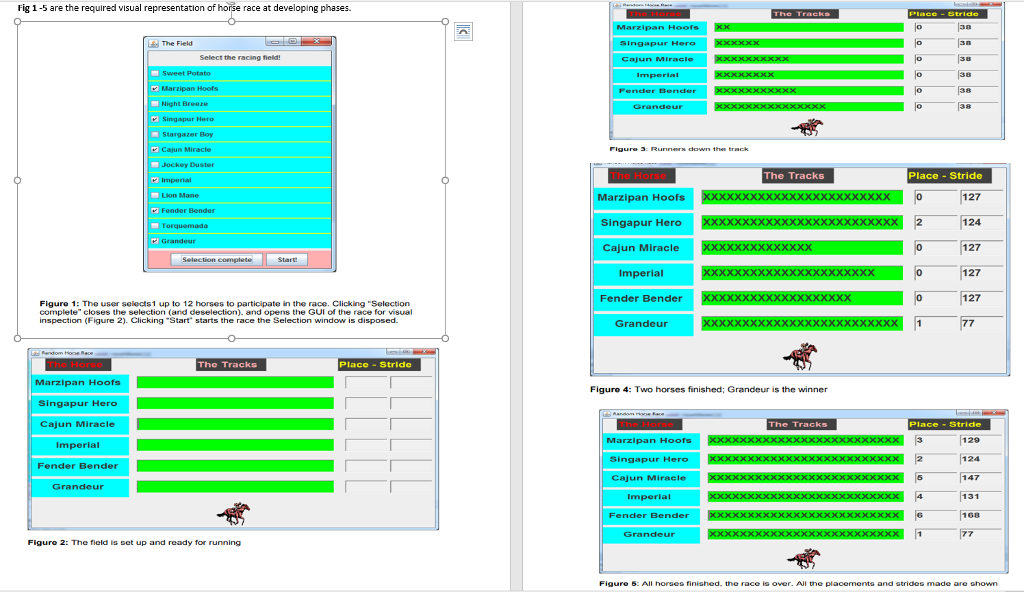
Fig 1-5 are the required visual representation of horse race at developing phases. The Field Singapur Hero 38 38 38 38 Cajun Miracle Marzipan Hoofs Night Breeze Singapur Hero Stargazer Boy Jockey Duster The Tracks Place-Stride 127 Marzipan Hoofs Singapur Hero Cajun Miracle 124 127 Imperial XXxxXxxxxxxxxxxxxxxxXX 127 Fender Bender 127 Figure 1: The user selects1 up to 12 horses to participate in the race. Clicking Selection complete" closes the selection (and deselection), and opens the GUI of the race for visual inspection (Figure 2). Clicking "Start starts the race the Selection window is disposed Marzipan Hoofs Singapur Hero Cajun Miracle Imperial Fender Bender Grandeur Figure 4: Two horses finished; Grandeur is the winner Marzipan Hoofs 129 Cajun Miracle Imperial 168 Figuro 2: The field is set up and ready for running Figure : All horses finished, the race is over. AJl the placements and strides made are shown Fig 1-5 are the required visual representation of horse race at developing phases. The Field Singapur Hero 38 38 38 38 Cajun Miracle Marzipan Hoofs Night Breeze Singapur Hero Stargazer Boy Jockey Duster The Tracks Place-Stride 127 Marzipan Hoofs Singapur Hero Cajun Miracle 124 127 Imperial XXxxXxxxxxxxxxxxxxxxXX 127 Fender Bender 127 Figure 1: The user selects1 up to 12 horses to participate in the race. Clicking Selection complete" closes the selection (and deselection), and opens the GUI of the race for visual inspection (Figure 2). Clicking "Start starts the race the Selection window is disposed Marzipan Hoofs Singapur Hero Cajun Miracle Imperial Fender Bender Grandeur Figure 4: Two horses finished; Grandeur is the winner Marzipan Hoofs 129 Cajun Miracle Imperial 168 Figuro 2: The field is set up and ready for running Figure : All horses finished, the race is over. AJl the placements and strides made are shown
Step by Step Solution
There are 3 Steps involved in it

Get step-by-step solutions from verified subject matter experts
 Study Help