







Question: Exercise: Resource Leveling begin{tabular}{l|l} Course Title: & Technical Project Management hline end{tabular} Version: 1.0 begin{tabular}{|l|l|} hline Definition & Critical Path is: The sequence of
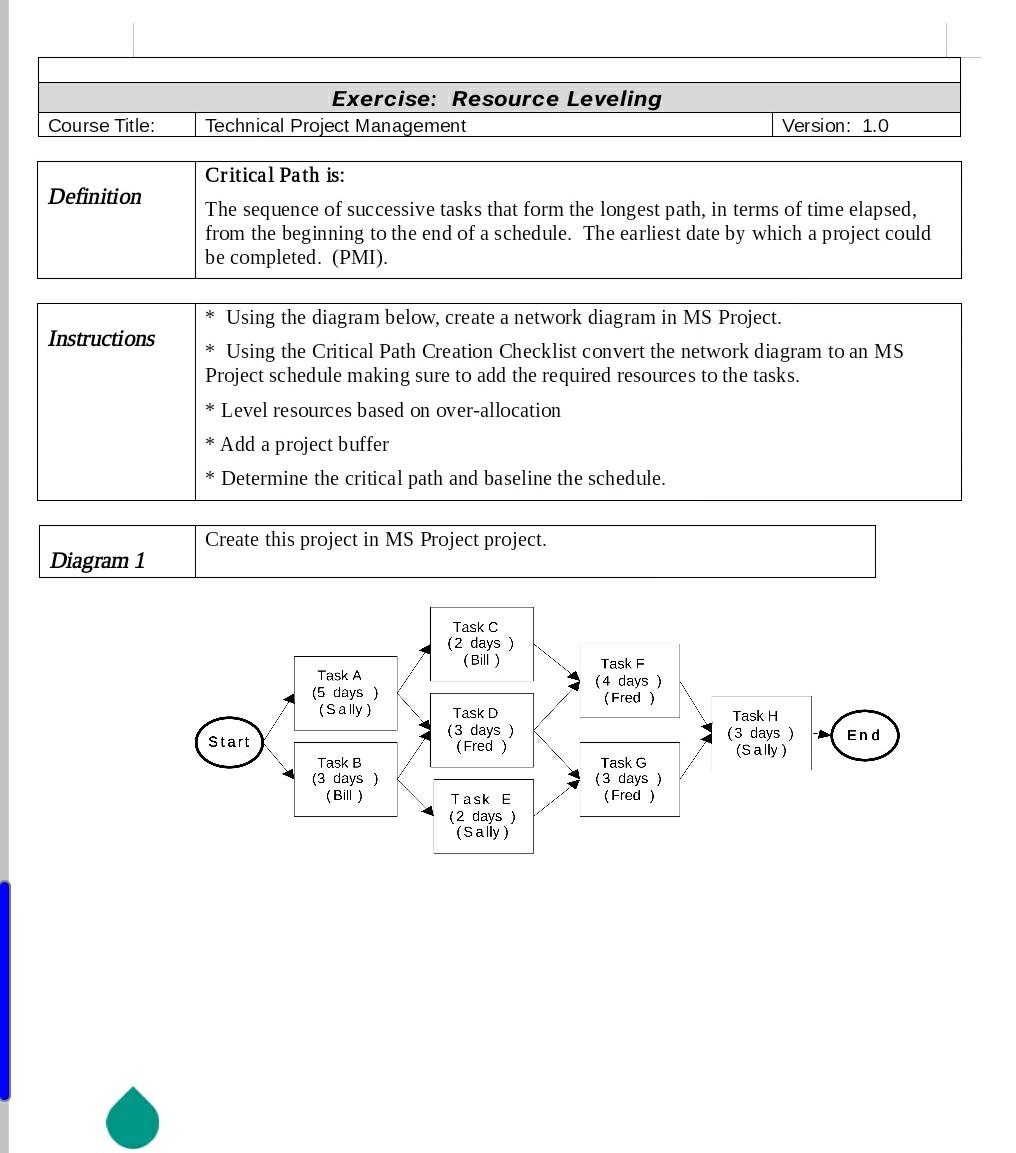
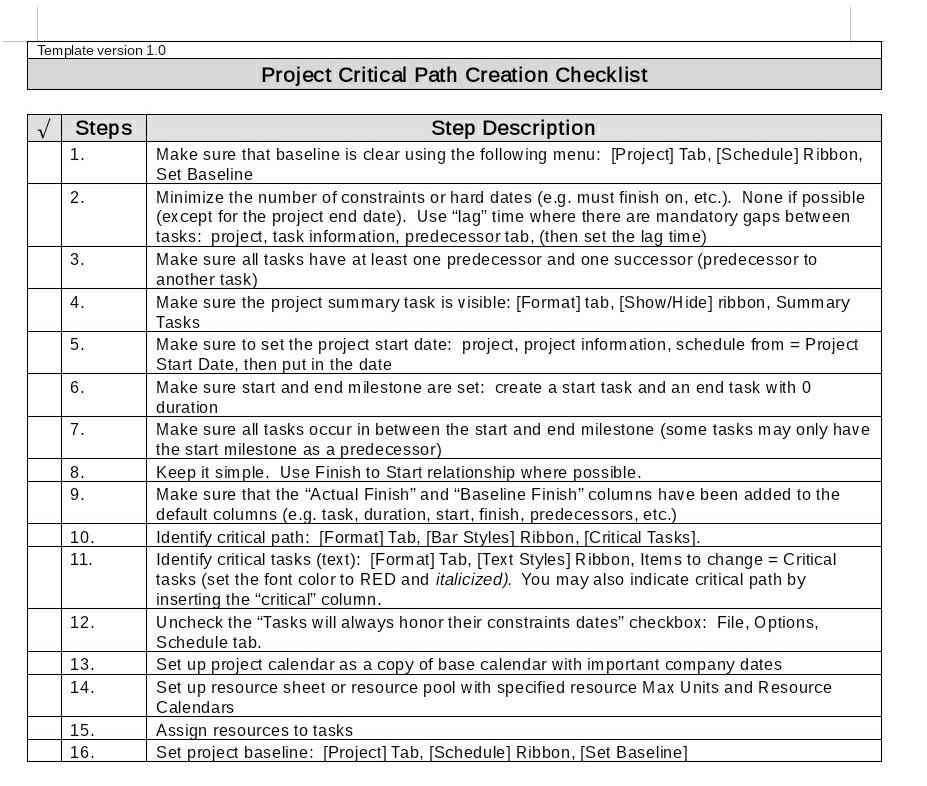
Exercise: Resource Leveling \begin{tabular}{l|l} Course Title: & Technical Project Management \\ \hline \end{tabular} Version: 1.0 \begin{tabular}{|l|l|} \hline Definition & Critical Path is: The sequence of successive tasks that form the longest path, in terms of time elapsed, from the beginning to the end of a schedule. The earliest date by which a project could be completed. (PMI). \\ \hline \end{tabular} \begin{tabular}{|l|l|} \hline Instructions & Using the diagram below, create a network diagram in MS Project. \\ & Using the Critical Path Creation Checklist convert the network diagram to an MS \\ Project schedule making sure to add the required resources to the tasks. \\ Level resources based on over-allocation \\ & Add a project buffer \\ & Determine the critical path and baseline the schedule. \\ \hline \end{tabular} \begin{tabular}{|l|l|} \hline Diagram 1 & Create this project in MS Project project. \\ \hline \end{tabular} Task F (4 days) (Fred) Task G End (3 days ) (Sally) Task (3 days ) (Fred) Template version 1.0 Project Critical Path Creation Checklist Exercise: Resource Leveling \begin{tabular}{l|l} Course Title: & Technical Project Management \\ \hline \end{tabular} Version: 1.0 \begin{tabular}{|l|l|} \hline Definition & Critical Path is: The sequence of successive tasks that form the longest path, in terms of time elapsed, from the beginning to the end of a schedule. The earliest date by which a project could be completed. (PMI). \\ \hline \end{tabular} \begin{tabular}{|l|l|} \hline Instructions & Using the diagram below, create a network diagram in MS Project. \\ & Using the Critical Path Creation Checklist convert the network diagram to an MS \\ Project schedule making sure to add the required resources to the tasks. \\ Level resources based on over-allocation \\ & Add a project buffer \\ & Determine the critical path and baseline the schedule. \\ \hline \end{tabular} \begin{tabular}{|l|l|} \hline Diagram 1 & Create this project in MS Project project. \\ \hline \end{tabular} Task F (4 days) (Fred) Task G End (3 days ) (Sally) Task (3 days ) (Fred) Template version 1.0 Project Critical Path Creation Checklist
Step by Step Solution
There are 3 Steps involved in it
1 Expert Approved Answer
Step: 1 Unlock

Question Has Been Solved by an Expert!
Get step-by-step solutions from verified subject matter experts
Step: 2 Unlock
Step: 3 Unlock
 Study Help