







Question: 1. Add to the project, Lab3, a new java file and name it Lab3Exercise2 1. Copy the following code into the class editor 2.
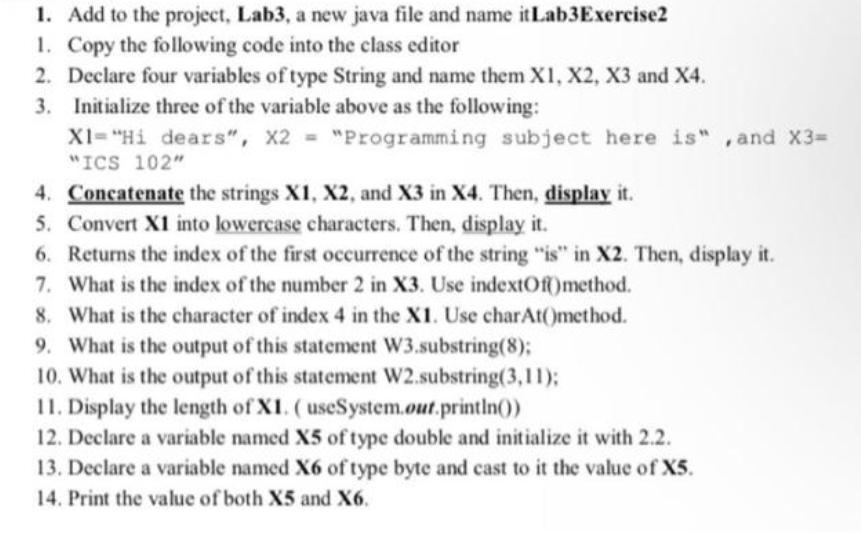
1. Add to the project, Lab3, a new java file and name it Lab3Exercise2 1. Copy the following code into the class editor 2. Declare four variables of type String and name them X1, X2, X3 and X4. 3. Initialize three of the variable above as the following: XI= "Hi dears", X2 = "Programming subject here is",and X3= "ICS 102" 4. Concatenate the strings X1, X2, and X3 in X4. Then, display it. 5. Convert X1 into lowercase characters. Then, display it. 6. Returns the index of the first occurrence of the string "is" in X2. Then, display it. 7. What is the index of the number 2 in X3. Use indextOf() method. 8. What is the character of index 4 in the X1. Use charAt(method. 9. What is the output of this statement W3.substring(8); 10. What is the output of this statement W2.substring(3,11); 11. Display the length of XI. (useSystem.out.println()) 12. Declare a variable named X5 of type double and initialize it with 2.2. 13. Declare a variable named X6 of type byte and cast to it the value of X5. 14. Print the value of both X5 and X6.
Step by Step Solution
3.32 Rating (149 Votes )
There are 3 Steps involved in it
Explanation First start by creating a new Java file named as Lab3Exercise2 To concatenate the strings we can use the operator along with spaces in bet... View full answer

Get step-by-step solutions from verified subject matter experts
 Study Help