







Question: Exp 1 9 _ Excel _ Ch 0 2 _ CapAssessment _ Inland _ Jewelers Project Description: You are an account manager for Inland Jewelers,
ExpExcelChCapAssessmentInlandJewelers
Project Description:
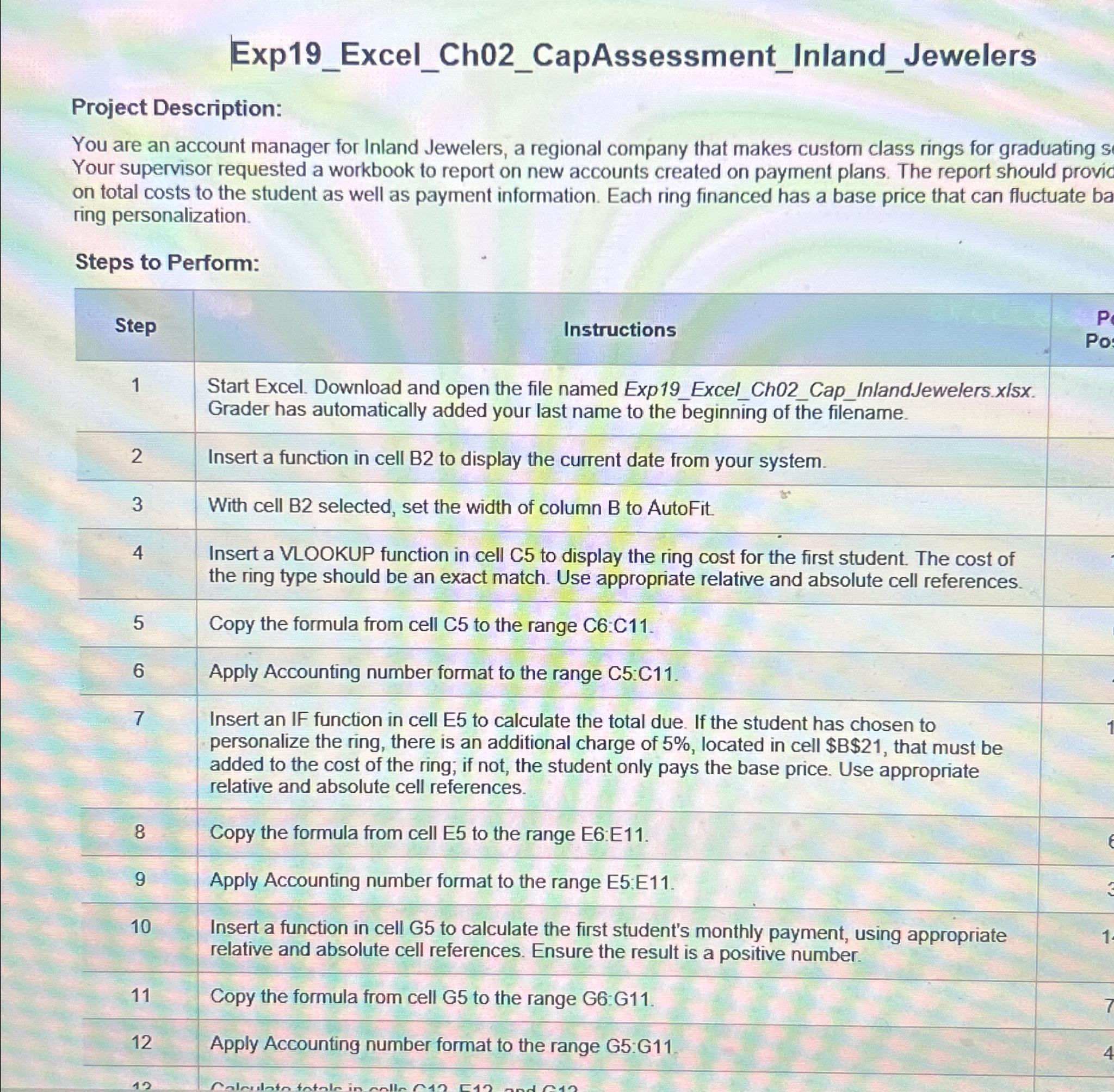
You are an account manager for Inland Jewelers, a regional company that makes custorn class rings for graduating s Your supervisor requested a workbook to report on new accounts created on payment plans. The report should provic on total costs to the student as well as payment information. Each ring financed has a base price that can fluctuate ba ring personalization.
Steps to Perform:
tableStepInstructionstableStart Excel. Download and open the file named ExpExcelChCapInlandJewelers.xIsx.Grader has automatically added your last name to the beginning of the filename.Insert a function in cell B to display the current date from your system.With cell B selected, set the width of column B to AutoFit.tableInsert a VLOOKUP function in cell C to display the ring cost for the first student. The cost ofthe ring type should be an exact match. Use appropriate relative and absolute cell references.Copy the formula from cell to the range :Apply Accounting number format to the range tableInsert an IF function in cell E to calculate the total due. If the student has chosen topersonalize the ring, there is an additional charge of located in cell $$ that must beadded to the cost of the ring; if not, the student only pays the base price. Use appropriaterelative and absolute cell references.Copy the formula from cell E to the range E:EApply Accounting number format to the range E:EtableInsert a function in cell G to calculate the first student's monthly payment, using appropriaterelative and absolute cell references. Ensure the result is a positive number.Copy the formula from cell G to the range G:GApply Accounting number format to the range G:G
Step by Step Solution
There are 3 Steps involved in it
1 Expert Approved Answer
Step: 1 Unlock

Question Has Been Solved by an Expert!
Get step-by-step solutions from verified subject matter experts
Step: 2 Unlock
Step: 3 Unlock
 Study Help