



Question: Expected output add: Notice that since this is the first execution of the program, load() gave message Patient_List.txt not found. This file is created at
Expected output
add: 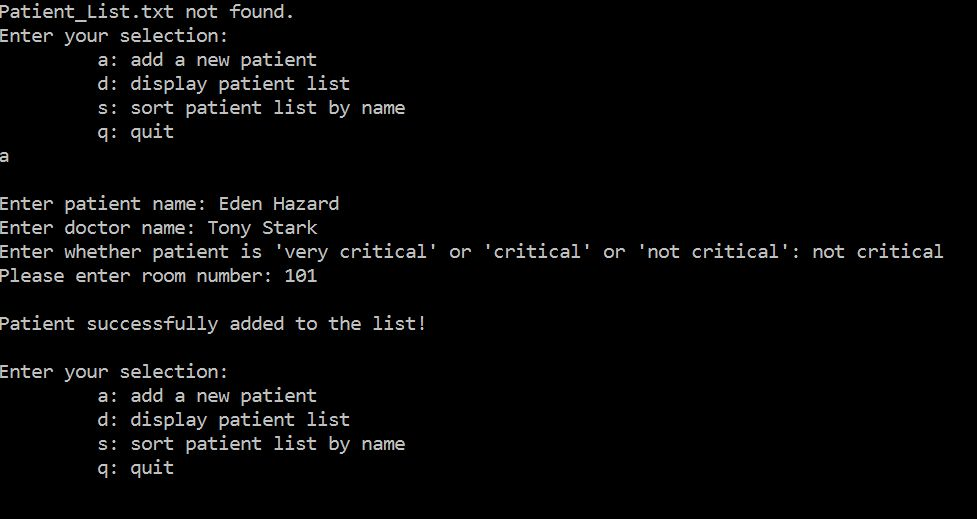
Notice that since this is the first execution of the program, load() gave message Patient_List.txt not found. This file is created at the end of the program by save().
display: (after adding 3 patient details) CSE240
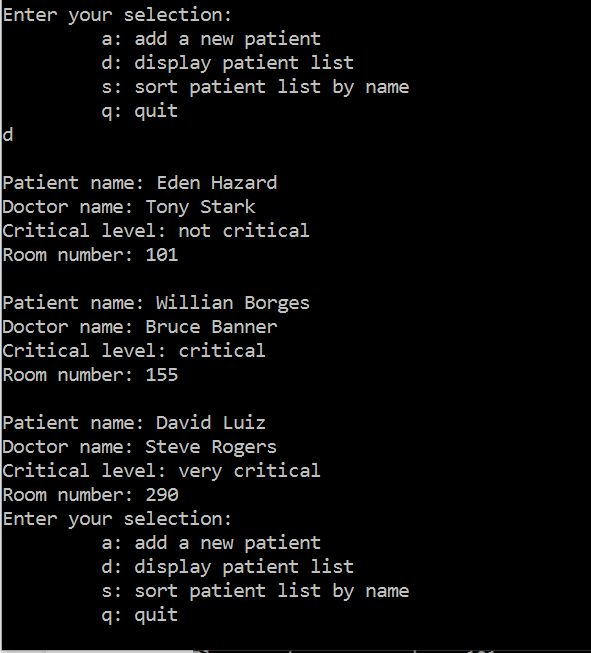
sort:
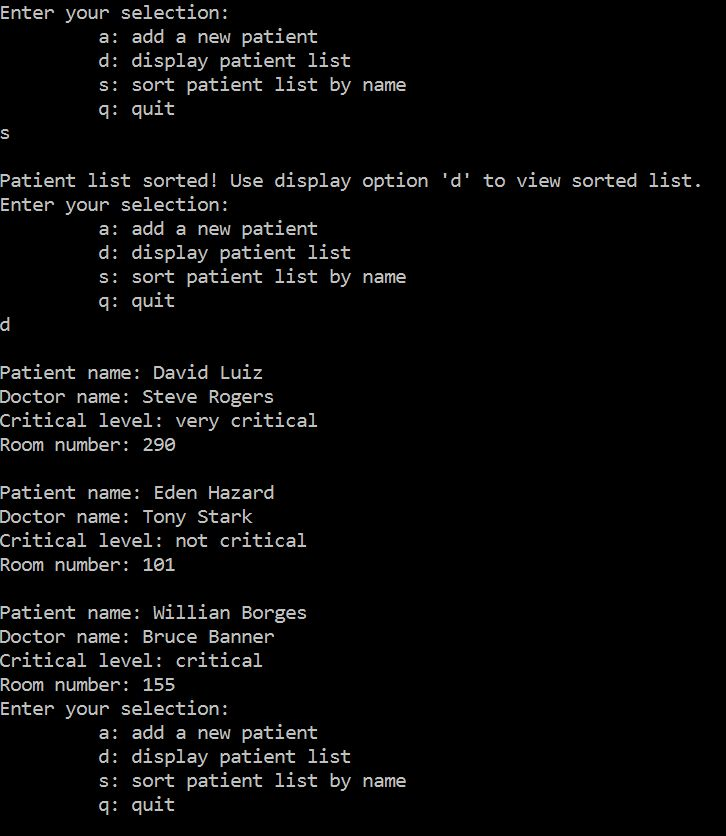
The 3 patients seen in display() output above are sorted in sort(). Use d option to verify sorted result.
load:
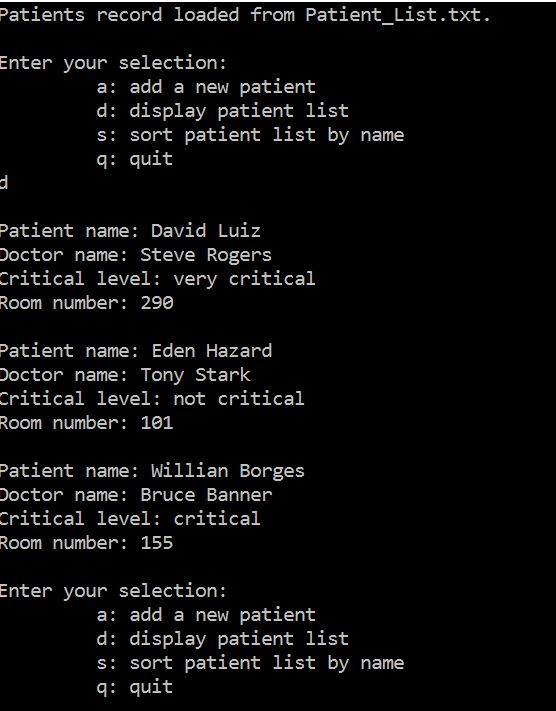
Notice the message given by load() Patients record loaded from Patient_List.txt at the top. To verify that load() worked as expected, use d display option to display loaded list.
// CSE240 Spring 2019 HW5 // Write your name here // Write the compiler used: Visual studio or gcc
// READ BEFORE YOU START: // You are given a partially completed program that creates a list of patients, like patients' record. // Each record has this information: patient's name, doctor's name, critical level of patient, room number. // The struct 'patientRecord' holds information of one patient. Critical level is enum type. // An array of structs called 'list' is made to hold the list of patients. // To begin, you should trace through the given code and understand how it works. // Please read the instructions above each required function and follow the directions carefully. // You should not modify any of the given code, the return types, or the parameters, you risk getting compile error. // You are not allowed to modify main (). // You can use string library functions.
// WRITE COMMENTS FOR IMPORANT STEPS IN YOUR CODE.
#include
#define MAX_PATIENTS 15 #define MAX_NAME_LENGTH 25
typedef enum { very_critical = 0, critical, not_critical } criticalType; // enum type
struct patientRecord { // struct for patient details char patientName[MAX_NAME_LENGTH]; char doctorName[MAX_NAME_LENGTH]; criticalType criticalLevel; unsigned int roomNumber; };
struct patientRecord list[MAX_PATIENTS]; // declare list of patients int count = 0; // the number of patients currently stored in the list (initialized to 0)
// functions already implmented void flushStdIn(); void executeAction(char); void save(char* fileName);
// functions that need implementation: int add(char* patientName_input, char* doctorName_input, char* criticalLevel_input, unsigned int roomNumber_input); // 20 points void display(); // 10 points void sort(); // 10 points void load(char* fileName); // 10 points
int main() { char* fileName = "Patient_List.txt"; load(fileName); // load list of patients from file (if it exists). Initially there will be no file. char choice = 'i'; // initialized to a dummy value do { printf(" Enter your selection: "); printf(" a: add a new patient "); printf(" d: display patient list "); printf(" s: sort patient list by name "); printf(" q: quit "); choice = getchar(); flushStdIn(); executeAction(choice); } while (choice != 'q');
save(fileName); // save list of patients to file (overwrites file, if it exists) return 0; }
// flush out leftover ' ' characters void flushStdIn() { char c; do c = getchar(); while (c != ' ' && c != EOF); }
// ask for details from user for the given selection and perform that action void executeAction(char c) { char patientName_input[MAX_NAME_LENGTH], doctorName_input[MAX_NAME_LENGTH]; unsigned int roomNumber_input, add_result= 0; char criticalLevel_input[20]; switch (c) { case 'a': // input patient record from user printf(" Enter patient name: "); fgets(patientName_input, sizeof(patientName_input), stdin); patientName_input[strlen(patientName_input) - 1] = '
Patient_List.txt not found your selection: Enter a: add a new patient d: display patient list s: sort patient list by name q: quit Enter patient name: Eden Hazard Enter doctor name: Tony Stark Enter whether patient is 'very critical' or 'critical' or 'not critical': not critical Please enter room number: 101 Patient successfully added to the list! Enter your selection: a: add a new patient d: display patient list s: sort patient list by name q: quit Enter your selection: a: add a new patient d: display patient list s: sort patient list by name q: quit Patient name: Eden Hazard Doctor name: Tony Stark Critical level: not critical Room number 101 Patient name: Willian Borges Doctor name: Bruce Banner Critical level: critical Room number 155 Patient name: David Luiz Doctor name: Steve Rogers Critical level: very critical Room number: 29 Enter your selection: a: add a new patient d: display patient list s: sort patient list by name q: quit Enter your selection: a: add a new patient d: display patient list s: sort patient list by name q: quit Patient list sorted! Use display option 'd' to view sorted list. Enter your selection: a: add a new patient d: display patient list s: sort patient list by name q: quit Patient name: David Luiz Doctor name: Steve Rogers Critical level: very critical Room number: 29e Patient name: Eden Hazard Doctor name: Tony Stark Critical level: not critical Room number 101 Patient name: Willian Borges Doctor name: Bruce Banner Critical level: critical Room number 155 Enter your selection: a: add a new patient d: display patient list s: sort patient list by name q: quit Patients record loaded from Patient List.txt Enter your selection: a: add a new patient d: display patient list s: sort patient list by name q: quit Patient name: David Luiz octor name: Steve Rogers Critical level: very critical Room number: 29 Patient name: Eden Hazard Doctor name: Tony Stark Critical level: not critical Room number: 101 Patient name: Willian Borges octor name: Bruce Banner Critical level: critical Room number: 155 Enter your selection: a: add a new patient d: display patient list s: sort patient list by name q: quit
Step by Step Solution
There are 3 Steps involved in it

Get step-by-step solutions from verified subject matter experts