



Question: Experimenting with Creating Colors, JRadioButton, JCheckBox A JFrame with the title My Numbers that has dimensions 300 x150. When I close the frame the program
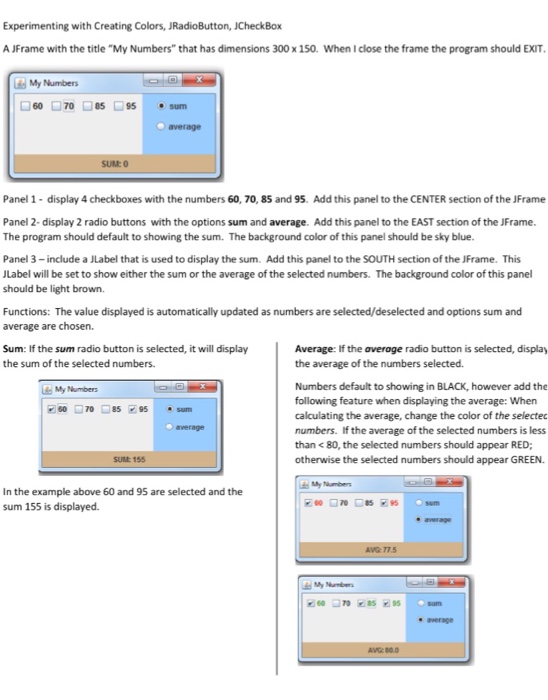
Experimenting with Creating Colors, JRadioButton, JCheckBox A JFrame with the title "My Numbers" that has dimensions 300 x150. When I close the frame the program should EXIT My Numbers 60 70 85 95 sum average SUM0 Panel 1 display 4 checkboxes with the numbers 60, 70, 85 and 95. Add this panel to the CENTER section of the JFrame Panel 2- display 2 radio buttons with the options sum and average. Add this panel to the EAST section of the JFrame The program should default to showing the sum. The background color of this panel should be sky blue Panel 3-include a JLabel that is used to display the sum. Add this panel to the SOUTH section of the JFrame. This Label will be set to show either the sum or the average of the selected numbers. The background color of this panel should be light brown Functions: The value displayed is automatically updated as numbers are selected/deselected and options sum and average are chosen. Sum: If the sum radio button is selected, it will display the sum of the selected numbers. Average: If the average radio button is selected, display the average of the numbers selected. Numbers default to showing in BLACK, however add the following feature when displaying the average: When calculating the average, change the color of the selectec numbers. If the average of the selected numbers is less than
Step by Step Solution
There are 3 Steps involved in it

Get step-by-step solutions from verified subject matter experts