







Question: EXPERT : PLEASE INCLUDE DATA AFTER ANSWERING QUESTIONS You just learned how to calculate the annual turnover rate for an entire organization. In the Practice
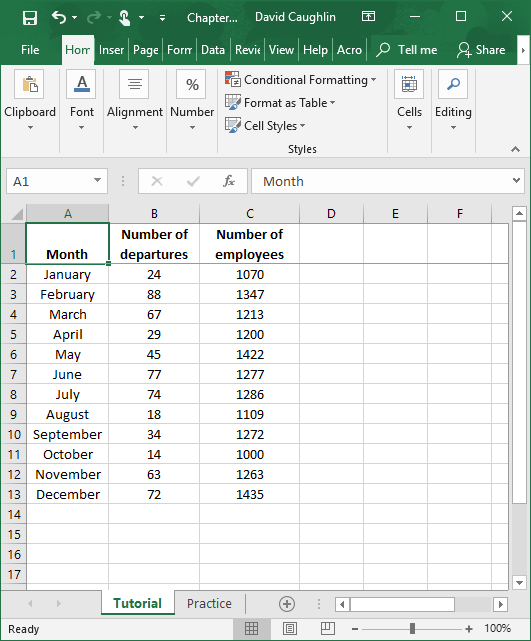
EXPERT : PLEASE INCLUDE DATA AFTER ANSWERING QUESTIONS
You just learned how to calculate the annual turnover rate for an entire organization. In the Practice sheet of the Excel workbook, you will find a new dataset. As before, you will have access to the number of departures and number of employees for each month of the year; however, in this dataset, you will have access to such data for multiple units in the organization. Do and respond to the following:
1.First, compute the annual turnover rates for all units. Which unit has the highest annual turnover rate? Which has the lowest?
2.Second, calculate the annual turnover rate for the entire organization. What is the advantage of calculating annual turnover rates for specific units as well as the organization as a whole? Did you notice anything surprising or particularly informative?
EXCEL SHEET LINK BELOW:
https://ubonline.ubalt.edu/access/content/group/1214MGMT400ZM1/Excel%20Data/Bauer_Chapter%2010%20-%20Excel%20Extension.xlsx
Sa Chapter... David Caughlin X File Home Inser Page For Data Revie View Help Acro Tell me Share A % Conditional Formatting Format as Table Clipboard Font Alignment Number Cells Editing Cell Styles Styles A1 fic Month A D E F B Number of departures 24 88 3 Number of employees 1070 1347 1213 1200 1422 1277 67 29 Month 2 January 3 February 4 March 5 April 6 May 7 June 8 9 August 10 September 11 October 12 November 13 December 14 July 45 77 74 18 34 1286 1109 1272 14 63 72 1000 1263 1435 15 16 17 Tutorial Practice Ready + 100% Sa Chapter... David Caughlin X File Home Inser Page For Data Revie View Help Acro Tell me Share A % Conditional Formatting Format as Table Clipboard Font Alignment Number Cells Editing Cell Styles Styles A1 fic Month A D E F B Number of departures 24 88 3 Number of employees 1070 1347 1213 1200 1422 1277 67 29 Month 2 January 3 February 4 March 5 April 6 May 7 June 8 9 August 10 September 11 October 12 November 13 December 14 July 45 77 74 18 34 1286 1109 1272 14 63 72 1000 1263 1435 15 16 17 Tutorial Practice Ready + 100%Step by Step Solution
There are 3 Steps involved in it

Get step-by-step solutions from verified subject matter experts
 Study Help