







Question: Explain the difference between performing simple what-if analysis and using the Goal Seek tool by giving an explicit example based on the worksheet shown in
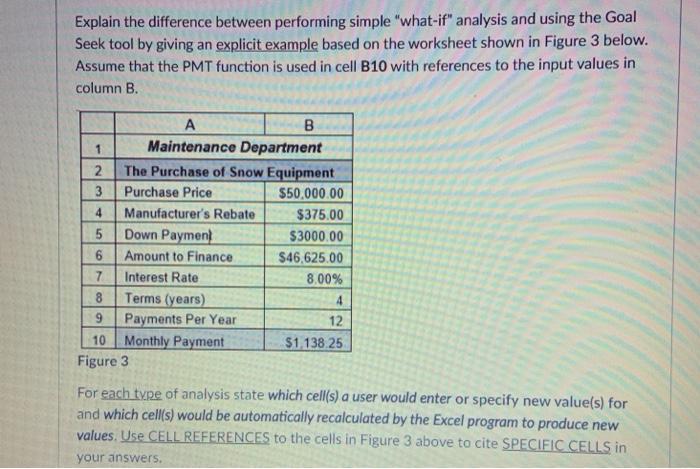
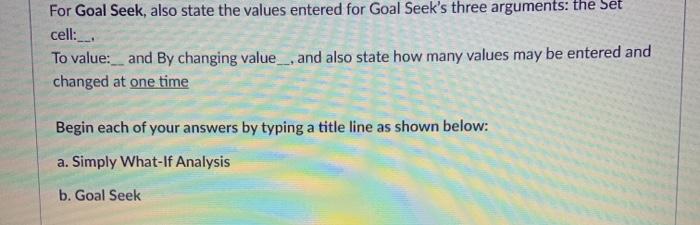
Explain the difference between performing simple "what-if" analysis and using the Goal Seek tool by giving an explicit example based on the worksheet shown in Figure 3 below. Assume that the PMT function is used in cell B10 with references to the input values in column B. 1 von WN A B 1 Maintenance Department The Purchase of Snow Equipment Purchase Price $50,000.00 4 Manufacturer's Rebate $375.00 5 Down Payment $3000.00 6 Amount to Finance $46,625.00 7 Interest Rate 8.00% 8 Terms (years) 4 9 Payments Per Year 12 10 Monthly Payment $1.138 25 Figure 3 For each type of analysis state which cell(s) a user would enter or specify new value(s) for and which cells) would be automatically recalculated by the Excel program to produce new values. Use CELL REFERENCES to the cells in Figure 3 above to cite SPECIFIC CELLS in your answers. Explain the difference between performing simple "what-if" analysis and using the Goal Seek tool by giving an explicit example based on the worksheet shown in Figure 3 below. Assume that the PMT function is used in cell B10 with references to the input values in column B. 1 von WN A B 1 Maintenance Department The Purchase of Snow Equipment Purchase Price $50,000.00 4 Manufacturer's Rebate $375.00 5 Down Payment $3000.00 6 Amount to Finance $46,625.00 7 Interest Rate 8.00% 8 Terms (years) 4 9 Payments Per Year 12 10 Monthly Payment $1.138 25 Figure 3 For each type of analysis state which cell(s) a user would enter or specify new value(s) for and which cells) would be automatically recalculated by the Excel program to produce new values. Use CELL REFERENCES to the cells in Figure 3 above to cite SPECIFIC CELLS in your answers
Step by Step Solution
There are 3 Steps involved in it

Get step-by-step solutions from verified subject matter experts
 Study Help