







Question: F G H J L M N B D E 1 Payroll Data 2 3 Employee ID First Name Last Name Hourly Rate Overtime Rate
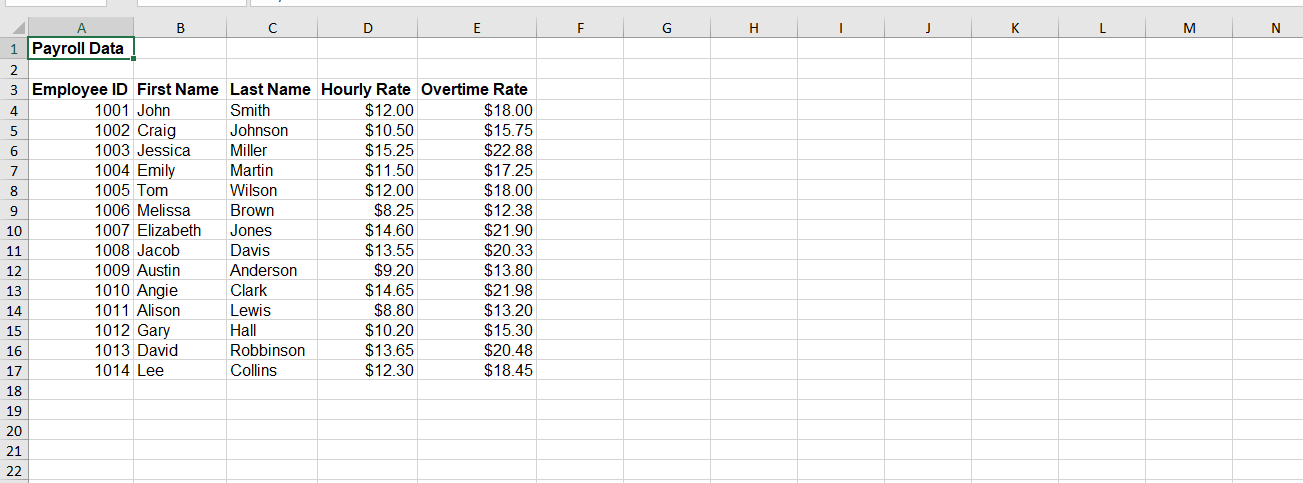
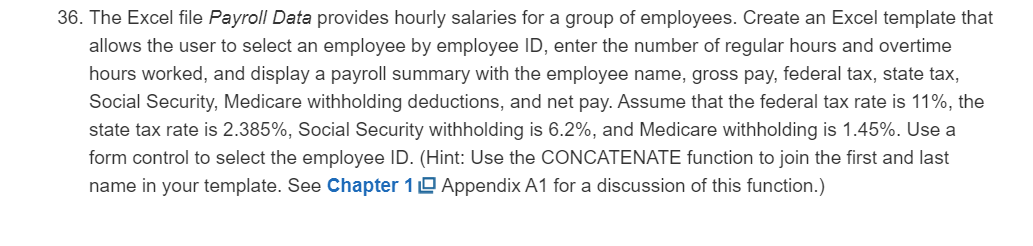
F G H J L M N B D E 1 Payroll Data 2 3 Employee ID First Name Last Name Hourly Rate Overtime Rate 4 1001 John Smith $12.00 $18.00 5 1002 Craig Johnson $10.50 $15.75 6 1003 Jessica Miller $15.25 $22.88 7 1004 Emily Martin $11.50 $17.25 8 1005 Tom Wilson $12.00 $18.00 9 1006 Melissa Brown $8.25 $12.38 10 1007 Elizabeth Jones $14.60 $21.90 11 1008 Jacob Davis $13.55 $20.33 12 1009 Austin Anderson $9.20 $13.80 13 1010 Angie Clark $14.65 $21.98 14 1011 Alison Lewis $8.80 $13.20 15 1012 Gary Hall $10.20 $15.30 16 1013 David Robbinson $13.65 $20.48 17 1014 Lee Collins $12.30 $18.45 18 19 20 21 22 36. The Excel file Payroll Data provides hourly salaries for a group of employees. Create an Excel template that allows the user to select an employee by employee ID, enter the number of regular hours and overtime hours worked, and display a payroll summary with the employee name, gross pay, federal tax, state tax, Social Security, Medicare withholding deductions, and net pay. Assume that the federal tax rate is 11%, the state tax rate is 2.385%, Social Security withholding is 6.2%, and Medicare withholding is 1.45%. Use a form control to select the employee ID. (Hint: Use the CONCATENATE function to join the first and last name in your template. See Chapter 10 Appendix A1 for a discussion of this function.)
Step by Step Solution
There are 3 Steps involved in it

Get step-by-step solutions from verified subject matter experts
 Study Help