







Question: Favorite Cities Develop a UWP app that looks like the following when it is loaded: My Favorite Cities Vancouver Victoria Toronto When the user clicks
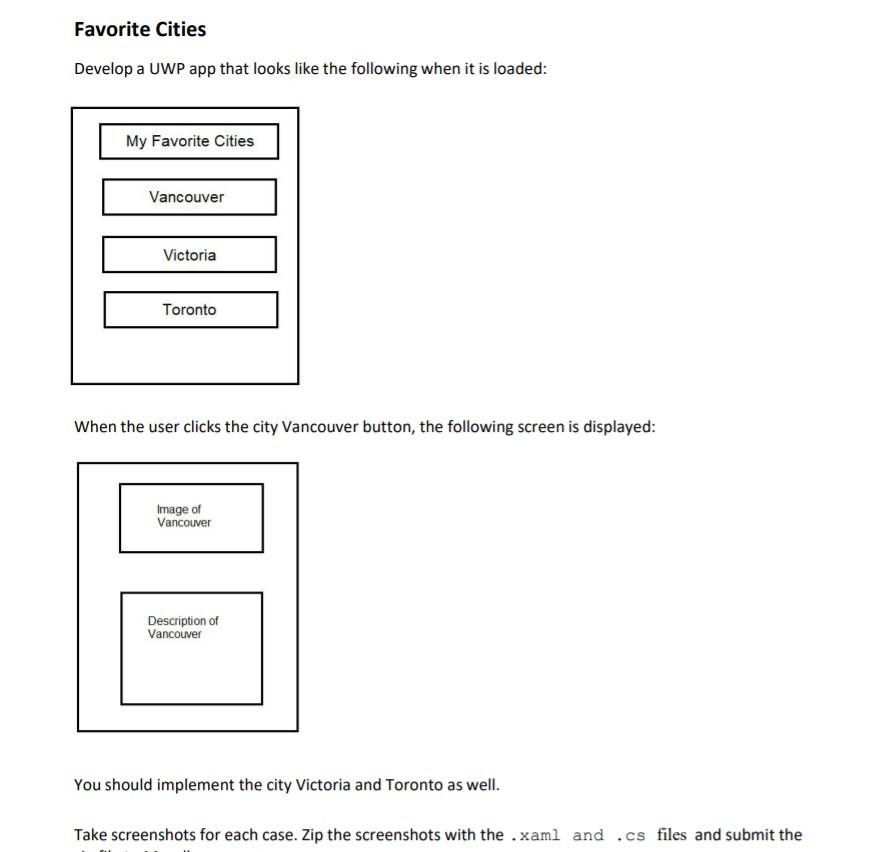
Favorite Cities Develop a UWP app that looks like the following when it is loaded: My Favorite Cities Vancouver Victoria Toronto When the user clicks the city Vancouver button, the following screen is displayed: Image of Vancouver Description of Vancouver You should implement the city Victoria and Toronto as well. Take screenshots for each case. Zip the screenshots with the .xaml and .cs files and submit the Favorite Cities Develop a UWP app that looks like the following when it is loaded: My Favorite Cities Vancouver Victoria Toronto When the user clicks the city Vancouver button, the following screen is displayed: Image of Vancouver Description of Vancouver You should implement the city Victoria and Toronto as well. Take screenshots for each case. Zip the screenshots with the .xaml and .cs files and submit the
Step by Step Solution
There are 3 Steps involved in it

Get step-by-step solutions from verified subject matter experts
 Study Help