







Question: Feature 5: Checking validity (checksum) Calculate the checksum using the information provided in the background and see if this matches the check digit. Background: Calculating
Feature 5: Checking validity (checksum) Calculate the checksum using the information provided in the background and see if this matches the check digit.
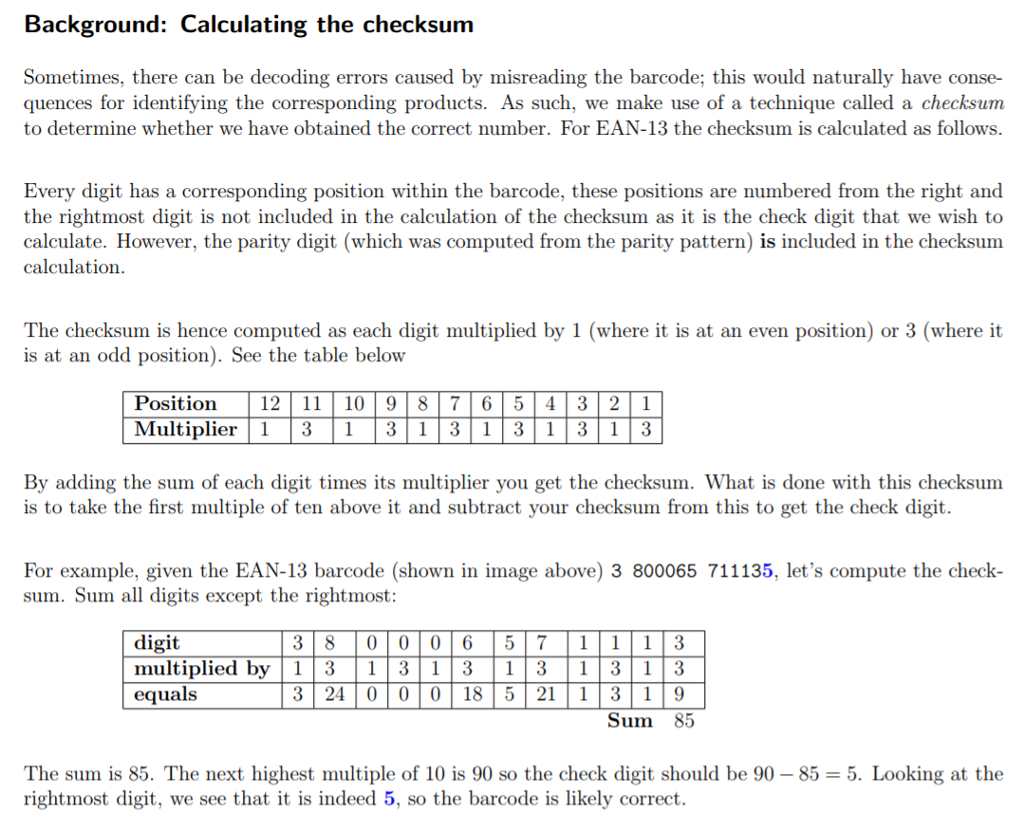
Background: Calculating the checksum Sometimes, there can be decoding errors caused by misreading the barcode; this would naturally have conse- quences for identifying the corresponding products. As such, we make use of a technique called a checksum to determine whether we have obtained the correct number. For EAN-13 the checksum is calculated as follows Every digit has a corresponding position within the barcode, these positions are numbered from the right and the rightmost digit is not included in the calculation of the checksum as it is the check digit that we wish to calculate. However, the parity digit (which was computed from the parity pattern) is included in the checksum calculation. The checksum is hence computed as each digit multiplied by 1 (where it is at an even position) or 3 (where it is at an odd position). See the table below Position 12 11109 8 7 6 5 4 3 2 1 Multiplier T | 3 | 1 | 3 3T13 Multiplier 13 1 3 1 By adding the sum of each digit times its multiplier you get the checksum. What is done with this checksum is to take the first multiple of ten above it and subtract your checksum from this to get the check digit. For example, given the EAN-13 barcode (shown in image above) 3 800065 711135, let's compute the check- sum. Sum all digits except the rightmost: digit 3 8 0 006571113 multiplied by 1 313 1 31 3 13 equals 3 The sun is 85. The next highest multiple of 10 is 90 so the check digit should be 90-85-5. Looking at the rightmost digit, we see that it is indeed 5, so the barcode is likely correct
Step by Step Solution
There are 3 Steps involved in it

Get step-by-step solutions from verified subject matter experts
 Study Help