







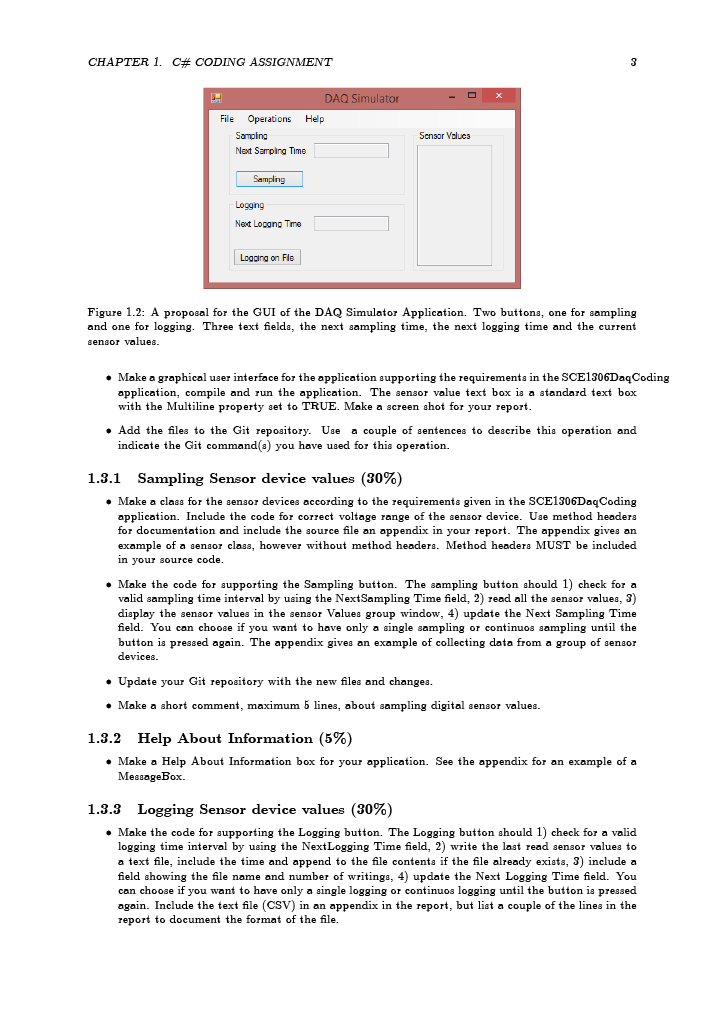
Question: Figure 1 . 2 : A proposal for the GUI of the DAQ Simulator Application. Two buttons, one for sampling and one for logging .
Figure : A proposal for the GUI of the DAQ Simulator Application. Two buttons, one for sampling
and one for logging Three text fields, the next sampling time, the next logging time and the current
sensor values.
Make a graphical user interface for the application supporting the requirements in the SCEDaqCoding
application, compile and run the application. The sensor value text box is a standard text box
with the Multiline property set to TRUE. Make a screen shot for your report.
Add the files to the Git repository. Use a couple of sentences to describe this operation and
indicate the Git commands you have used for this operation.
Sampling Sensor device values
Make a class for the sensor devices according to the requirements given in the SCEDaqCoding
application. Include the code for correct voltage range of the sensor device. Use method headers
for documentation and include the source file an appendix in your report. The appendix gives an
example of a sensor class, however without method headers. Method headera MUST be included
in your source code.
Make the code for supporting the Sampling button. The sampling button should check for a
valid sampling time interval by using the NextSampling Time field, read all the sensor values,
display the sensor values in the sensor Values group window, update the Next Sampling Time
field. You can choose if you want to have only a single sampling or continuos sampling until the
button is pressed again. The appendix gives an example of collecting data from a group of sensor
devices.
Update your Git repository with the new files and changes.
Make a short comment, maximum lines, about sampling digital sensor values.
Help About Information
Make a Help About Information box for your application. See the appendix for an example of a
MessageBox.
Logging Sensor device values
Make the code for supporting the Logging button. The Logging button should check for a valid
logging time interval by using the NextLogging Time field, write the last read sensor values to
a text file, include the time and append to the file contents if the file already exists, include a
field showing the file name and number of writings, update the Next Logging Time field. You
can choose if you want to have only a single logging or continuos logging until the button is pressed
again. Include the text file CSV in an appendix in the report, but list a couple of the lines in the
report to document the format of the file.this is picure see next picture picture
Step by Step Solution
There are 3 Steps involved in it
1 Expert Approved Answer
Step: 1 Unlock

Question Has Been Solved by an Expert!
Get step-by-step solutions from verified subject matter experts
Step: 2 Unlock
Step: 3 Unlock
 Study Help