





Question: Figure 2 ER Diagram Section 2 Populate the database. Please check sections 3 for details. Section 3 Use SQL to specify the following queries. When

Figure 2 ER Diagram

Section 2

Populate the database. Please check sections 3 for details.

Section 3

Use SQL to specify the following queries. When you populate the database, insert data such that at least one rowwill be display as the result of running each query.

1) Retrieve information about the projects (title, status and whether archived or not) that have an Optional reviewer.
2) Retrieve the information about the investigators (first name, last name and organization) who have done more than one project.
3) Retrieve the information of reviewers (first name and last name), investigators (first name and last name) for the project Air Quality Research Project.
4) Get the contact information (contact number, contact person name, contact type and contact remainders) for the projects which have a contact history. Also get the Project_IDs for those projects.
5) Get the project information (project id, title, status and whether archived or not) which has a Co_PI.
6) Retrieve all the projects (project id, title) in which John Smith serves as a principle investigator.
7) Retrieve the reviewers who reviewed more than 2 projects. Please list reviewers SSN and number of projects reviewed by the reviewer.
8) Retrieve the investigators who serve as PI for at least 2 projects. Please list the SSN, last name, and number of projects served as PI.

Section 4

Specify the statements to drop all the tables. Pay attention to the order of the drop statements in order to drop everything successfully. Note that this section is exactly the same as the one in Assignment 4. You can use your assignment 4 directly, or modify your assignment 4 (if needed).
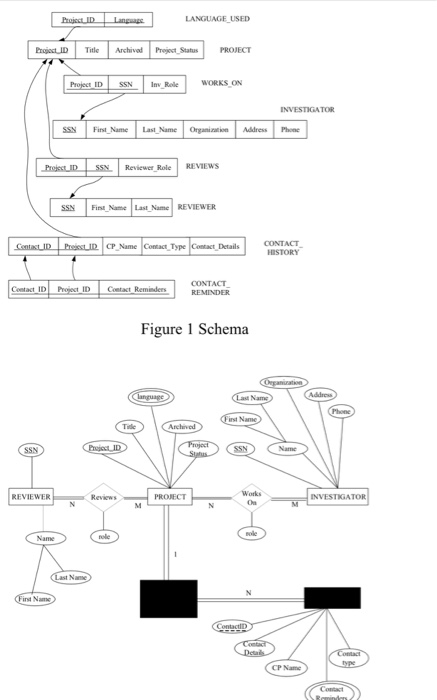
 Figure 2 ER Diagram Section 2 Populate the database. Please check

LANGUAGE USED Project IDchivod Prejot Staus PROJECT Project ID SSNInv Reile WORKS ON INVESTIGATOR SSN Finst Name Last NameOngainAdess Phone PretD Revwer Role REVIEWS SSNFint Name Last Name REVIEWER Details CONTACT HISTORY CP Name Comact Type CONTACT Ceetact ID Project ID Contact Reminders REMINDER Figure 1 Schema irst Name Title SSN REVIEWERReviews PROJECT OaINVESTIGATOR CP Name Contact

Step by Step Solution

There are 3 Steps involved in it

1 Expert Approved Answer
Step: 1 Unlock blur-text-image
Question Has Been Solved by an Expert!

Get step-by-step solutions from verified subject matter experts

Step: 2 Unlock
Step: 3 Unlock

Students Have Also Explored These Related Databases Questions!