







Question: figuring out the code on this question: View called CustomerInfo (4 points): CustomerID The CustomerInfo view should include these columns: FullName (concatenate FirstName, MiddleName, &
figuring out the code on this question:
- View called CustomerInfo (4 points):
- CustomerID
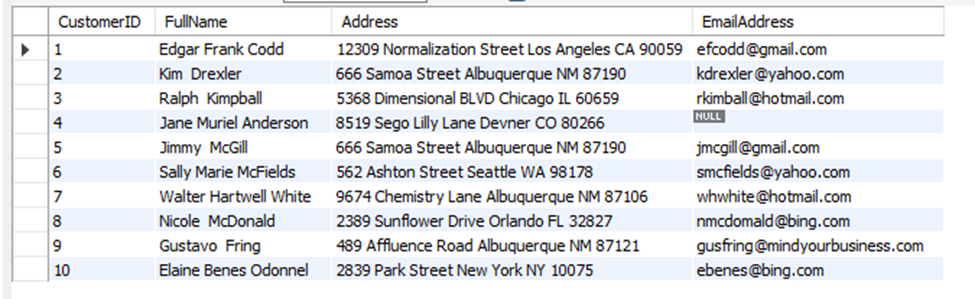
The CustomerInfo view should include these columns:
- FullName (concatenate FirstName, MiddleName, & LastName with spaces in between)
- Address (concatenate StreetAdddress, City, State, & ZipCode with spaces in between)
- PrimaryEmail (If customer has no email, show NULL for the customer's email address)
Hints:
- Start by SELECTing CustomerID and concatenating FullName & Address from Customers.
- JOIN into CustomerEmails.
- We need the view to include Customers who don't have emails, so the join type is important here.
- We also only want the Primary Email, so only include those rows from the CustomerEmails table.
- Please keep in mind, you can have more than 1 predicate in joins. The ON clause might be a good place to specify you only want Primary Email rows from the CustomerEmails table.
OUTPUT:
CoursHeroTranscribedText
CustomerID FullName 1 2 3 4 5 6 7 8 9 10 Edgar Frank Codd Kim Drexler Ralph Kimpball Jane Muriel Anderson Jimmy McGill Sally Marie McFields Walter Hartwell White Nicole McDonald Gustavo Fring Elaine Benes Odonnel Address EmailAddress 12309 Normalization Street Los Angeles CA 90059 efcodd@gmail.com kdrexler@yahoo.com rkimball@hotmail.com 666 Samoa Street Albuquerque NM 87190 5368 Dimensional BLVD Chicago IL 60659 8519 Sego Lilly Lane Devner CO 80266 666 Samoa Street Albuquerque NM 87190 562 Ashton Street Seattle WA 98178 9674 Chemistry Lane Albuquerque NM 87106 2389 Sunflower Drive Orlando FL 32827 489 Affluence Road Albuquerque NM 87121 2839 Park Street New York NY 10075 NULL jmcgill@gmail.com smcfields@yahoo.com whwhite @hotmail.com nmcdomald@bing.com gusfring@mindyourbusiness.com ebenes@bing.com
Step by Step Solution
There are 3 Steps involved in it

Get step-by-step solutions from verified subject matter experts
 Study Help