







Question: File 10, Try-Catch Block, Random Numbers In this lab you will create a well-commented java project that will contain a class name Filelo. At first,
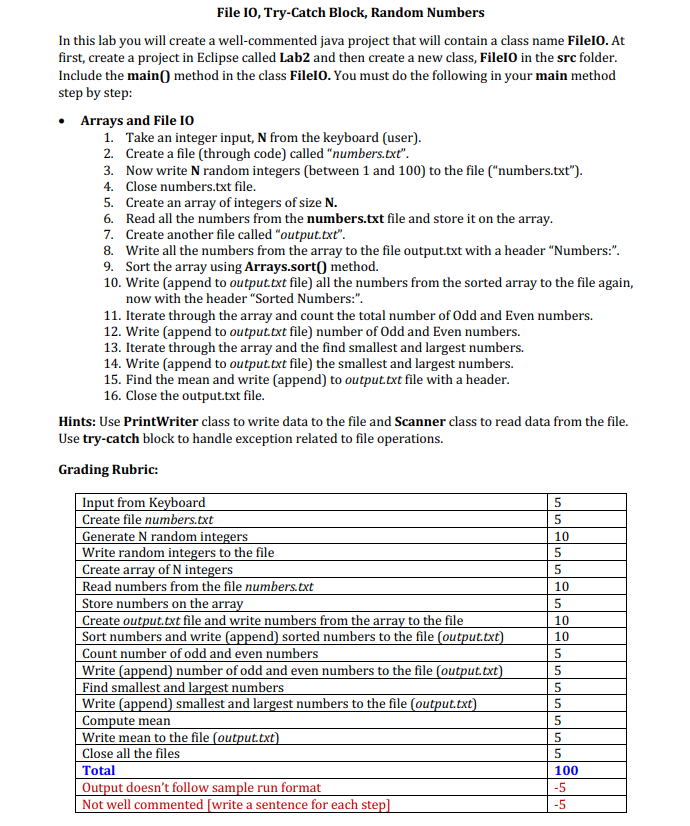
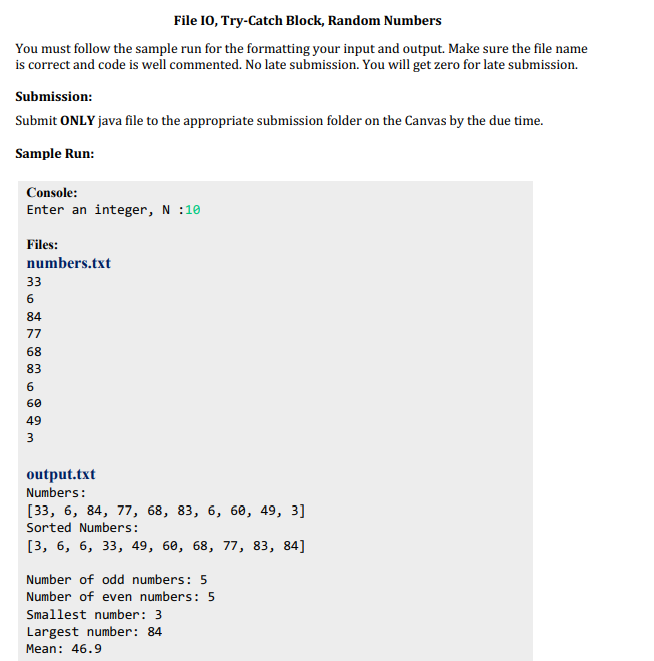
File 10, Try-Catch Block, Random Numbers In this lab you will create a well-commented java project that will contain a class name Filelo. At first, create a project in Eclipse called Lab2 and then create a new class, Filelo in the src folder. Include the main() method in the class Filelo. You must do the following in your main method step by step: Arrays and File 10 1. Take an integer input, N from the keyboard (user). 2. Create a file (through code) called "numbers.txt". 3. Now write N random integers (between 1 and 100) to the file ("numbers.txt"). 4. Close numbers.txt file. 5. Create an array of integers of size N. 6. Read all the numbers from the numbers.txt file and store it on the array. 7. Create another file called "output.txt". 8. Write all the numbers from the array to the file output.txt with a header "Numbers:". 9. Sort the array using Arrays.sort() method. 10. Write append to output.txt file) all the numbers from the sorted array to the file again, now with the header "Sorted Numbers:". 11. Iterate through the array and count the total number of Odd and Even numbers. 12. Write append to output.txt file) number of Odd and Even numbers. 13. Iterate through the array and the find smallest and largest numbers. 14. Write (append to output.txt file) the smallest and largest numbers. 15. Find the mean and write (append) to output.txt file with a header. 16. Close the output.txt file. Hints: Use PrintWriter class to write data to the file and Scanner class to read data from the file. Use try-catch block to handle exception related to file operations. Grading Rubric: Input from Keyboard Create file numbers.txt Generate N random integers Write random integers to the file Create array of N integers Read numbers from the file numbers.txt Store numbers on the array Create output.txt file and write numbers from the array to the file Sort numbers and write (append) sorted numbers to the file (output.txt) Count number of odd and even numbers Write (append) number of odd and even numbers to the file (output.txt) Find smallest and largest numbers Write (append) smallest and largest numbers to the file (output.txt) Compute mean Write mean to the file (output.txt) Close all the files Total Output doesn't follow sample run format Not well commented (write a sentence for each step] 5 5 10 5 5 10 5 10 10 5 5 5 5 5 5 5 100 -5 -5 File 10, Try-Catch Block, Random Numbers You must follow the sample run for the formatting your input and output. Make sure the file name is correct and code is well commented. No late submission. You will get zero for late submission. Submission: Submit ONLY java file to the appropriate submission folder on the Canvas by the due time. Sample Run: Console: Enter an integer, N:10 Files: numbers.txt 33 6 84 77 68 83 6 60 49 3 3 output.txt Numbers: [33, 6, 84, 77, 68, 83, 6, 60, 49, 3] Sorted Numbers: [3, 6, 6, 33, 49, 60, 68, 77, 83, 84] Number of odd numbers: 5 Number of even numbers: 5 Smallest number: 3 Largest number: 84 Mean: 46.9
Step by Step Solution
There are 3 Steps involved in it

Get step-by-step solutions from verified subject matter experts
 Study Help