







Question: File / Folder / Permission Practice Create a Directory In your class folder on Elvis ( probably named UnixFiles ) , create a folder named
FileFolderPermission Practice
Create a Directory
In your class folder on Elvis probably named UnixFiles create a
folder named FileTreeIf you completed FileTree you can us
cp r to copy that folder.
In FileTree create the following subtree of files and directories
Except for README.txt all the files were created with the touch
command, and are empty.
All the folders they have a d on the left were created with mkdir
See below for infore set using chmod
See below for information about README.txt Be sure you get the
names and permissions exact.
After you create a directory, you can cd into it to create any
subdirectories or files. To go back up remember that every folder
has an entry named which points to the parent.
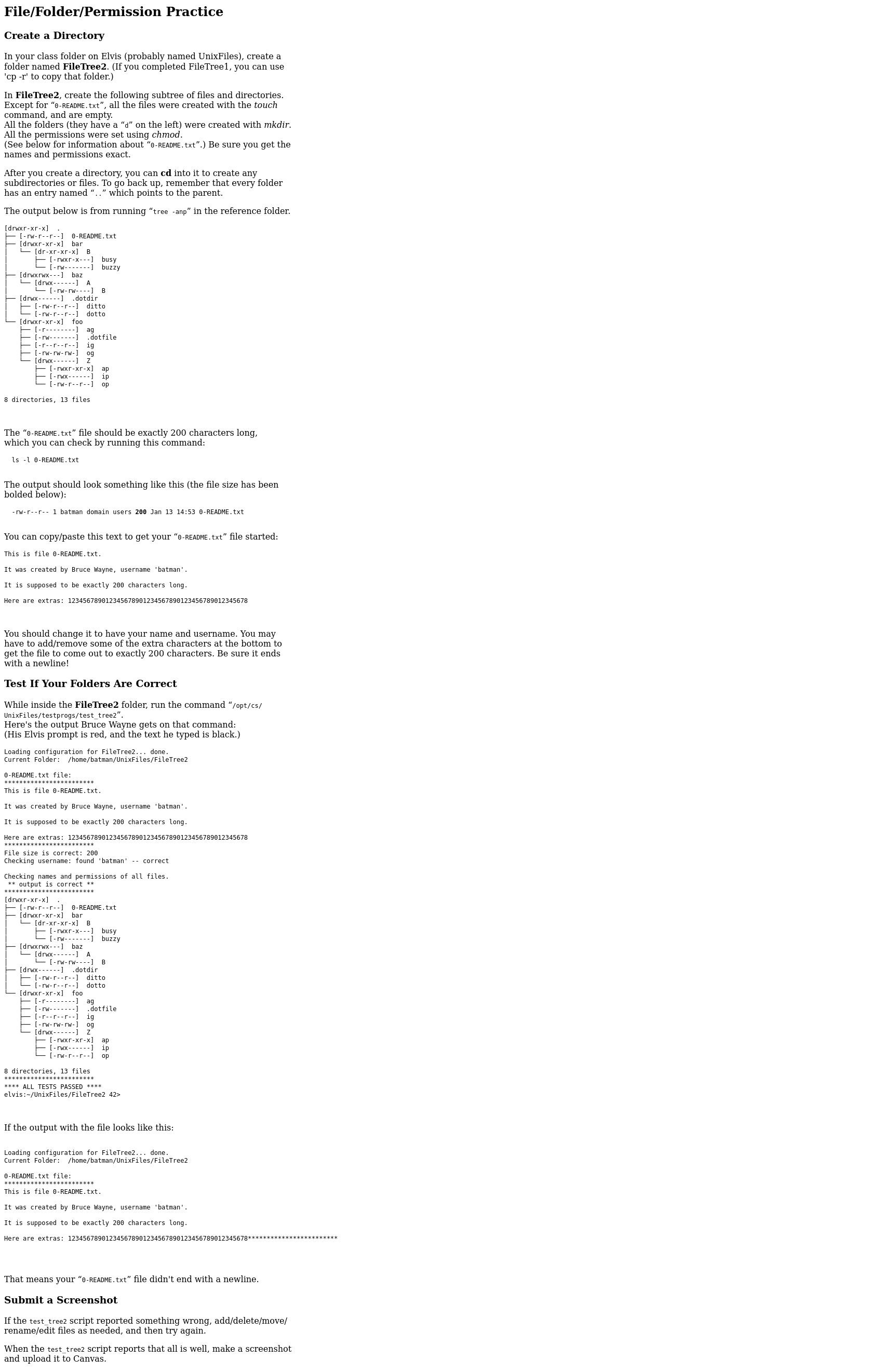
The output below is from running "tree anp" in the reference folder.
drwxrxrx
rwrr
drxrxrx
drwxrwxcdots baz a
rwrr ditto
drwxxrx foo fonden
rrwr
directories, files
The README.txt file should be exactly characters long,
which you can check by running this command:
ls l README.txt
The output should look something like this the file size has been
bolded below:
rwrr batman domain users Jan :README.txt
You can copypaste this text to get your README. txt file started:
This is file README.txt
It was created by Bruce Wayne, username 'batman'.
It is supposed to be exactly characters long
Here are extras:
You should change it to have your name and username. You may
have to addremove some of the extra characters at the bottom to
get the file to come out to exactly characters. Be sure it ends
with a newline!
Test If Your Folders Are Correct
While inside the FileTree folder, run the command optcs
UnixFilestestprogstesttree
Loading configuration for FileTree done.
Current Folder: homebatmanUnixFilesFileTree
README.txt file:
This is file README.txt
It was created by Bruce Wayne, username 'batman'
It is supposed to be exactly characters long.
File size is correct:
Checking
Checking username: found 'batman' correct
Checking names and permissions of all files.
drwxrxrxrwrr
drxrxrx
drwxrwx baz
drwxcdots A
drwxdotdir
drwxrxrx foo rwr dott
Erwrr
drwxcdots
directories, filesIf the output with the file looks like this:
Loading configuration for FileTree done.
Current Folder: homebatmanUnixFilesFileTree
README.txt file
This is file READE
It was created by Bruce Wayne, username 'batman'
It is supposed to be exactly characters long
That means your README.txt file didn't end with a newline.
Submit a Screenshot
If the testtree script reported something wrong, adddeletemove
renameedit files as needed, and then try again.
When the testtree script reports that all is well, make a screenshot
and upload it to Canvas.
Step by Step Solution
There are 3 Steps involved in it
1 Expert Approved Answer
Step: 1 Unlock

Question Has Been Solved by an Expert!
Get step-by-step solutions from verified subject matter experts
Step: 2 Unlock
Step: 3 Unlock
 Study Help