







Question: please answer asap Create a Directory In your LabTech folder on Elvis (probably named LABTECH), create a folder named FileTree. In FileTree, create the following
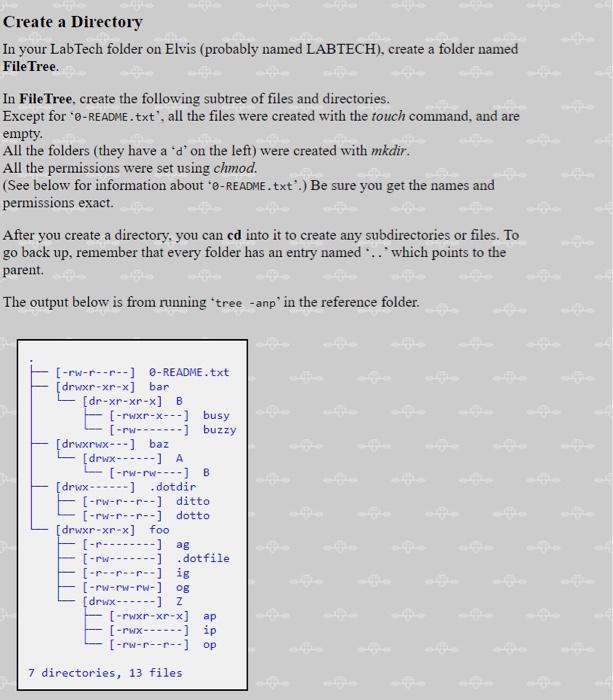
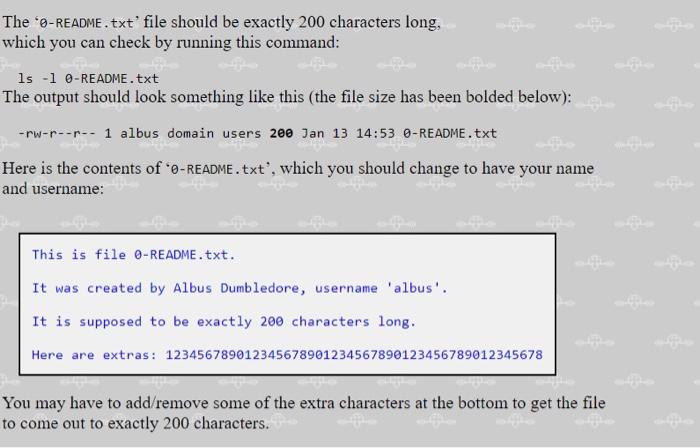
Create a Directory In your LabTech folder on Elvis (probably named LABTECH), create a folder named FileTree. In FileTree, create the following subtree of files and directories. Except for ' -README.txt', all the files were created with the touch command, and are empty. All the folders (they have a ' d ' on the left) were created with mkdir. All the permissions were set using chmod. (See below for information about ' -README. txt'.) Be sure you get the names and permissions exact. After you create a directory, you can cd into it to create any subdirectories or files. To go back up, remember that every folder has an entry named '.. ' which points to the parent. The output below is from running 'tree - anp' in the reference folder. The ' -README . txt' file should be exactly 200 characters long, which you can check by running this command: Is - l 0-README.txt The output should look something like this (the file size has been bolded below): rwrr1 albus domain users 200 Jan 1314:53 0-README.txt Here is the contents of ' -README.txt', which you should change to have your name and username: This is file 0-README.txt. It was created by Albus Dumbledore, username 'albus'. It is supposed to be exactly 200 characters long. Here are extras: 123456789012345678901234567890123456789012345678 You may have to add/remove some of the extra characters at the bottom to get the file to come out to exactly 200 characters
Step by Step Solution
There are 3 Steps involved in it

Get step-by-step solutions from verified subject matter experts
 Study Help