







Question: /*------------------------------------------------------------------ File: genFileData.c Author: Gilbert Arbez, Fall 2016 Description: Opens a text file and saves 100 data values. To be used in exercises of lab
/*------------------------------------------------------------------
File: genFileData.c
Author: Gilbert Arbez, Fall 2016
Description: Opens a text file and saves 100 data values. To be used
in exercises of lab 6.
---------------------------------------------------------------------*/
#include
#include
// Some Definitions
#define TXT_FILENAME "data.txt"
#define MIN_VAL -20.0 // Minimum value of data values
#define MAX_VAL 40.0 // Maximum value of data values
#define NUM_VALUES 100 // Number of values to save in the file
/*---------------------------------------------------------------------
Function: main
Description: Opens a text file and saves 100 data values in the file.
------------------------------------------------------------------------*/
void main(void)
{
// Variable Declarations
FILE *fp; // file pointer
double value; // for computing value to save
int cntr; // counter for loop
// Open file for writing
fp = fopen(TXT_FILENAME, "w");
if(fp == NULL)
{
printf("Cannot open file %s for writing ", TXT_FILENAME);
}
else
{
// Write data values in the file
for(cntr = 0; cntr
{
value = ((double)rand()/RAND_MAX)*(MAX_VAL - MIN_VAL) + MIN_VAL;
fprintf(fp,"%.3f ", value);
}
fclose(fp); // close the file
}
}
---------------------------------------------------------------------------------
/*------------------------------------------------------------------
File: analyseBinFile.c
Author:
Description: Reads the contents of a bin file and analyses the data.
---------------------------------------------------------------------*/
#include
// Symbolic constants
#define BIN_FILE "data.bin"
#define NUM_VALUES 100 // number of values to read from binary file
// For computed values
#define NUM 3 // number of computed values
// The following are indexes into the array
// containing computed values
#define MINIX 0
#define MAXIX 1
#define AVGIX 2
// function prototypes
void analyseBinFile(FILE *, double *);
/*---------------------------------------------------------------------
Function: main
Description: Opens a binary file and calls analyzeFileBin to determine the
minimum, the maximum and the average values of the contents
of the file.
------------------------------------------------------------------------*/
void main(void)
{
// Variable declarations
FILE *fp; // File pointer for binary file
double outputVals[NUM];
// Open the file
fp = fopen(BIN_FILE, "rb");
if(fp == NULL)
printf("Cannot open binary file %s ", BIN_FILE);
else
{
analyseBinFile(fp, outputVals);
// Display the results
printf("Analysis of file data gives: ");
printf(" Minimum: %.3f ", outputVals[MINIX]);
printf(" Maximum: %.3f ", outputVals[MAXIX]);
printf(" Average: %.3f ", outputVals[AVGIX]);
fclose(fp);
}
}
/*-----------------------------------------------------------------------
Function: analyseBinFile
Parameters:
fp - file pointer for input binary file
outPt - pointer to array for storing compute values.
Description: Reads all data values into an array and scans the data
within the array to compute three output
values: the minimum value, the maximum value and the average
value of the data
------------------------------------------------------------------------*/
void analyseBinFile(FILE *fp, double *outPt)
{
}
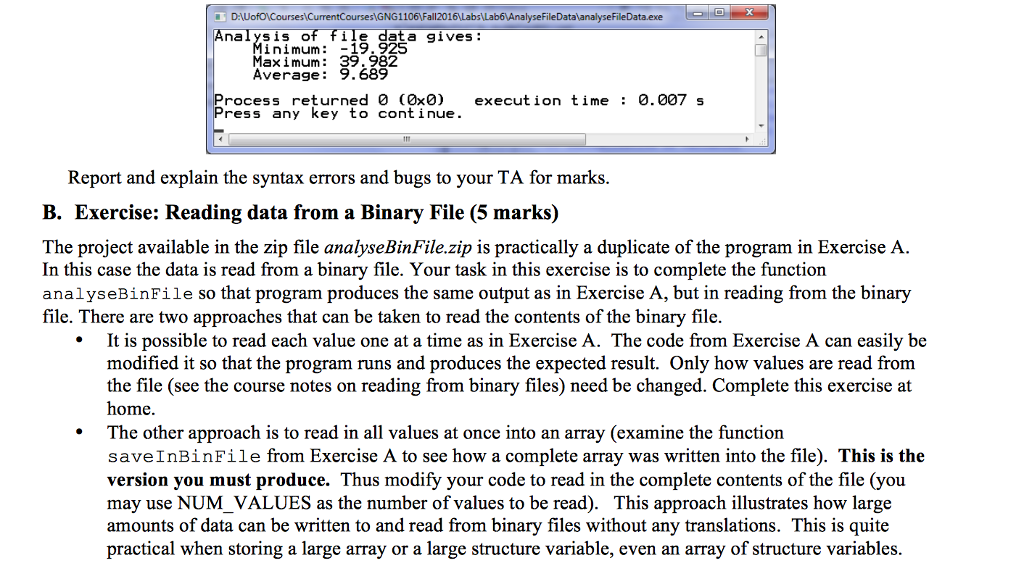
O DANUofO\Courses\CurrentCourses\GNG1106\Fall2016\Labs\Lab6\AnalyseFileDataxanalyseFileData.exe - O Analysis of file data gives: Minimum: -19.925 Max i mum: 39.982 Average: 9.689 Process returnedo (Ox0) execution time : 0.007 s Press any key to continue. Report and explain the syntax errors and bugs to your TA for marks. B. Exercise: Reading data from a Binary File (5 marks) The project available in the zip file analyseBinFile.zip is practically a duplicate of the program in Exercise A. In this case the data is read from a binary file. Your task in this exercise is to complete the function analysebinFile so that program produces the same output as in Exercise A, but in reading from the binary file. There are two approaches that can be taken to read the contents of the binary file. It is possible to read each value one at a time as in Exercise A. The code from Exercise A can easily be modified it so that the program runs and produces the expected result. Only how values are read from the file (see the course notes on reading from binary files) need be changed. Complete this exercise at home. The other approach is to read in all values at once into an array (examine the function savelnBinfile from Exercise A to see how a complete array was written into the file). This is the version you must produce. Thus modify your code to read in the complete contents of the file (you may use NUM_VALUES as the number of values to be read). This approach illustrates how large amounts of data can be written to and read from binary files without any translations. This is quite practical when storing a large array or a large structure variable, even an array of structure variables
Step by Step Solution
There are 3 Steps involved in it

Get step-by-step solutions from verified subject matter experts
 Study Help