







Question: File Home Insert Page Layout Formulas Data Review View Help Share Com X - General 29 0 TO - . Format Calbei BIU Paste 2
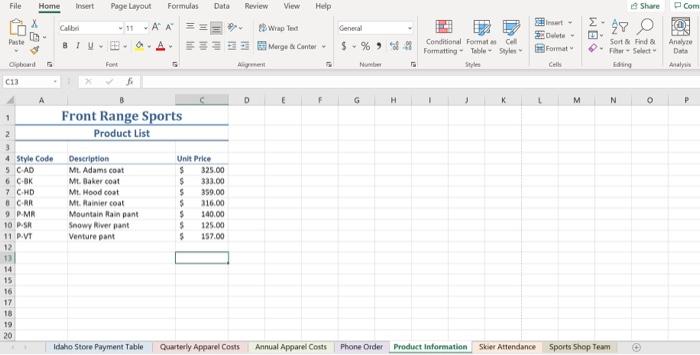
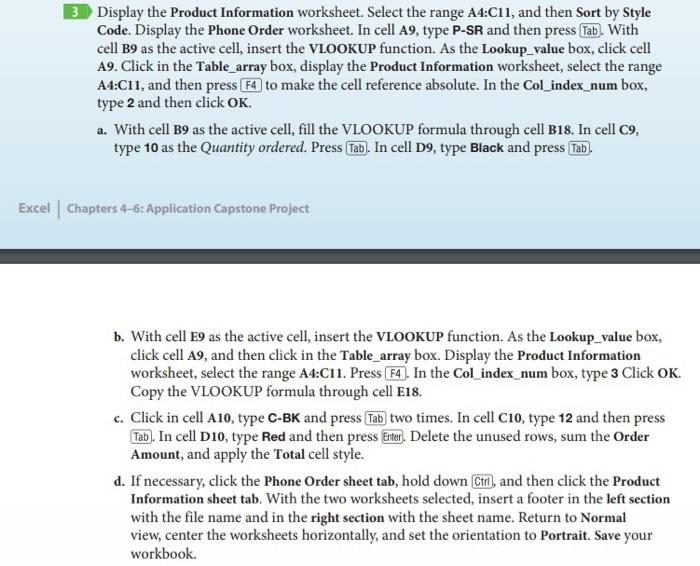
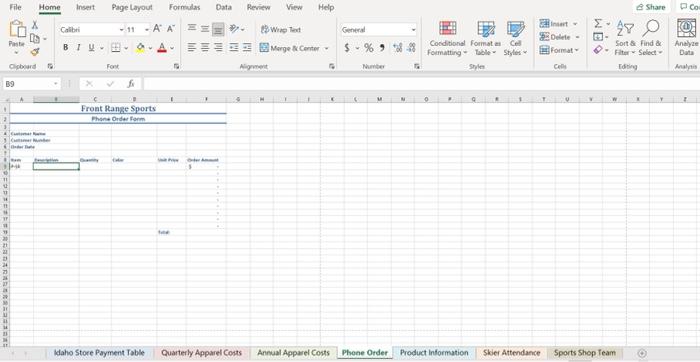
File Home Insert Page Layout Formulas Data Review View Help Share Com X - General 29 0 TO - . Format Calbei BIU Paste 2 Wrap Test 2. Merge Center $ % 92 Conditional Format Cell Formatting Table Styles Style Sort & Find her - Select Analyse Data Global Fort Nu An C13 G H M N N P 1 Front Range Sports Product List Unit Price $ 325.00 $ 333.00 $ 359.00 $ 316.00 $ 140.00 5 125.00 5 157.00 2 3 4 Style Code Description 5 CAD Mt. Adams coat 6 COK Mt. Baker coat 7 CHD Mt. Hood coat 8CRR Mt. Rainier coat 9. PMR Mountain Rain pant 10 P.SR Snowy River pant 11 PVT Venture part 12 13 14 15 16 17 18 19 20 Idaho Store Payment Table Quwterly Apparel Costs Annual Apparel Costs Phone Order Product Information Skier Attendance Sports Shop Team 3 Display the Product Information worksheet. Select the range A4:C11, and then Sort by Style Code. Display the Phone Order worksheet. In cell A9, type P-SR and then press Tab). With cell B9 as the active cell, insert the VLOOKUP function. As the Lookup_value box, click cell A9. Click in the Table_array box, display the Product Information worksheet, select the range A4:C11, and then press F4 to make the cell reference absolute. In the Col_index_num box, type 2 and then click OK. a. With cell B9 as the active cell, fill the VLOOKUP formula through cell B18. In cell 09, type 10 as the Quantity ordered. Press Tab). In cell D9, type Black and press Tab). Excel Chapters 4-6: Application Capstone Project b. With cell E9 as the active cell, insert the VLOOKUP function. As the Lookup_value box, click cell A9, and then click in the Table_array box. Display the Product Information worksheet, select the range A4:C11. Press F4). In the Col_index_num box, type 3 Click OK. Copy the VLOOKUP formula through cell E18. c. Click in cell A10, type C-BK and press Tab two times. In cell C10, type 12 and then press Tab). In cell D10, type Red and then press Enter). Delete the unused rows, sum the Order Amount, and apply the Total cell style. d. If necessary, click the Phone Order sheet tab, hold down Ctrl), and then click the Product Information sheet tab. With the two worksheets selected, insert a footer in the left section with the file name and in the right section with the sheet name. Return to Normal view, center the worksheets horizontally, and set the orientation to Portrait. Save your workbook. Share Co File Home Insert Page Layout Formas Data Review View Help X Calibri - 11-AA 13 Wed IS- Paste BIU... A Morge Center General - Olete- $ -% % *** Formatting able Styles Format 27 0 f Conditional Format Sort & Find & - Select Toting Analyze Data Clipboard 18 Font Ali Nu Cell Any B9 M 0 U w Front Range Sports Phone Order Form 11 YT 11 21 nhuum Idaho Store Payment Table Quarterly Apparel Costs Annual Apparel Costs Phone Order Product Information Skier Attendance Sports Shop Team File Home Insert Page Layout Formulas Data Review View Help Share Com X - General 29 0 TO - . Format Calbei BIU Paste 2 Wrap Test 2. Merge Center $ % 92 Conditional Format Cell Formatting Table Styles Style Sort & Find her - Select Analyse Data Global Fort Nu An C13 G H M N N P 1 Front Range Sports Product List Unit Price $ 325.00 $ 333.00 $ 359.00 $ 316.00 $ 140.00 5 125.00 5 157.00 2 3 4 Style Code Description 5 CAD Mt. Adams coat 6 COK Mt. Baker coat 7 CHD Mt. Hood coat 8CRR Mt. Rainier coat 9. PMR Mountain Rain pant 10 P.SR Snowy River pant 11 PVT Venture part 12 13 14 15 16 17 18 19 20 Idaho Store Payment Table Quwterly Apparel Costs Annual Apparel Costs Phone Order Product Information Skier Attendance Sports Shop Team 3 Display the Product Information worksheet. Select the range A4:C11, and then Sort by Style Code. Display the Phone Order worksheet. In cell A9, type P-SR and then press Tab). With cell B9 as the active cell, insert the VLOOKUP function. As the Lookup_value box, click cell A9. Click in the Table_array box, display the Product Information worksheet, select the range A4:C11, and then press F4 to make the cell reference absolute. In the Col_index_num box, type 2 and then click OK. a. With cell B9 as the active cell, fill the VLOOKUP formula through cell B18. In cell 09, type 10 as the Quantity ordered. Press Tab). In cell D9, type Black and press Tab). Excel Chapters 4-6: Application Capstone Project b. With cell E9 as the active cell, insert the VLOOKUP function. As the Lookup_value box, click cell A9, and then click in the Table_array box. Display the Product Information worksheet, select the range A4:C11. Press F4). In the Col_index_num box, type 3 Click OK. Copy the VLOOKUP formula through cell E18. c. Click in cell A10, type C-BK and press Tab two times. In cell C10, type 12 and then press Tab). In cell D10, type Red and then press Enter). Delete the unused rows, sum the Order Amount, and apply the Total cell style. d. If necessary, click the Phone Order sheet tab, hold down Ctrl), and then click the Product Information sheet tab. With the two worksheets selected, insert a footer in the left section with the file name and in the right section with the sheet name. Return to Normal view, center the worksheets horizontally, and set the orientation to Portrait. Save your workbook. Share Co File Home Insert Page Layout Formas Data Review View Help X Calibri - 11-AA 13 Wed IS- Paste BIU... A Morge Center General - Olete- $ -% % *** Formatting able Styles Format 27 0 f Conditional Format Sort & Find & - Select Toting Analyze Data Clipboard 18 Font Ali Nu Cell Any B9 M 0 U w Front Range Sports Phone Order Form 11 YT 11 21 nhuum Idaho Store Payment Table Quarterly Apparel Costs Annual Apparel Costs Phone Order Product Information Skier Attendance Sports Shop Team
Step by Step Solution
There are 3 Steps involved in it

Get step-by-step solutions from verified subject matter experts
 Study Help