







Question: //filestat.c #include #include #include #include #include int main(int argc, char *argv[]) { mode_t file_perm; /* File permissions */ struct stat file_details; /* Detailed file info
![//filestat.c #include #include #include #include #include int main(int argc, char *argv[])](https://dsd5zvtm8ll6.cloudfront.net/si.experts.images/questions/2024/09/66f3d1f547fe0_02866f3d1f4b70a9.jpg)
//filestat.c
#include
#include
#include
#include
#include
int main(int argc, char *argv[])
{
mode_t file_perm; /* File permissions */
struct stat file_details; /* Detailed file info */
/* Retrieve the file details */
//write your code here
/* Get the file type */
//write your code here
/* Get the time of last access of the file */
//write your code here
/* Get the file permissions */
printf("File Permissions: ");
//write your code here
}
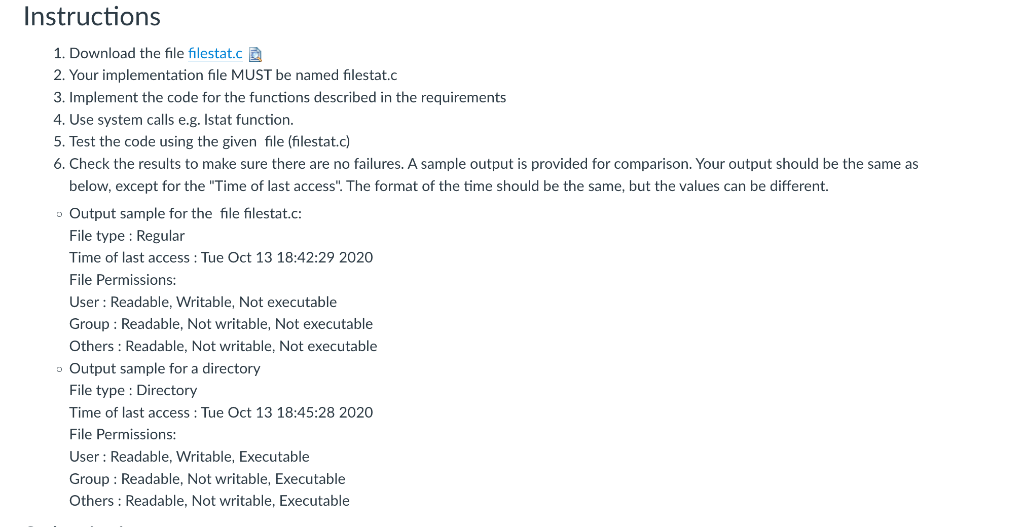
Overview Write a program that takes one file/directory name as command line input and reports the following information on the file: (a) File type (b) Time of last access (c) Read, write and execute permissions Requirements You will write a program (filestat) which will perform the following functions It will run from the command line as shown below: > filestat filename //This will display the following properties of filename: 1) File type, 2) Time of last access, 3) Read, write, and execute permissions for User, Group, and Others. > filestat directory //This will display the following properties of directory: 1) File type, 2) Time of last access, 3) Read, write, and execute permissions for User, Group, and Others.. Arguments: Expects one file name or directory name as argument. You may assume that the user will type the command correctly. Syntax: filestat
Step by Step Solution
There are 3 Steps involved in it

Get step-by-step solutions from verified subject matter experts
 Study Help