



Question: Fill in the blanks o n the Excel sheet A B E F G H I 0 a R S 1 mo 2 NAME DOB
Fill in the blanks o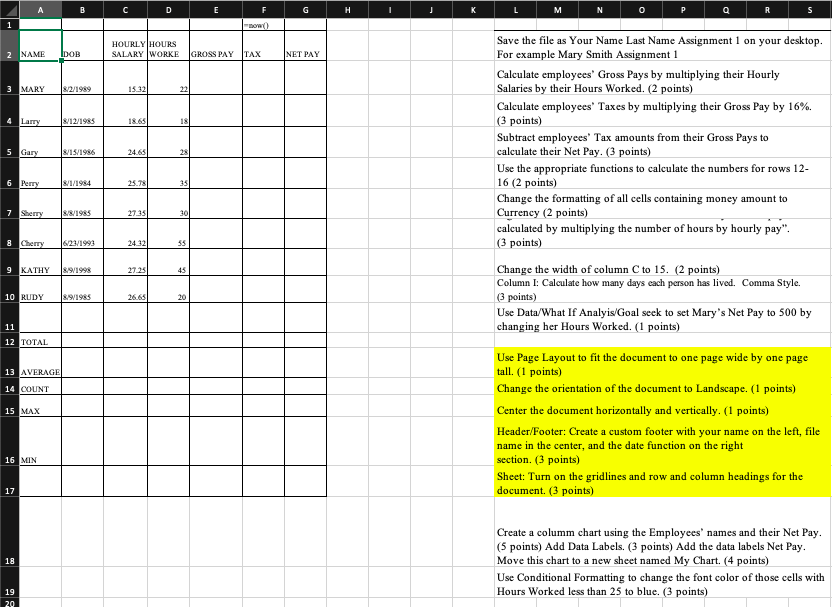 n the Excel sheet
A B E F G H I 0 a R S 1 mo 2 NAME DOB HOURLY HOURS SALARY WORKE GROSS PAY TAX NET PAY 3 MARY 8/2/1989 1532 22 4 Larry &/12/1985 18.65 18 5 Gary 8/15/1986 24.65 28 6 Persy &/1/1984 25.78 35 Save the file as Your Name Last Name Assignment 1 on your desktop. For example Mary Smith Assignment 1 Calculate employees' Gross Pays by multiplying their Hourly Salaries by their Hours Worked. (2 points) Calculate employees' Taxes by multiplying their Gross Pay by 16%. (3 points) Subtract employees' Tax amounts from their Gross Pays to calculate their Net Pay. (3 points) Use the appropriate functions to calculate the numbers for rows 12- 16 (2 points) Change the formatting of all cells containing money amount to Currency (2 points) calculated by multiplying the number of hours by hourly pay". (3 points) Change the width of column C to 15. (2 points) Column I: Calculate how many days each person has lived. Comma Style. points) Use Data/What If Analyis/Goal seek to set Mary's Net Pay to 500 by changing her Hours Worked. (1 points) 7 Sherry 8/8/1985 27.35 301 8 Cherry 6/23/1993 24.32 55 9 KATHY &9/1995 2725 45 10 RUDY & 9/1985 26.65 20 11 12 TOTAL 13 AVERAGE 14 COUNT 15 MAX Use Page Layout to fit the document to one page wide by one page tall. (1 points) Change the orientation of the document to Landscape. (1 points) Center the document horizontally and vertically. (1 points) Header/Footer: Create a custom footer with your name on the left, file name in the center, and the date function on the right section. (3 points) Sheet: Turn on the gridlines and row and column headings for the document. (3 points) 16 MIN 17 18 Create a columm chart using the Employees' names and their Net Pay. (5 points) Add Data Labels. (3 points) Add the data labels Net Pay. Move this chart to a new sheet named My Chart. (4 points) Use Conditional Formatting to change the font color of those cells with Hours Worked less than 25 to blue. (3 points) 19 20
Step by Step Solution
There are 3 Steps involved in it
1 Expert Approved Answer
Step: 1 Unlock

Question Has Been Solved by an Expert!
Get step-by-step solutions from verified subject matter experts
Step: 2 Unlock
Step: 3 Unlock