







Question: Fill in the code below so you get the desired output given that user enters value 5. Desired output: (in this case the user enters
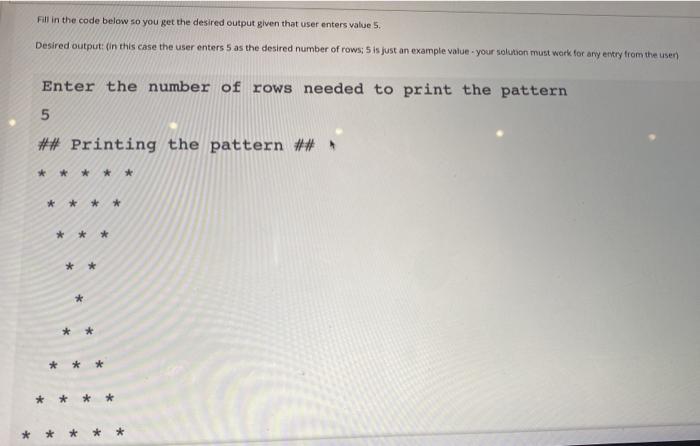
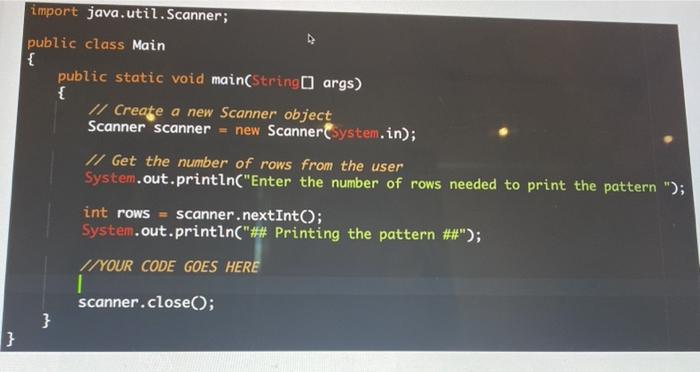
Fill in the code below so you get the desired output given that user enters value 5. Desired output: (in this case the user enters 5 as the desired number of rows; 5 is just an example Value - your solution must work for any entry from the user Enter the number of rows needed to print the pattern 5 ## Printing the pattern ## * * * * * * * * * * * import java.util.Scanner; public class Main { public static void main(String[] args) { // Create a new Scanner object Scanner scanner = new Scanner(System.in); // Get the number of rows from the user System.out.println("Enter the number of rows needed to print the pattern "); int rows = scanner.nextInt(); System.out.println("## Printing the pattern ##"); //YOUR CODE GOES HERE scanner.close(); } }
Step by Step Solution
There are 3 Steps involved in it

Get step-by-step solutions from verified subject matter experts
 Study Help