







Question: Problem 1 Open a blank Excel workbook and save it as a MACRO - ENABLED file. Open the Visual Basic Editor ( VBE ) and
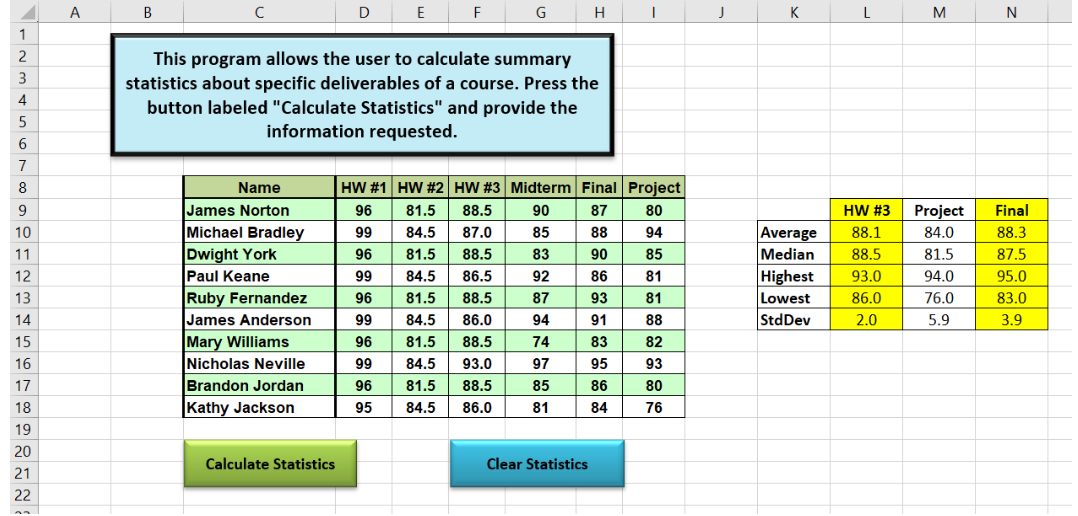
Problem Open a blank Excel workbook and save it as a MACROENABLED file. Open the Visual Basic Editor VBE and insert a new module into the Project Explorer. You must write NOT record all your sub procedures inside this module. Write a program that allows the user to calculate summary statistics for a maximum of six deliverables of a course. The summary statistics that will be calculated for these deliverables are average, median, highest, lowest, and sample standard deviation. Assign your main sub procedure to the calculate statistics button.Your program must meet the following requirements:a Manually you do not need do any of this in code create a graphical user interface such as the one depicted in Figure Use the value provided in the CSV file on Canvas.b Minimum requirements are to always ask for assignments for this, you skip this step. For bonus credit, prompt the user to input the number of assignments to calculate statistics for. In this case you would need to prompt the user via an input box for the total number of deliverables for which summary statistics will be calculated. You must verify that the user enters a value that can represent a valid integer number in the range If the user enters a value that does not represent a number, the user enters a valid value but the value is outside of the allowed range, or the user enters a noninteger value, your program must display an error message box. Once the user acknowledges the error by pressing the OK button on the message box, your program must continue to display the input box asking for the number of assignments until a valid value is provided. See figures and for examples. Note: you must use a repetition programming structure with a single input box function statement to fulfill this requirement.c The value for the total number of deliverables must be used by a repetition programming structure to control the calculation and the printing of the summary statistics for the deliverables. This is items for the minimum requirements, or the user input value of to for the bonus. The user must first be prompted via an input box for the label that will identify the specific deliverable to be processed. Your code must check that labels are entered as shown in range D:I in Figure Note that the user should be allowed to enter labels for deliverables in any order. If the user enters an incorrect value, your program must display an error message box and then reprompt the user to enter the value. See figures and for examples. Note: you must use a repetition programming structure with a single input box function statement to fulfill this requirement.d At any point in the process, if the user presses cancel or enters nothing and presses OK your program needs to end. Other errors in input need to reprompt the user for valid input. Hint: if you are in a loop, you may need to pay attention to the loop counter when there is an error so that you do not needlessly increment it ie decrement the counter so that when it increments in your loop you are back where you need to bee As the user provides valid labels for the deliverables, your program will print a table with the summary statistics for each deliverable specified in the order they were specified. Have one decimal place of precision for calculated statistics. Figure depicts an example of how this table looks. You must include row and column labels along with the calculated statistics.Hint: Use a variable of type Range, or the Range object, in combination with the Offset property to insert labels and values into the summary statistics table. Use the variables in your loops in the offset property to get locations of everything you need!Write a sub procedure named ClearStats that will clear the output statistics table and formatting. Assign this to the Clear Statistics button.
Step by Step Solution
There are 3 Steps involved in it
1 Expert Approved Answer
Step: 1 Unlock

Question Has Been Solved by an Expert!
Get step-by-step solutions from verified subject matter experts
Step: 2 Unlock
Step: 3 Unlock
 Study Help