







Question: Fill in the spaces in the table as example shows using assembling MIPS Assembly Language program code. Use decimal values for the OpCode row, and
Fill in the spaces in the table as example shows using assembling MIPS Assembly Language program code.
Use decimal values for the OpCode row, and Hex digits for the Instruction rows.
Most parts have been filled out except last two instruction.
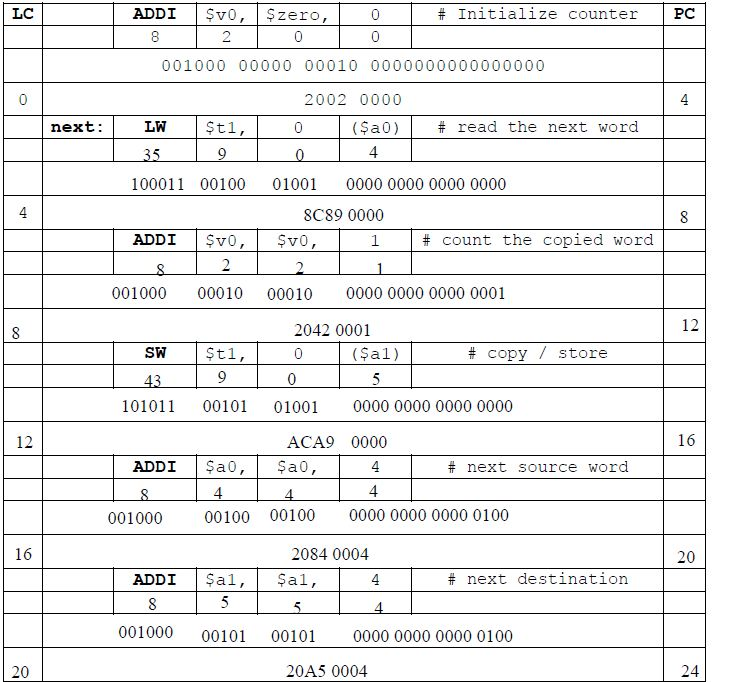
Continue to fill out the bottom table. The following talbe continues the above instruction.
Note:
BNE instruction:The format is opcode, rs=$t1, rd=$zero
JR instruction: R-format instruction
LC ADDI VO Szero, # Initialize counter | PC 001000 00000 00010 0000000000000000 2002 0000 next: ($a0) | # read the next word 4 100011 00100 01001 0000 0000 0000 0000 8C89 0000 # count the copied word 001000 00010 00010 0000 0000 0000 0001 2042 0001 12 SW tl, (al) # copy / store 101011 00101 01001 0000 0000 0000 0000 12 ACA9 0000 16 ADDIa0a0, 4 4 f next source word 001000 00100 00100 0000 0000 0000 0100 16 2084 0004 20 # next destination 001000 00101 00101 0000 0000 0000 0100 20 20A5 0004 24 LC ADDI VO Szero, # Initialize counter | PC 001000 00000 00010 0000000000000000 2002 0000 next: ($a0) | # read the next word 4 100011 00100 01001 0000 0000 0000 0000 8C89 0000 # count the copied word 001000 00010 00010 0000 0000 0000 0001 2042 0001 12 SW tl, (al) # copy / store 101011 00101 01001 0000 0000 0000 0000 12 ACA9 0000 16 ADDIa0a0, 4 4 f next source word 001000 00100 00100 0000 0000 0000 0100 16 2084 0004 20 # next destination 001000 00101 00101 0000 0000 0000 0100 20 20A5 0004 24
Step by Step Solution
There are 3 Steps involved in it

Get step-by-step solutions from verified subject matter experts
 Study Help