







Question: , fill = None, border = r g b ( 0 , 3 0 , 7 0 ) , , fill = None, border =
fillNone, border
fillNone, border
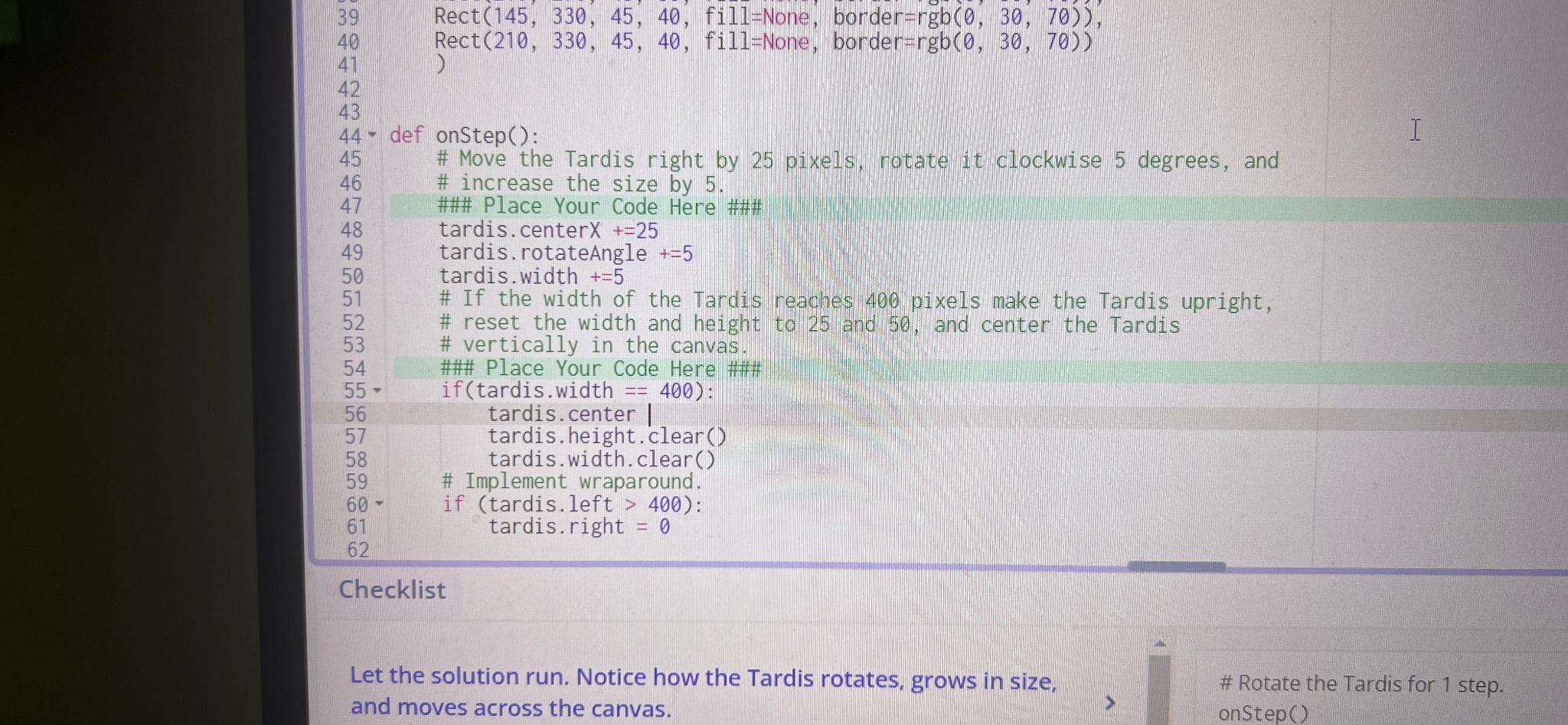
def onstep:
# Move the Tardis right by pixels, rotate it clockwise degrees, and
# increase the size by
### Place Your Code Here ###
tardis. center
tardis. rotateAngle
tardis. width
# If the width of the Tardis reaches pixels make the Tardis upright,
# reset the width and height to and and center the Tardis
# vertically in the canvas.
### Place Your Code Here #f#
if tardis width :
tardis. center
tardis.height.clear
tardis. width. clear
# Implement wraparound.
if tardisleft :
tardis. right
Checklist
Let the solution run. Notice how the Tardis rotates, grows in size, and moves across the canvas.
# Rotate the Tardis for step.
Step by Step Solution
There are 3 Steps involved in it
1 Expert Approved Answer
Step: 1 Unlock

Question Has Been Solved by an Expert!
Get step-by-step solutions from verified subject matter experts
Step: 2 Unlock
Step: 3 Unlock
 Study Help