







Question: Financial application: Payroll & Access Code creation For this assignment, you will create a payroll and Access Code program for a small startup company. You
Financial application: Payroll & Access Code creation
For this assignment, you will create a payroll and Access Code program for a small startup company. You will create a Python program (named: LastnameFirstInitial_PA2) to calculate the total net paycheck and Access Code using the following information. Your program should function identically to the examples below.
Data to be input by the user:
Employee Name (first and last)
Number of hours worked
Hourly pay rate
Federal tax rate
State tax rate
Determine Access Code:
Create and combine the following 4 strings to determine the users initial Access Code (beware of extra spaces). You will use string functions, methods, and operators for this.
1. Use integer division to divide the length of the name string by 4. Use the portion of the name that starts at that position number, and includes up to the character in position 9 (see examples below)
2. Use the last 2 letters, in upper case
3. Use the min and max letters/characters
4. Use the second letters from the users first and last names
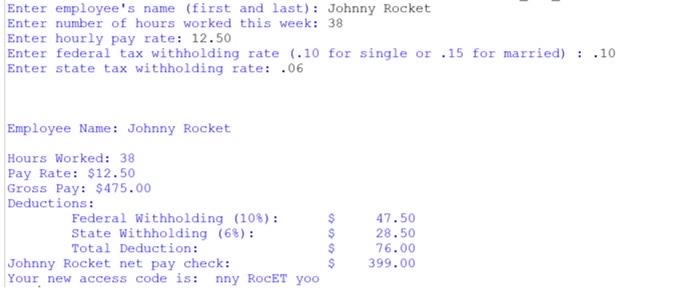
Enter employee's name (first and last): Johnny Rocket Enter number of hours worked this week: 38 Enter hourly pay rate: 12.50 Enter federal tax withholding rate (.10 for single or .15 for married) : .10 Enter state tax withholding rate: .06 Employee Name: Johnny Rocket Hours Worked: 38 Pay Rate: $12.50 Gross Pay: $475.00 Deductions: Federal Withholding (108): State Withholding (68): Total Deduction: Johnny Rocket net pay check: Your new access code is: nny RocET yoo > > > > 47.50 28.50 76.00 399.00
Step by Step Solution
There are 3 Steps involved in it

Get step-by-step solutions from verified subject matter experts
 Study Help