







Question: Firewall Simulation Description: Simulate a basic firewall that filters network traffic based on user - defined rules, such as blocking or allowing traffic from specific
Firewall Simulation
Description:
Simulate a basic firewall that filters network traffic based on userdefined rules, such as blocking or allowing traffic from specific IP addresses.
Key Concepts:
Network traffic filtering: Network traffic filtering involves inspecting packets traversing a network and making decisions based on predefined rules. Filtering criteria may include sourcedestination IP addresses, port numbers, protocols, and packet content.
IP protocols: IP protocols define the rules and conventions used for communication between networked devices. Examples include TCP Transmission Control Protocol UDP User Datagram Protocol and ICMP Internet Control Message Protocol
Firewall rules: Firewall rules specify how network traffic should be handled by a firewall. Rules define conditions eg sourcedestination IP addresses, port numbers and actions eg allow, block for packets matching those conditions, providing security enforcement and access control.
Code Skeleton:
def firewallrulespacket:
# Example rule: Block traffic from a specific IP
blockedip
if packetIPsrc blockedip:
printfBlocked traffic from blockedip
return False
return True
def simulatetrafficpackets:
for packet in packets:
if firewallrulespacket:
printfAllowed packet from packetIPsrc
else:
printfBlocked packet from packetIPsrc
# Example usage pseudopackets for illustration
packets IP: src: IP: src:
simulatetrafficpackets
Enhancements:
Stateful Inspection: Enhance to perform stateful inspection, tracking the state of active connections.
Alert system: Integrate a basic email alert system that triggers when traffic is blocked.
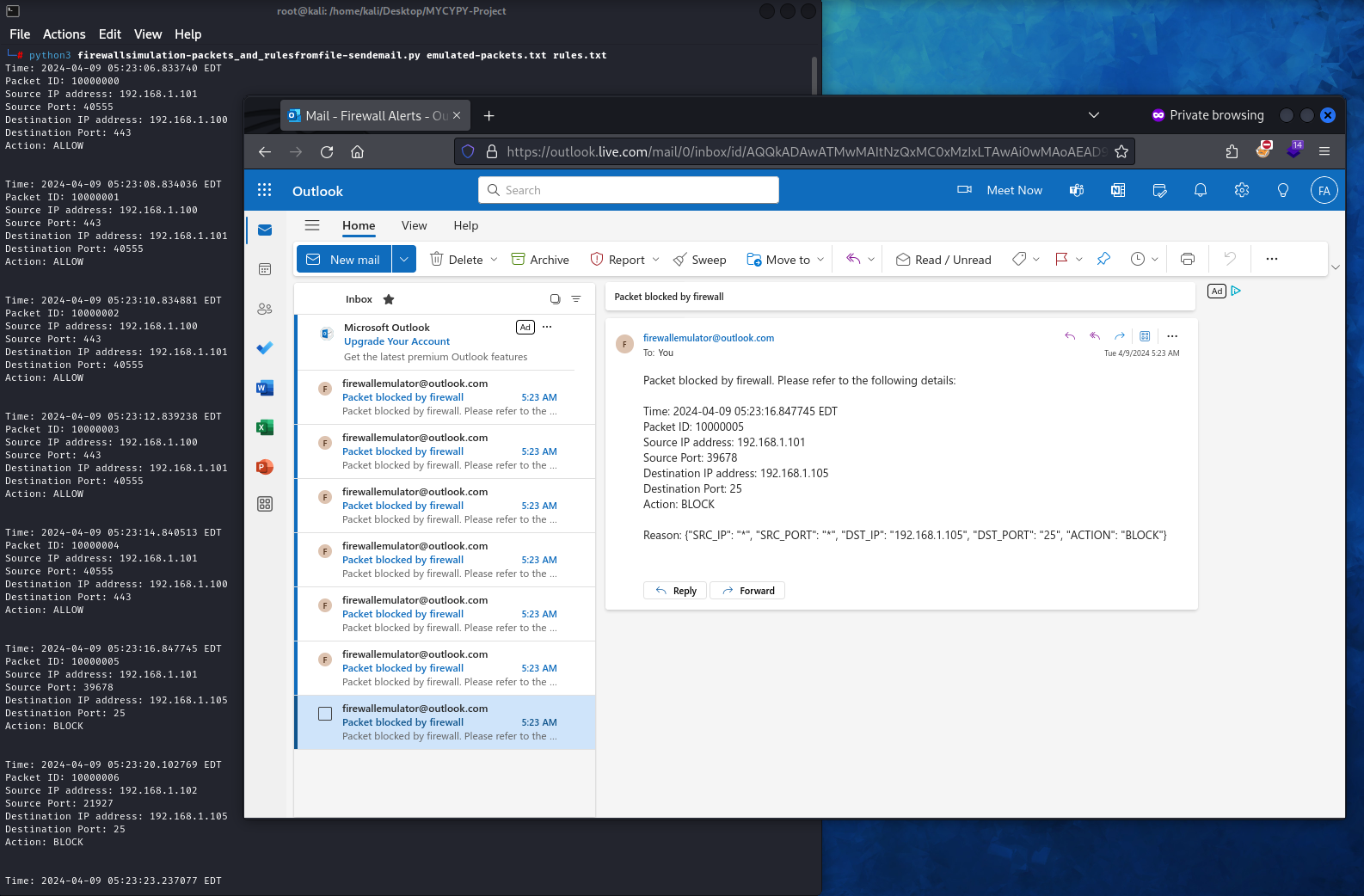
Example Screenshot of the project
This project emulates packets by reading a file passed as a parameter. This file, contains the packets in a keyvalue format, depicting their several attributes, such as packet ID source & destination IP address and ports. The rule list is also fed to the emulator via a file. Based on the rule list, the emulated packets are either allowed or blocked. If a packet is blocked, an immediate alert is generated and a mail sent to the administrator for their perusal.
Step by Step Solution
There are 3 Steps involved in it
1 Expert Approved Answer
Step: 1 Unlock

Question Has Been Solved by an Expert!
Get step-by-step solutions from verified subject matter experts
Step: 2 Unlock
Step: 3 Unlock
 Study Help