







Question: Fix the code. I need help with this code. Thank You. Display a Clock Your task is to use the shapes we introduced today to
Fix the code. I need help with this code. Thank You.
Display a Clock
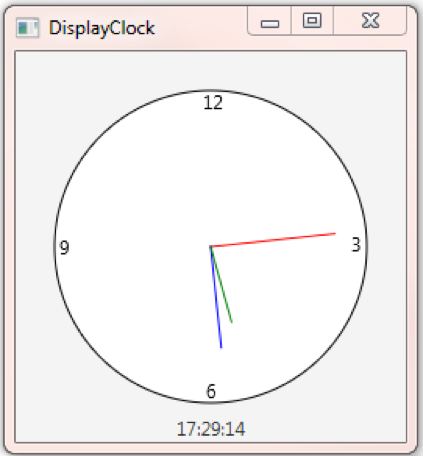
Your task is to use the shapes we introduced today to create a clock display as shown in the above example. You can pick a random time to display or the current time.
Download the DisplayClock.java, which has already add the basic framework you need. Do the following step by step:
1. Set the initial size of the scene to 200 x 200. This will make the following position computation easier.
2. Add a circle object into the center of the pane. Set the parameters appropriately according to the initial size of the pane.
3. Add the four numbers: 12, 3, 6, and 9 as Text objects into the pane. Again, compute and test the parameters to position them appropriately.
4. Add three lines, representing the hour, minute and second hands respectively. Use different color and length to distinguish them.
5. (Optional) Add another text at the bottom of your clock to show the time in digits.
import javafx.application.Application; import javafx.scene.Scene; import javafx.scene.layout.Pane; import javafx.scene.paint.Color; import javafx.scene.shape.Circle; import javafx.scene.shape.Line; import javafx.geometry.Insets; import javafx.stage.Stage; import javafx.scene.text.Text; import javafx.scene.text.Font; import javafx.scene.text.FontWeight; import javafx.scene.text.FontPosture;
public class DisplayClock extends Application { @Override // Override the start method in the Application class public void start(Stage primaryStage) { // Create a pane to hold the clock components Pane pane = new Pane(); //Your code here: create a circle, and it to your pane
//Your code here: create 4 texts, representing the four numbers on your clock.
//Your code here: create 3 lines, representing the hour, minute and second on your clock.
// Create a scene and place it in the stage, modify and set the size of the initial scene to 200 by 200 Scene scene = new Scene(pane); primaryStage.setTitle("DisplayClock"); // Set the stage title primaryStage.setScene(scene); // Place the scene in the stage primaryStage.show(); // Display the stage }
public static void main(String[] args) { launch(args); } }
Displayclock 12 17:29:14 Displayclock 12 17:29:14
Step by Step Solution
There are 3 Steps involved in it

Get step-by-step solutions from verified subject matter experts
 Study Help